
Turn on suggestions
Auto-suggest helps you quickly narrow down your search results by suggesting possible matches as you type.
Showing results for
EN
Turn on suggestions
Auto-suggest helps you quickly narrow down your search results by suggesting possible matches as you type.
Showing results for
Options
- Subscribe to RSS Feed
- Mark Topic as New
- Mark Topic as Read
- Pin this post for me
- Bookmark
- Subscribe to Topic
- Mute
- Printer Friendly Page

-FeelShift-
Contributor
Options
- Mark as New
- Bookmark
- Subscribe
- Mute
- Subscribe to RSS Feed
- Permalink
- Report Inappropriate Content
3 weeks ago
Fill Pattern Object
3 weeks ago
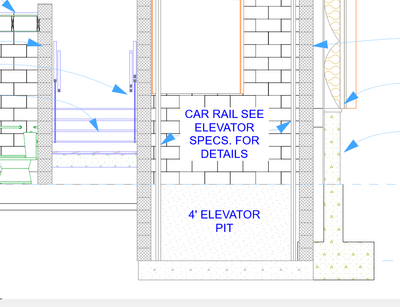
Hi, I’m having an issue creating CMU blocks with the correct hatch pattern. The hatch appears to be too dense, making the CMU block look almost completely black. I don’t see an option to adjust the fill or hatch density to make it lighter.
How do you change the density of the CMU object, so it appears less dense?
Thank you!

Solved! Go to Solution.
1 Solution
Accepted Solutions

 Laszlo Nagy
Community Admin
Options
- Mark as New
- Bookmark
- Subscribe
- Mute
- Subscribe to RSS Feed
- Permalink
- Report Inappropriate Content
3 weeks ago
3 weeks ago
Go to the Options > Element Attributes > Fills Dialog, and redefine the size of the Fill.
If the Fill is a Vector Fill, you can set the X and Y Pattern Unit Size to, e.g., double its current size.
If the Fill is a Symbol Fill, you can set the X and Y Scale.
Loving Archicad since 1995 - Find Archicad Tips at x.com/laszlonagy
AMD Ryzen9 5900X CPU, 64 GB RAM 3600 MHz, Nvidia GTX 1060 6GB, 500 GB NVMe SSD
2x28" (2560x1440), Windows 10 PRO ENG, Ac20-Ac29
AMD Ryzen9 5900X CPU, 64 GB RAM 3600 MHz, Nvidia GTX 1060 6GB, 500 GB NVMe SSD
2x28" (2560x1440), Windows 10 PRO ENG, Ac20-Ac29
Solution
1 Reply 1
Laszlo Nagy
Community Admin
Options
- Mark as New
- Bookmark
- Subscribe
- Mute
- Subscribe to RSS Feed
- Permalink
- Report Inappropriate Content
3 weeks ago
3 weeks ago
Go to the Options > Element Attributes > Fills Dialog, and redefine the size of the Fill.
If the Fill is a Vector Fill, you can set the X and Y Pattern Unit Size to, e.g., double its current size.
If the Fill is a Symbol Fill, you can set the X and Y Scale.
Loving Archicad since 1995 - Find Archicad Tips at x.com/laszlonagy
AMD Ryzen9 5900X CPU, 64 GB RAM 3600 MHz, Nvidia GTX 1060 6GB, 500 GB NVMe SSD
2x28" (2560x1440), Windows 10 PRO ENG, Ac20-Ac29
AMD Ryzen9 5900X CPU, 64 GB RAM 3600 MHz, Nvidia GTX 1060 6GB, 500 GB NVMe SSD
2x28" (2560x1440), Windows 10 PRO ENG, Ac20-Ac29
Solution

Still looking?

Suggested topics
- Fill Pattern Object in Modeling
- Section Views and Plan Views in Documentation
- Detailing | Better methods of 2d drafting, creation of Blocks , Detail Elements , 2d Objects in Documentation
- W Lesene 27, complex profile wall fill direction problem in Modeling
- Custom Distorsion - Fill Patterns in Documentation
