
Turn on suggestions
Auto-suggest helps you quickly narrow down your search results by suggesting possible matches as you type.
Showing results for
EN
Turn on suggestions
Auto-suggest helps you quickly narrow down your search results by suggesting possible matches as you type.
Showing results for
Options
- Subscribe to RSS Feed
- Mark Topic as New
- Mark Topic as Read
- Pin this post for me
- Bookmark
- Subscribe to Topic
- Mute
- Printer Friendly Page

shir_khann
Booster
Options
- Mark as New
- Bookmark
- Subscribe
- Mute
- Subscribe to RSS Feed
- Permalink
- Report Inappropriate Content
2023-06-05 09:27 AM
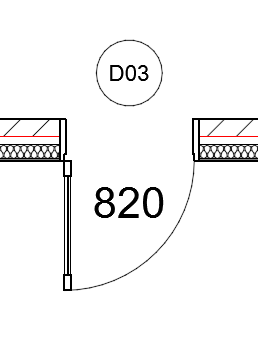
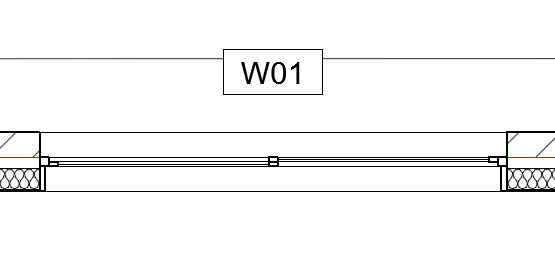
How do I Save Custom Door and Window Marker?
2023-06-05
09:27 AM
Hi Everyone,
I am trying to figure out how and where to save the custom markers that I have made for my doors and window so that I can import them into my future projects and template. I see the option "load other window-door marker..." and would be great if anyone can help and explain how to save this custom markers and reload them into future projects as it will save me a lot of time.
I found this post which is way back from 2005 and doesn't help very much with the current version.
https://community.graphisoft.com/t5/Modeling/Door-Window-Marker/m-p/38259/thread-id/19006
AC26 AUS | AMD Ryzen 7 3700X 8-Core Processor, NVIDIA GeForce RTX 2080 SUPER
Solved! Go to Solution.
12 Replies 12

ananas
Expert
Options
- Mark as New
- Bookmark
- Subscribe
- Mute
- Subscribe to RSS Feed
- Permalink
- Report Inappropriate Content
2024-07-30 10:28 AM - last edited on 2024-07-30 10:45 AM by Barry Kelly
2024-07-30
10:28 AM
Hi!
I understood your answer, but I can not find door mark in Archicad library anywhere.
Is it possible that it is not awailable from Archicad 26 on anymore?
I clicked through all 2D symbols in Archicad and could nto find it ...
I wonder now how could I change Archciad default door stamp, so it would change in all doors at once.


Yves
Expert
Options
- Mark as New
- Bookmark
- Subscribe
- Mute
- Subscribe to RSS Feed
- Permalink
- Report Inappropriate Content
2024-07-30
12:52 PM
- last edited on
2024-07-30
02:16 PM
by
 Laszlo Nagy
2024-07-30
12:52 PM
Hi,
This type of object is not visible in the object tool
You have to go to the libraries and objects menu
Here are screenshots from the French version


Yves Houssier
Belgium
Archicad 19 -> 24
iMac - Mac Os 10,13
Belgium
Archicad 19 -> 24
iMac - Mac Os 10,13
ananas
Expert
Options
- Mark as New
- Bookmark
- Subscribe
- Mute
- Subscribe to RSS Feed
- Permalink
- Report Inappropriate Content
2024-07-30
01:37 PM
- last edited on
2024-07-30
02:17 PM
by
Laszlo Nagy
2024-07-30
01:37 PM
Thank you soo much!
I finally found it!


- « Previous
-
- 1
- 2
- Next »
- « Previous
-
- 1
- 2
- Next »
Still looking?

Suggested topics
- Detail marker as plan in Documentation
- gdl custom object snaps back to older version upon opening the file in Libraries & objects
- Drag and Drop from Plan Window to Library Object Script Window Not Working in Libraries & objects
- Windows with chamfered reveals to both sides in Modeling
- Window with adjustable frame extensions (jamb) and automatic insulation return – AC29 / GDL in Modeling
