
Turn on suggestions
Auto-suggest helps you quickly narrow down your search results by suggesting possible matches as you type.
Showing results for
EN
Turn on suggestions
Auto-suggest helps you quickly narrow down your search results by suggesting possible matches as you type.
Showing results for
Options
- Subscribe to RSS Feed
- Mark Topic as New
- Mark Topic as Read
- Pin this post for me
- Bookmark
- Subscribe to Topic
- Mute
- Printer Friendly Page

Anonymous
Not applicable
Options
- Mark as New
- Bookmark
- Subscribe
- Mute
- Subscribe to RSS Feed
- Permalink
- Report Inappropriate Content
2014-05-12
06:58 PM
- last edited on
2023-05-24
09:00 AM
by
 Rubia Torres
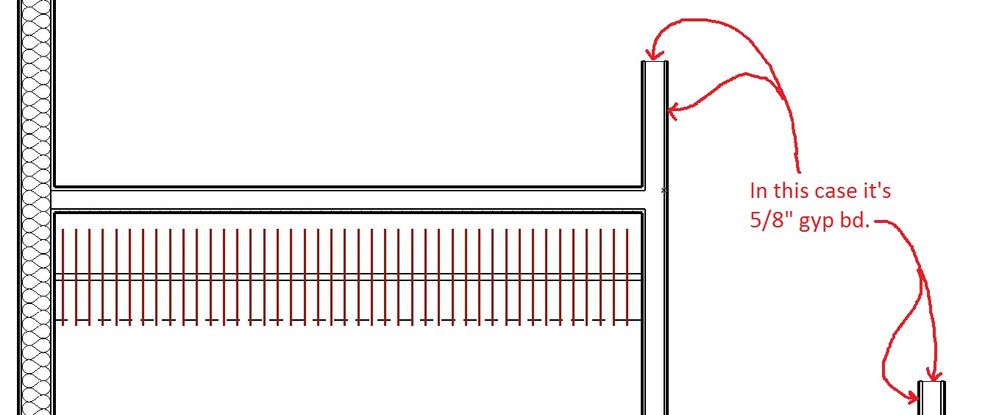
How to show finish mat. at wall ends?
2014-05-12
06:58 PM
around the end of the wall?
19 Replies 19

Karl Ottenstein
Moderator Emeritus
Options
- Mark as New
- Bookmark
- Subscribe
- Mute
- Subscribe to RSS Feed
- Permalink
- Report Inappropriate Content
2014-05-12 08:27 PM
2014-05-12
08:27 PM
The Wall End Tool:
http://helpcenter.graphisoft.com/guides/archicad-17-int-reference-guide/user-interface-reference/too...
For whatever reason, the page above doesn't show a plan view, but it achieves what you want.
For whatever reason, the page above doesn't show a plan view, but it achieves what you want.
Vote for Wish: Copy/Paste in 3D
AC 29 USA and earlier • hardware key • macOS Tahoe 26.7 MacBook Pro M2 Max 12CPU/30GPU cores, 32GB
AC 29 USA and earlier • hardware key • macOS Tahoe 26.7 MacBook Pro M2 Max 12CPU/30GPU cores, 32GB
Anonymous
Not applicable
Options
- Mark as New
- Bookmark
- Subscribe
- Mute
- Subscribe to RSS Feed
- Permalink
- Report Inappropriate Content
2014-05-12 08:53 PM
2014-05-12
08:53 PM
Thanks Karl!
Never even noticed the wall end tool. Of course, I didn't need it until now as this is the first job I have done using the composite / skin feature of archicad.
Very excited about the time it's going to save. Thank you again for the help!
Never even noticed the wall end tool. Of course, I didn't need it until now as this is the first job I have done using the composite / skin feature of archicad.
Very excited about the time it's going to save. Thank you again for the help!
Karl wrote:
The Wall End Tool:
http://helpcenter.graphisoft.com/guides/archicad-17-int-reference-guide/user-interface-reference/too...
For whatever reason, the page above doesn't show a plan view, but it achieves what you want.

Karl Ottenstein
Moderator Emeritus
Options
- Mark as New
- Bookmark
- Subscribe
- Mute
- Subscribe to RSS Feed
- Permalink
- Report Inappropriate Content
2014-05-12 09:12 PM
2014-05-12
09:12 PM
You're welcome. But, it should blend perfectly with all skins for an even wrap. Hard to guess from just a screenshot what might be keeping it from happening for you.
You could select just the wall and the end (2 items only selected) and save as a MOD (be sure to not check the box to replace the elements with a hotlink to the mod), zip that, and post it here for one of us to look at the parameters.
You could select just the wall and the end (2 items only selected) and save as a MOD (be sure to not check the box to replace the elements with a hotlink to the mod), zip that, and post it here for one of us to look at the parameters.
Vote for Wish: Copy/Paste in 3D
AC 29 USA and earlier • hardware key • macOS Tahoe 26.7 MacBook Pro M2 Max 12CPU/30GPU cores, 32GB
AC 29 USA and earlier • hardware key • macOS Tahoe 26.7 MacBook Pro M2 Max 12CPU/30GPU cores, 32GB
Anonymous
Not applicable
Options
- Mark as New
- Bookmark
- Subscribe
- Mute
- Subscribe to RSS Feed
- Permalink
- Report Inappropriate Content
2014-05-12 10:19 PM
2014-05-12
10:19 PM
Thanks Karl,
I lost so much time yesterday don't have any left to learn the MOD thing. I've no experiance with the MOD feature yet...
I lost so much time yesterday don't have any left to learn the MOD thing. I've no experiance with the MOD feature yet...
Karl wrote:
You're welcome. But, it should blend perfectly with all skins for an even wrap. Hard to guess from just a screenshot what might be keeping it from happening for you.
You could select just the wall and the end (2 items only selected) and save as a MOD (be sure to not check the box to replace the elements with a hotlink to the mod), zip that, and post it here for one of us to look at the parameters.
Karl Ottenstein
Moderator Emeritus
Options
- Mark as New
- Bookmark
- Subscribe
- Mute
- Subscribe to RSS Feed
- Permalink
- Report Inappropriate Content
2014-05-12 10:58 PM
2014-05-12
10:58 PM
Hi Jonathan,
Sorry to add learning stress on top of this... Here are the steps to save you time... very quick... just select and save. The MOD file contains just the two elements - your wall and wall end - and their related attributes.
Two posts for two screenshots. This one shows you the command to use after you select those two elements...
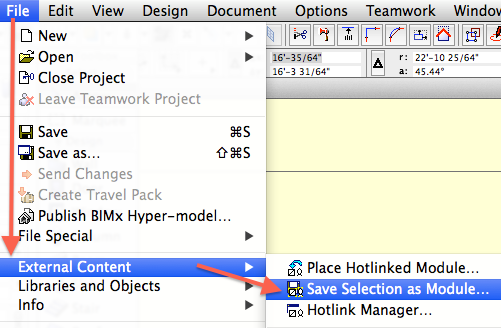
Sorry to add learning stress on top of this... Here are the steps to save you time... very quick... just select and save. The MOD file contains just the two elements - your wall and wall end - and their related attributes.
Two posts for two screenshots. This one shows you the command to use after you select those two elements...
Vote for Wish: Copy/Paste in 3D
AC 29 USA and earlier • hardware key • macOS Tahoe 26.7 MacBook Pro M2 Max 12CPU/30GPU cores, 32GB
AC 29 USA and earlier • hardware key • macOS Tahoe 26.7 MacBook Pro M2 Max 12CPU/30GPU cores, 32GB
Anonymous
Not applicable
Options
- Mark as New
- Bookmark
- Subscribe
- Mute
- Subscribe to RSS Feed
- Permalink
- Report Inappropriate Content
2014-05-12 10:58 PM
2014-05-12
10:58 PM
Took another quick look into the wall end dialog and gypsum board 328126... is not available there - maybe that is the problem - the walls are comprised of materials from the "building materials" and the wall end tool materials are from the fill types which don't include the same listings for fills.
This seems strange to me, because one would expect the wall end tool to have the same selections as the wall?
Just put a marquee around the wall end and saved as a MOD from clipboard thingy. Lets see if this works - nope, it just told me that the extension mod is not allowed
This seems strange to me, because one would expect the wall end tool to have the same selections as the wall?
Just put a marquee around the wall end and saved as a MOD from clipboard thingy. Lets see if this works - nope, it just told me that the extension mod is not allowed
Karl wrote:
You're welcome. But, it should blend perfectly with all skins for an even wrap. Hard to guess from just a screenshot what might be keeping it from happening for you.
You could select just the wall and the end (2 items only selected) and save as a MOD (be sure to not check the box to replace the elements with a hotlink to the mod), zip that, and post it here for one of us to look at the parameters.
Karl Ottenstein
Moderator Emeritus
Options
- Mark as New
- Bookmark
- Subscribe
- Mute
- Subscribe to RSS Feed
- Permalink
- Report Inappropriate Content
2014-05-12 10:59 PM
2014-05-12
10:59 PM
...and then this version of a Save Dialog appears (will look different on Windows for you... and for Mac users if the dialog is expanded)...
The key here - in order to have no affect on your file - is to NOT check the box indicated in the screenshot.
Just save the file somewhere, zip it and attach here. It'll be tiny.
The key here - in order to have no affect on your file - is to NOT check the box indicated in the screenshot.
Just save the file somewhere, zip it and attach here. It'll be tiny.
Vote for Wish: Copy/Paste in 3D
AC 29 USA and earlier • hardware key • macOS Tahoe 26.7 MacBook Pro M2 Max 12CPU/30GPU cores, 32GB
AC 29 USA and earlier • hardware key • macOS Tahoe 26.7 MacBook Pro M2 Max 12CPU/30GPU cores, 32GB

Anonymous
Not applicable
Options
- Mark as New
- Bookmark
- Subscribe
- Mute
- Subscribe to RSS Feed
- Permalink
- Report Inappropriate Content
2014-05-12 11:50 PM
2014-05-12
11:50 PM
Okay, lets see if it works.
I hope I didn't adversely affect my file when I tried the marquee around the wall end and then save as a mod file from clipboard deal.
Looks like it worked.
So, you can make a mod file of any part of a project that is selected and send to whomever for whatever. Is it too complex to explain the basic difference between hotlinked and not hotlinked?
I remember making a mod file now. It was several years ago I think, but don't remember the hot link part. Definetly don't know anything about the hot link part.
Used to tell people that everything I know could fit in a thimble and felt good about bragging like that because I was pretty sure it wasn't an exaggeration. Guess I need to rethink this whole idea.
I hope I didn't adversely affect my file when I tried the marquee around the wall end and then save as a mod file from clipboard deal.
Looks like it worked.
So, you can make a mod file of any part of a project that is selected and send to whomever for whatever. Is it too complex to explain the basic difference between hotlinked and not hotlinked?
I remember making a mod file now. It was several years ago I think, but don't remember the hot link part. Definetly don't know anything about the hot link part.
Used to tell people that everything I know could fit in a thimble and felt good about bragging like that because I was pretty sure it wasn't an exaggeration. Guess I need to rethink this whole idea.
Karl wrote:
...and then this version of a Save Dialog appears (will look different on Windows for you... and for Mac users if the dialog is expanded)...
The key here - in order to have no affect on your file - is to NOT check the box indicated in the screenshot.
Just save the file somewhere, zip it and attach here. It'll be tiny.
Karl Ottenstein
Moderator Emeritus
Options
- Mark as New
- Bookmark
- Subscribe
- Mute
- Subscribe to RSS Feed
- Permalink
- Report Inappropriate Content
2014-05-13 02:56 AM
2014-05-13
02:56 AM
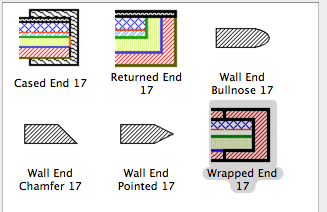
Easy solution. You selected the 'Cased End' wall end object. Simply switching to the 'Wrapped End' cleaned things up.
Vote for Wish: Copy/Paste in 3D
AC 29 USA and earlier • hardware key • macOS Tahoe 26.7 MacBook Pro M2 Max 12CPU/30GPU cores, 32GB
AC 29 USA and earlier • hardware key • macOS Tahoe 26.7 MacBook Pro M2 Max 12CPU/30GPU cores, 32GB
Still looking?

Suggested topics
- Surface / Component Schedule Bug: Automatic Column Wrapping Ignores Folded Geometry and Returns Flat in Project data & BIM
- Need help modelling a Wall Reveal in Modeling
- Profile wall issue in Modeling
- Railing ends disappear when perpendicular to elevation in Modeling
- Brick Soldiers Arched Entry in Modeling
