
Turn on suggestions
Auto-suggest helps you quickly narrow down your search results by suggesting possible matches as you type.
Showing results for
EN
Turn on suggestions
Auto-suggest helps you quickly narrow down your search results by suggesting possible matches as you type.
Showing results for
Options
- Subscribe to RSS Feed
- Mark Topic as New
- Mark Topic as Read
- Pin this post for me
- Bookmark
- Subscribe to Topic
- Mute
- Printer Friendly Page

K McLachlain
Beginner
Options
- Mark as New
- Bookmark
- Subscribe
- Mute
- Subscribe to RSS Feed
- Permalink
- Report Inappropriate Content
2023-08-08 10:04 AM
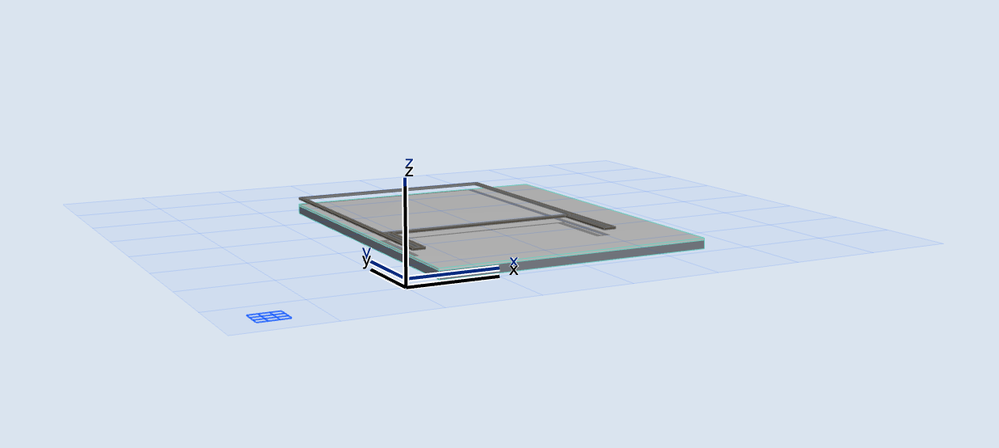
I created a simple cabin in Archicad but the walls have no height in 3D mode or elevations.
2023-08-08
10:04 AM
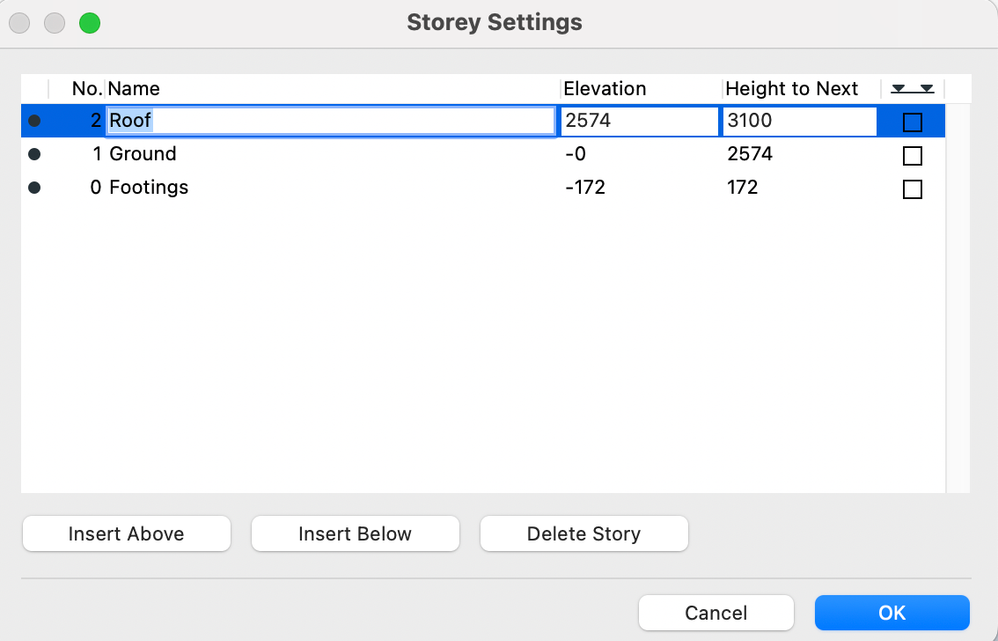
I don't know why the model still looks like a 2D drawing. I went into storey settings and checked the heights of each storey. The height of the ground floor is set at 2574mm, so I am not sure why no height is showing in 3D. There was a problem with the height of the footings level which I have now adjusted but it made no difference.
I have read some of the replies to posts on similar problems but being new to Archicad, I have no idea what the people offering solutions are talking about. If anyone could offer the 'Archicad for Dummies' wording for the solution, I would be very grateful.
Thanks, K
2 Replies 2

Barry Kelly
Moderator
Options
- Mark as New
- Bookmark
- Subscribe
- Mute
- Subscribe to RSS Feed
- Permalink
- Report Inappropriate Content
2023-08-08 10:39 AM
2023-08-08
10:39 AM
Can you select a wall and show us the top and bottom height settings?
Barry.
One of the forum moderators.
Versions 6.5 to 27
i7-10700 @ 2.9Ghz, 32GB ram, GeForce RTX 2060 (6GB), Windows 10
Lenovo Thinkpad - i7-1270P 2.20 GHz, 32GB RAM, Nvidia T550, Windows 11
Versions 6.5 to 27
i7-10700 @ 2.9Ghz, 32GB ram, GeForce RTX 2060 (6GB), Windows 10
Lenovo Thinkpad - i7-1270P 2.20 GHz, 32GB RAM, Nvidia T550, Windows 11

Kamelite
Expert
Options
- Mark as New
- Bookmark
- Subscribe
- Mute
- Subscribe to RSS Feed
- Permalink
- Report Inappropriate Content
2023-08-08 12:55 PM
2023-08-08
12:55 PM
Are the walls linked to the current storey and the storey above?
.Kamelite
Windows 10, Archicad 27,28 and 29

Still looking?

Suggested topics
- Add-on to automatically track/stamp elements with Teamwork user + date/time + create/reserve/edit in Teamwork & BIMcloud
- Archicad Doors and Windows with IfcOpeningElement in Project data & BIM
- Number of Section Elevation and Detail Markers (Total Number of Viewpoints) in Documentation
- Want to Hire someone to Translate a large Microstation 3d Project in General discussions
- CI Tools Detail Element Tool – How do I increase the overall length of a 2D flashing? in Modeling
