
Turn on suggestions
Auto-suggest helps you quickly narrow down your search results by suggesting possible matches as you type.
Showing results for
EN
Turn on suggestions
Auto-suggest helps you quickly narrow down your search results by suggesting possible matches as you type.
Showing results for
Options
- Subscribe to RSS Feed
- Mark Topic as New
- Mark Topic as Read
- Pin this post for me
- Bookmark
- Subscribe to Topic
- Mute
- Printer Friendly Page

LeeJaeYoung
Virtuoso
Options
- Mark as New
- Bookmark
- Subscribe
- Mute
- Subscribe to RSS Feed
- Permalink
- Report Inappropriate Content
2023-10-12 06:37 AM
I want to move the coordinates to the z-axis.
2023-10-12
06:37 AM
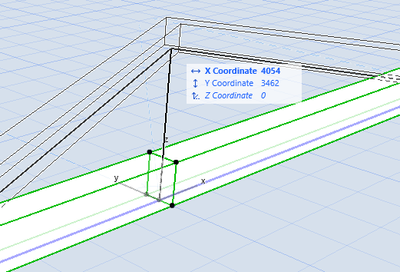
I want to move the coordinates to the z-axis.
What should I do?
I'm trying to do beam editing.
AC27 on window 11
Solved! Go to Solution.
1 Solution
Accepted Solutions
LeeJaeYoung
Virtuoso
Options
- Mark as New
- Bookmark
- Subscribe
- Mute
- Subscribe to RSS Feed
- Permalink
- Report Inappropriate Content
2023-10-12 06:59 AM
2023-10-12
06:59 AM
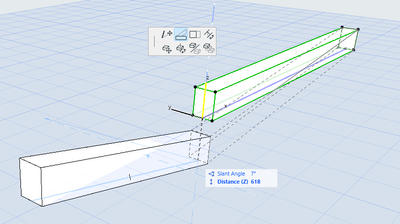
1. I have to change them one by one. ^^
: I’ve tried everything else ㅋㅋ.
2. I also found out that segments don’t work like this ^^
AC27 on window 11
Solution
3 Replies 3
LeeJaeYoung
Virtuoso
Options
- Mark as New
- Bookmark
- Subscribe
- Mute
- Subscribe to RSS Feed
- Permalink
- Report Inappropriate Content
2023-10-12 06:59 AM
2023-10-12
06:59 AM
1. I have to change them one by one. ^^
: I’ve tried everything else ㅋㅋ.
2. I also found out that segments don’t work like this ^^
AC27 on window 11
Solution

Patrick M
Virtuoso
Options
- Mark as New
- Bookmark
- Subscribe
- Mute
- Subscribe to RSS Feed
- Permalink
- Report Inappropriate Content
2023-10-12 08:30 PM
2023-10-12
08:30 PM
yeah, thats my experience too. change them one by one.
if they are mirrors of each other, eye drop/inject should work, as their angle will invert from being mirrored in the original placement
BIM solutions and trouble shooting (self proclaimed) expert. Using Archicad Version (all of them), on Mac OS (whatever is 1 version older than current)

Barry Kelly
Moderator
Options
- Mark as New
- Bookmark
- Subscribe
- Mute
- Subscribe to RSS Feed
- Permalink
- Report Inappropriate Content
2023-10-16 05:25 AM
2023-10-16
05:25 AM
As you showed in your image, you must use 'incline angle' in the pet palette to adjust the incline of the beam.
Adjusting the node can only affect in the X/Y planes - not the Z.
The incline angle does not work when two beams are selected because one will be a positive angle and the other a negative angle, and if the beams are different lengths, the angles will also be different.
Because these two values will be different, you can not edit them at the same time.
Barry.
One of the forum moderators.
Versions 6.5 to 27
i7-10700 @ 2.9Ghz, 32GB ram, GeForce RTX 2060 (6GB), Windows 10
Lenovo Thinkpad - i7-1270P 2.20 GHz, 32GB RAM, Nvidia T550, Windows 11
Versions 6.5 to 27
i7-10700 @ 2.9Ghz, 32GB ram, GeForce RTX 2060 (6GB), Windows 10
Lenovo Thinkpad - i7-1270P 2.20 GHz, 32GB RAM, Nvidia T550, Windows 11

Still looking?

Suggested topics
- Project origin error, intangible second project origin in 3D view in Modeling
- Importing Surveyors Data into Archicad in Modeling
- Coordinates | Absolute coordinates | Collaborate in Collaboration with other software
- Export IFC with local East/North coordinates but real world Z (sea level) coordinate in Collaboration with other software
- Can't use keyboard shortcuts in my EDU ArchiCAD 28 in General discussions
