
Turn on suggestions
Auto-suggest helps you quickly narrow down your search results by suggesting possible matches as you type.
Showing results for
EN
Turn on suggestions
Auto-suggest helps you quickly narrow down your search results by suggesting possible matches as you type.
Showing results for
Options
- Subscribe to RSS Feed
- Mark Topic as New
- Mark Topic as Read
- Pin this post for me
- Bookmark
- Subscribe to Topic
- Mute
- Printer Friendly Page

FCA
Contributor
Options
- Mark as New
- Bookmark
- Subscribe
- Mute
- Subscribe to RSS Feed
- Permalink
- Report Inappropriate Content
2023-05-25
02:02 PM
- last edited on
2023-05-25
04:32 PM
by
 Rubia Torres
Keep Solid Element Operation Open by default?
2023-05-25
02:02 PM
Is there a way to keep Solid Element Operation Window open by default? Every file requires me to open it from fresh even though I use it everyday.
What is the reason for this? Am I doing something wrong?
Solved! Go to Solution.
Solved
Labels:
- Labels:
-
Solid Element Operations
1 Solution
Accepted Solutions
 Rubia Torres
Graphisoft
Options
- Mark as New
- Bookmark
- Subscribe
- Mute
- Subscribe to RSS Feed
- Permalink
- Report Inappropriate Content
2023-05-25 04:42 PM - edited 2023-05-25 04:44 PM
2023-05-25
04:42 PM
Hi @FCA,
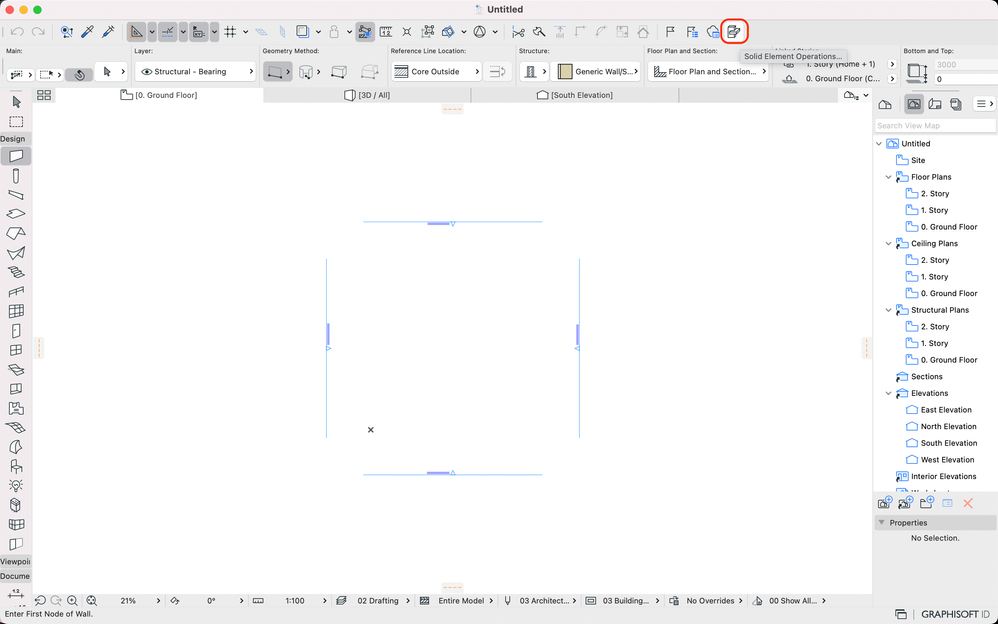
You can set it in your work environment settings to appear in the toolbar. Easily you can open it while working:

Best,
Rubia Torres
Community Expert | GRAPHISOFT SE
Did you get a helpful answer on the forum?
Give it back to the Community by marking it as an accepted solution!
3 Replies 3
Rubia Torres
Graphisoft
Options
- Mark as New
- Bookmark
- Subscribe
- Mute
- Subscribe to RSS Feed
- Permalink
- Report Inappropriate Content
2023-05-25 04:42 PM - edited 2023-05-25 04:44 PM
2023-05-25
04:42 PM
Hi @FCA,
You can set it in your work environment settings to appear in the toolbar. Easily you can open it while working:
Best,
Rubia Torres
Community Expert | GRAPHISOFT SE
Did you get a helpful answer on the forum?
Give it back to the Community by marking it as an accepted solution!
FCA
Contributor
Options
- Mark as New
- Bookmark
- Subscribe
- Mute
- Subscribe to RSS Feed
- Permalink
- Report Inappropriate Content
2023-05-25 05:25 PM
2023-05-25
05:25 PM
Great, thanks so much!

BJC
Contributor
Options
- Mark as New
- Bookmark
- Subscribe
- Mute
- Subscribe to RSS Feed
- Permalink
- Report Inappropriate Content
2023-05-28 08:11 AM
2023-05-28
08:11 AM
Or you can assign a keyboard shortcut. I use Control O.

Still looking?

Suggested topics
