
Turn on suggestions
Auto-suggest helps you quickly narrow down your search results by suggesting possible matches as you type.
Showing results for
EN
Turn on suggestions
Auto-suggest helps you quickly narrow down your search results by suggesting possible matches as you type.
Showing results for
Options
- Subscribe to RSS Feed
- Mark Topic as New
- Mark Topic as Read
- Pin this post for me
- Bookmark
- Subscribe to Topic
- Mute
- Printer Friendly Page

Ignacio Azpiazu
Ace
Options
- Mark as New
- Bookmark
- Subscribe
- Mute
- Subscribe to RSS Feed
- Permalink
- Report Inappropriate Content
2023-01-10 07:57 PM - edited 2023-01-10 08:11 PM
Magicwanding a closed polygon to morph lines?
2023-01-10
07:57 PM
Is there any way of magicwanding a closed polygon into morph lines (I think not), or exploding the morph surface into its morph perimeter lines/polygon, or somehow obtaining the morph linear segments/outline only? I am manually tracing stuff when I need the 3D outlines instead of the surface/volumes, and if there is no better way I wish there were.
Solved! Go to Solution.
1 Solution
Accepted Solutions

ryejuan
Advisor
Options
- Mark as New
- Bookmark
- Subscribe
- Mute
- Subscribe to RSS Feed
- Permalink
- Report Inappropriate Content
2023-01-11 02:28 AM
2023-01-11
02:28 AM
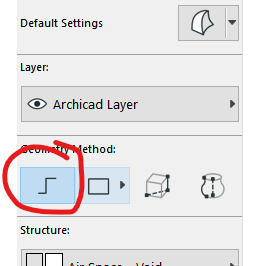
use this method then once you have created your morph element you can press and hold CTRL+SHIFT then click and delete the solid face of the morph to retain the morph lines only.
In the end what is your Objective? ArchiCAD 9 onwards
CPU: i9-14900K @ 3.2Ghz; GPU: GeForce RTX 5080 super (16GB); SSD: XPG GAMMIX S70 1TB; RAM: 64GB @ 4200MT/s.
WINDOWS 11 PRO
CPU: i9-14900K @ 3.2Ghz; GPU: GeForce RTX 5080 super (16GB); SSD: XPG GAMMIX S70 1TB; RAM: 64GB @ 4200MT/s.
WINDOWS 11 PRO
2 Replies 2
ryejuan
Advisor
Options
- Mark as New
- Bookmark
- Subscribe
- Mute
- Subscribe to RSS Feed
- Permalink
- Report Inappropriate Content
2023-01-11 02:28 AM
2023-01-11
02:28 AM
use this method then once you have created your morph element you can press and hold CTRL+SHIFT then click and delete the solid face of the morph to retain the morph lines only.
In the end what is your Objective? ArchiCAD 9 onwards
CPU: i9-14900K @ 3.2Ghz; GPU: GeForce RTX 5080 super (16GB); SSD: XPG GAMMIX S70 1TB; RAM: 64GB @ 4200MT/s.
WINDOWS 11 PRO
CPU: i9-14900K @ 3.2Ghz; GPU: GeForce RTX 5080 super (16GB); SSD: XPG GAMMIX S70 1TB; RAM: 64GB @ 4200MT/s.
WINDOWS 11 PRO
Ignacio Azpiazu
Ace
Options
- Mark as New
- Bookmark
- Subscribe
- Mute
- Subscribe to RSS Feed
- Permalink
- Report Inappropriate Content
2023-01-11 04:09 PM
2023-01-11
04:09 PM
That does the job. Morph, you're so pretty, the way you are. Thanks ryejuan.

Still looking?

Suggested topics
- Zone tool gives the dreaded 'no closed polygon... etc' error message in Modeling
- converting fills to zone with magic wand in Modeling
- Converting hatch/ fill into zone in Collaboration with other software
- Magicwanding a closed polygon to morph lines? in Modeling
- Is there a way to create a slab using the inner edge of a wall (like with zones) in Modeling
