
Turn on suggestions
Auto-suggest helps you quickly narrow down your search results by suggesting possible matches as you type.
Showing results for
EN
Turn on suggestions
Auto-suggest helps you quickly narrow down your search results by suggesting possible matches as you type.
Showing results for
Options
- Subscribe to RSS Feed
- Mark Topic as New
- Mark Topic as Read
- Pin this post for me
- Bookmark
- Subscribe to Topic
- Mute
- Printer Friendly Page

FWS
Participant
Options
- Mark as New
- Bookmark
- Subscribe
- Mute
- Subscribe to RSS Feed
- Permalink
- Report Inappropriate Content
2023-09-22
04:20 AM
- last edited on
2024-07-09
10:33 AM
by
 Aruzhan Ilaikova
Redefine Favourites
2023-09-22
04:20 AM
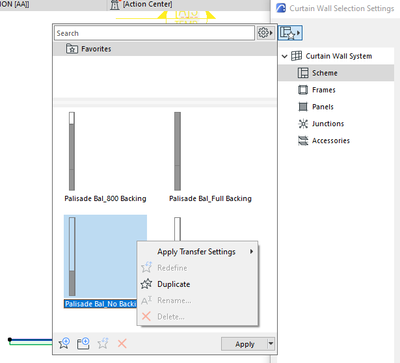
Hi all,
Hope everyone is doing well.
Our team has created a curtain wall favorite but when we want to return and "redefine" it, the option is greyed out.
Can anyone share what the possible issue is?
Only the one curtain wall element is selected here in this case.
Labels:
- Labels:
-
Curtain Walls
1 Reply 1

Lee Hankins
Virtuoso
Options
- Mark as New
- Bookmark
- Subscribe
- Mute
- Subscribe to RSS Feed
- Permalink
- Report Inappropriate Content
2023-09-22 10:25 AM
2023-09-22
10:25 AM
Are you trying to update the settings of the Favourite you have already created? If that's the case, double-click it to activate it, making sure you have all settings selected to transfer when applying a Favourite in Element transfer Settings. Then head to the Parameters palette of the Curtain Wall Tool and make the changes you wish to make. Once you have done that then right-click on the Favourite you have already saved and select 'Redefine'. Hope that makes sense.
Lee Hankins
ArchiCAD 4.5 - Archicad 29
macOS Tahoe (26.0)
ArchiCAD 4.5 - Archicad 29
macOS Tahoe (26.0)

Still looking?

Suggested topics
- Fill Display Order on Internal Elevations in Modeling
- Object Library Folder Display in Libraries & objects
- Favourites Preview Incorrect in Libraries & objects
- Archicad 29 Template Migration – Door Tags & Library Issues in Project data & BIM
- I’m experiencing an issue with my template after upgrading from Archicad 26 to Archicad 29. in Libraries & objects
