
Turn on suggestions
Auto-suggest helps you quickly narrow down your search results by suggesting possible matches as you type.
Showing results for
EN
Turn on suggestions
Auto-suggest helps you quickly narrow down your search results by suggesting possible matches as you type.
Showing results for
Options
- Subscribe to RSS Feed
- Mark Topic as New
- Mark Topic as Read
- Pin this post for me
- Bookmark
- Subscribe to Topic
- Mute
- Printer Friendly Page

JohnJay
Expert
Options
- Mark as New
- Bookmark
- Subscribe
- Mute
- Subscribe to RSS Feed
- Permalink
- Report Inappropriate Content
2023-03-03 08:48 PM
Reload library command?
2023-03-03
08:48 PM
Is there a command to refresh all libraries (same as 'Reload and Apply') without needing to open the Library Manager, clicking or reload and then closing the window?
AC27 | i7990x | RTX4070 | W10
Solved! Go to Solution.
1 Solution
Accepted Solutions

Karl Ottenstein
Moderator Emeritus
Options
- Mark as New
- Bookmark
- Subscribe
- Mute
- Subscribe to RSS Feed
- Permalink
- Report Inappropriate Content
2023-03-03 11:16 PM
2023-03-03
11:16 PM
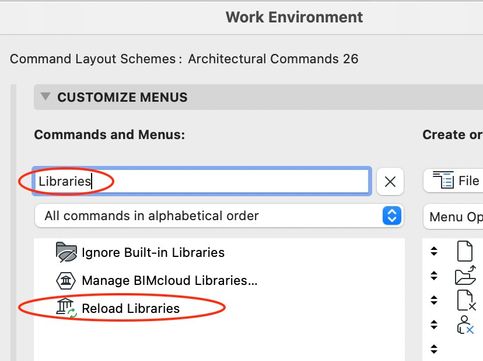
I believe this command is what you're looking for... You can add it to a menu... or add a shortcut key combination for it. Note that there are quite a few commands available in the Work Environment that don't exist in the standard menu structure. You might find something else useful in the list of all commands...
Vote for Wish: Copy/Paste in 3D
AC 29 USA and earlier • hardware key • macOS Tahoe 26.7 MacBook Pro M2 Max 12CPU/30GPU cores, 32GB
AC 29 USA and earlier • hardware key • macOS Tahoe 26.7 MacBook Pro M2 Max 12CPU/30GPU cores, 32GB
Solution
2 Replies 2
Karl Ottenstein
Moderator Emeritus
Options
- Mark as New
- Bookmark
- Subscribe
- Mute
- Subscribe to RSS Feed
- Permalink
- Report Inappropriate Content
2023-03-03 11:16 PM
2023-03-03
11:16 PM
I believe this command is what you're looking for... You can add it to a menu... or add a shortcut key combination for it. Note that there are quite a few commands available in the Work Environment that don't exist in the standard menu structure. You might find something else useful in the list of all commands...
Vote for Wish: Copy/Paste in 3D
AC 29 USA and earlier • hardware key • macOS Tahoe 26.7 MacBook Pro M2 Max 12CPU/30GPU cores, 32GB
AC 29 USA and earlier • hardware key • macOS Tahoe 26.7 MacBook Pro M2 Max 12CPU/30GPU cores, 32GB
Solution
JohnJay
Expert
Options
- Mark as New
- Bookmark
- Subscribe
- Mute
- Subscribe to RSS Feed
- Permalink
- Report Inappropriate Content
2023-03-04 01:14 PM
2023-03-04
01:14 PM
Thank you Karl
Yes that was it. I did do a search for 'reload' but nothing came up
I was missing the "All commands in alphabetical order" in the drop down below the search bar
AC27 | i7990x | RTX4070 | W10

Still looking?

Suggested topics
