
Turn on suggestions
Auto-suggest helps you quickly narrow down your search results by suggesting possible matches as you type.
Showing results for
EN
Turn on suggestions
Auto-suggest helps you quickly narrow down your search results by suggesting possible matches as you type.
Showing results for
Options
- Subscribe to RSS Feed
- Mark Topic as New
- Mark Topic as Read
- Pin this post for me
- Bookmark
- Subscribe to Topic
- Mute
- Printer Friendly Page

Zaraf
Booster
Options
- Mark as New
- Bookmark
- Subscribe
- Mute
- Subscribe to RSS Feed
- Permalink
- Report Inappropriate Content
2023-05-18
02:59 PM
- last edited on
2023-05-24
07:31 PM
by
 Rubia Torres
Surfaces glitch
2023-05-18
02:59 PM
Hello!
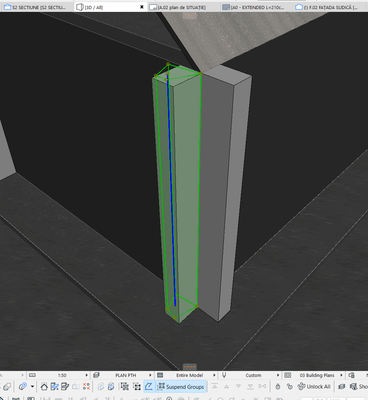
I started a new project in Archicad 26 and i noticed that in 3D my surfaces are acting a little weird.
I saw some fix on another post about it being because my project origin got messed up somehow but that didn't help to get a fix with this issue. You will see in the video I made the coordinates palette that i have some weird values.
Does anyone know how to fix this?
Thanks!
LE: forgot to add that it may also affect the grip points for the elements.
Version 23 to 29
Lenovo Legion 5 Pro, Intel i9-12900H @5GHz, 32GB RAM, NVIDIA GeForce RTX 3070 Ti 8GB, Windows 11 / mac mini m4
Lenovo Legion 5 Pro, Intel i9-12900H @5GHz, 32GB RAM, NVIDIA GeForce RTX 3070 Ti 8GB, Windows 11 / mac mini m4
Solved! Go to Solution.
1 Solution
Accepted Solutions

runxel
Moderator
Options
- Mark as New
- Bookmark
- Subscribe
- Mute
- Subscribe to RSS Feed
- Permalink
- Report Inappropriate Content
2023-05-18 05:58 PM
2023-05-18
05:58 PM
You have already determined the cause of this: You're still to far from the project origin, as we can see in the coordinates down below.
Move your project to the global origin, save, close, and open the file. You should be good now. (This needs to be done for worksheets, too btw!)
Lucas Becker | AC 29 on Mac (Sequoia) | Graphisoft Insider Panelist | Akroter.io – high-end GDL objects | Author of Runxel's Archicad Wiki | Editor at SelfGDL | Developer of the GDL plugin for Sublime Text
My List of AC shortcomings & bugs | I Will Piledrive You If You Mention AI Again |
POSIWID – The Purpose Of a System Is What It Does /// «Furthermore, I consider that Carth... yearly releases must be destroyed»
My List of AC shortcomings & bugs | I Will Piledrive You If You Mention AI Again |
POSIWID – The Purpose Of a System Is What It Does /// «Furthermore, I consider that Carth... yearly releases must be destroyed»
Solution
17 Replies 17
runxel
Moderator
Options
- Mark as New
- Bookmark
- Subscribe
- Mute
- Subscribe to RSS Feed
- Permalink
- Report Inappropriate Content
2023-05-18 05:58 PM
2023-05-18
05:58 PM
You have already determined the cause of this: You're still to far from the project origin, as we can see in the coordinates down below.
Move your project to the global origin, save, close, and open the file. You should be good now. (This needs to be done for worksheets, too btw!)
Lucas Becker | AC 29 on Mac (Sequoia) | Graphisoft Insider Panelist | Akroter.io – high-end GDL objects | Author of Runxel's Archicad Wiki | Editor at SelfGDL | Developer of the GDL plugin for Sublime Text
My List of AC shortcomings & bugs | I Will Piledrive You If You Mention AI Again |
POSIWID – The Purpose Of a System Is What It Does /// «Furthermore, I consider that Carth... yearly releases must be destroyed»
My List of AC shortcomings & bugs | I Will Piledrive You If You Mention AI Again |
POSIWID – The Purpose Of a System Is What It Does /// «Furthermore, I consider that Carth... yearly releases must be destroyed»
Solution
Zaraf
Booster
Options
- Mark as New
- Bookmark
- Subscribe
- Mute
- Subscribe to RSS Feed
- Permalink
- Report Inappropriate Content
2023-05-18 06:01 PM
2023-05-18
06:01 PM
I already tried to move the project to the global origin and nothing changed.
Any other reason that might happen?
Version 23 to 29
Lenovo Legion 5 Pro, Intel i9-12900H @5GHz, 32GB RAM, NVIDIA GeForce RTX 3070 Ti 8GB, Windows 11 / mac mini m4
Lenovo Legion 5 Pro, Intel i9-12900H @5GHz, 32GB RAM, NVIDIA GeForce RTX 3070 Ti 8GB, Windows 11 / mac mini m4
runxel
Moderator
Options
- Mark as New
- Bookmark
- Subscribe
- Mute
- Subscribe to RSS Feed
- Permalink
- Report Inappropriate Content
2023-05-18 11:53 PM
2023-05-18
11:53 PM
Well according to the coordinates visible in the video you didn't actually do that? 🤷🏻♂️
Maybe you are confusing the user origin with the global project origin?
Lucas Becker | AC 29 on Mac (Sequoia) | Graphisoft Insider Panelist | Akroter.io – high-end GDL objects | Author of Runxel's Archicad Wiki | Editor at SelfGDL | Developer of the GDL plugin for Sublime Text
My List of AC shortcomings & bugs | I Will Piledrive You If You Mention AI Again |
POSIWID – The Purpose Of a System Is What It Does /// «Furthermore, I consider that Carth... yearly releases must be destroyed»
My List of AC shortcomings & bugs | I Will Piledrive You If You Mention AI Again |
POSIWID – The Purpose Of a System Is What It Does /// «Furthermore, I consider that Carth... yearly releases must be destroyed»
Zaraf
Booster
Options
- Mark as New
- Bookmark
- Subscribe
- Mute
- Subscribe to RSS Feed
- Permalink
- Report Inappropriate Content
2023-05-19 07:47 AM
2023-05-19
07:47 AM
I guess I am because i don't really know the difference. I'll look into it now, but i gladly take any advice on how to do this properly.
Version 23 to 29
Lenovo Legion 5 Pro, Intel i9-12900H @5GHz, 32GB RAM, NVIDIA GeForce RTX 3070 Ti 8GB, Windows 11 / mac mini m4
Lenovo Legion 5 Pro, Intel i9-12900H @5GHz, 32GB RAM, NVIDIA GeForce RTX 3070 Ti 8GB, Windows 11 / mac mini m4

Barry Kelly
Moderator
Options
- Mark as New
- Bookmark
- Subscribe
- Mute
- Subscribe to RSS Feed
- Permalink
- Report Inappropriate Content
2023-05-19 07:56 AM
2023-05-19
07:56 AM
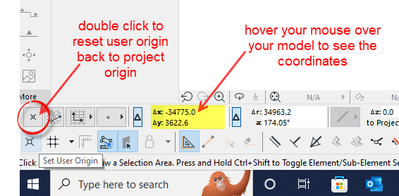
Turn on the 'Coordinates' palette if you don't have it already.
Reset the user origin.
Check the coordinates of your model and if they are not close to zero, your model is too far from the project origin.
Barry.
One of the forum moderators.
Versions 6.5 to 27
i7-10700 @ 2.9Ghz, 32GB ram, GeForce RTX 2060 (6GB), Windows 10
Lenovo Thinkpad - i7-1270P 2.20 GHz, 32GB RAM, Nvidia T550, Windows 11
Versions 6.5 to 27
i7-10700 @ 2.9Ghz, 32GB ram, GeForce RTX 2060 (6GB), Windows 10
Lenovo Thinkpad - i7-1270P 2.20 GHz, 32GB RAM, Nvidia T550, Windows 11
Zaraf
Booster
Options
- Mark as New
- Bookmark
- Subscribe
- Mute
- Subscribe to RSS Feed
- Permalink
- Report Inappropriate Content
2023-05-19 01:27 PM
2023-05-19
01:27 PM
This helped a lot. I got it fixed now. Thanks a lot!
Have a nice day!
Version 23 to 29
Lenovo Legion 5 Pro, Intel i9-12900H @5GHz, 32GB RAM, NVIDIA GeForce RTX 3070 Ti 8GB, Windows 11 / mac mini m4
Lenovo Legion 5 Pro, Intel i9-12900H @5GHz, 32GB RAM, NVIDIA GeForce RTX 3070 Ti 8GB, Windows 11 / mac mini m4
Zaraf
Booster
Options
- Mark as New
- Bookmark
- Subscribe
- Mute
- Subscribe to RSS Feed
- Permalink
- Report Inappropriate Content
2023-05-26 10:24 AM
2023-05-26
10:24 AM
This problem seemed to have reappeared, i tried to redo the same steps but did not work.. Any reason why this keeps happening?
Version 23 to 29
Lenovo Legion 5 Pro, Intel i9-12900H @5GHz, 32GB RAM, NVIDIA GeForce RTX 3070 Ti 8GB, Windows 11 / mac mini m4
Lenovo Legion 5 Pro, Intel i9-12900H @5GHz, 32GB RAM, NVIDIA GeForce RTX 3070 Ti 8GB, Windows 11 / mac mini m4
Barry Kelly
Moderator
Options
- Mark as New
- Bookmark
- Subscribe
- Mute
- Subscribe to RSS Feed
- Permalink
- Report Inappropriate Content
2023-05-26 10:27 AM
2023-05-26
10:27 AM
If you have moved you model close to the Project Origin, check that you have not left something stranded far away still.
Turn all layers on.
In 3D zoom to extents.
If you model becomes very small, you have something far from the origin.
Barry.
One of the forum moderators.
Versions 6.5 to 27
i7-10700 @ 2.9Ghz, 32GB ram, GeForce RTX 2060 (6GB), Windows 10
Lenovo Thinkpad - i7-1270P 2.20 GHz, 32GB RAM, Nvidia T550, Windows 11
Versions 6.5 to 27
i7-10700 @ 2.9Ghz, 32GB ram, GeForce RTX 2060 (6GB), Windows 10
Lenovo Thinkpad - i7-1270P 2.20 GHz, 32GB RAM, Nvidia T550, Windows 11
Zaraf
Booster
Options
- Mark as New
- Bookmark
- Subscribe
- Mute
- Subscribe to RSS Feed
- Permalink
- Report Inappropriate Content
2023-05-26 10:42 AM
2023-05-26
10:42 AM
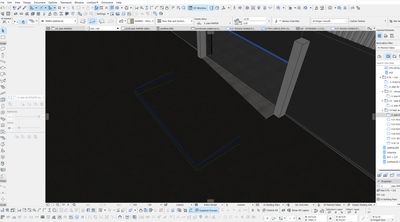
And the problem seems to have reappeared. The worst part is that is ruins my grip points for editing elements and I use 3D viewport a lot in my workflow.
For example, I tried to use a mesh as a ramp because it will have the lower edge intersected with the another ramp..
Any other ideas on how i can fix this?
Version 23 to 29
Lenovo Legion 5 Pro, Intel i9-12900H @5GHz, 32GB RAM, NVIDIA GeForce RTX 3070 Ti 8GB, Windows 11 / mac mini m4
Lenovo Legion 5 Pro, Intel i9-12900H @5GHz, 32GB RAM, NVIDIA GeForce RTX 3070 Ti 8GB, Windows 11 / mac mini m4

Still looking?

Suggested topics
- Rounded Wall Corner displays correctly in Floor Plan but glitches in 3D Document in Modeling
- Wall surface offset in Modeling
- Surface texture in elevation won't publish to pdf in Documentation
- Some free useful objects: Road signs, parametric pathway, roof crickets, crowds in Libraries & objects
- Surface / Component Schedule Bug: Automatic Column Wrapping Ignores Folded Geometry and Returns Flat in Project data & BIM
