
Turn on suggestions
Auto-suggest helps you quickly narrow down your search results by suggesting possible matches as you type.
Showing results for
EN
Turn on suggestions
Auto-suggest helps you quickly narrow down your search results by suggesting possible matches as you type.
Showing results for
Options
- Subscribe to RSS Feed
- Mark Topic as New
- Mark Topic as Read
- Pin this post for me
- Bookmark
- Subscribe to Topic
- Mute
- Printer Friendly Page

Anonymous
Not applicable
Options
- Mark as New
- Bookmark
- Subscribe
- Mute
- Subscribe to RSS Feed
- Permalink
- Report Inappropriate Content
2011-05-18
04:51 AM
- last edited on
2023-05-24
01:09 PM
by
 Rubia Torres
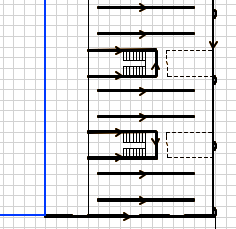
arrows on my walls?
2011-05-18
04:51 AM
I dont know what i have pressed to have done this and cant find any talk of it around. This isn't the only thing to just change lately; Im also having problems with my tools not following the cursor?
any idea as to what i might be doing? or how i can fix theses things??
3 Replies 3
Anonymous
Not applicable
Options
- Mark as New
- Bookmark
- Subscribe
- Mute
- Subscribe to RSS Feed
- Permalink
- Report Inappropriate Content
2011-05-18 05:02 AM
2011-05-18
05:02 AM
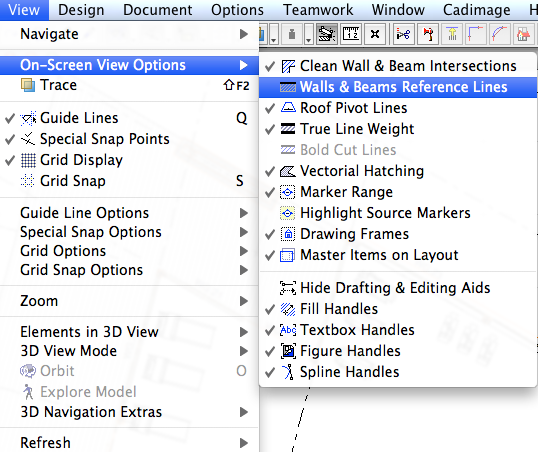
Arrows are showing wall reference lines and the direction they have been drawn. Go to View> On Screen View Options and UNcheck Walls and Beams Reference Lines.
Anonymous
Not applicable
Options
- Mark as New
- Bookmark
- Subscribe
- Mute
- Subscribe to RSS Feed
- Permalink
- Report Inappropriate Content
2011-05-18 05:08 AM
2011-05-18
05:08 AM
LauraBot wrote:If you mean Pet Palettes, try Options> Work Environment - Dialogue Boxes and Palettes and see what Pet Palette Preferences you have set (Follow cursor or Jump to preferred position)
Im also having problems with my tools not following the cursor
Anonymous
Not applicable
Options
- Mark as New
- Bookmark
- Subscribe
- Mute
- Subscribe to RSS Feed
- Permalink
- Report Inappropriate Content
2011-05-18 05:09 AM
2011-05-18
05:09 AM
thankyou!
I was clicking things on and off for hours trying to figure that out
I was clicking things on and off for hours trying to figure that out
Still looking?
