
Turn on suggestions
Auto-suggest helps you quickly narrow down your search results by suggesting possible matches as you type.
Showing results for
EN
Turn on suggestions
Auto-suggest helps you quickly narrow down your search results by suggesting possible matches as you type.
Showing results for
Options
- Subscribe to RSS Feed
- Mark Topic as New
- Mark Topic as Read
- Pin this post for me
- Bookmark
- Subscribe to Topic
- Mute
- Printer Friendly Page

Bara3
Booster
Options
- Mark as New
- Bookmark
- Subscribe
- Mute
- Subscribe to RSS Feed
- Permalink
- Report Inappropriate Content
2023-04-23
02:53 PM
- last edited on
2023-05-24
01:05 PM
by
 Rubia Torres
stairs - section symbol
2023-04-23
02:53 PM
Hello,
I want to change symbol of section in my floor plan (you can see it in the picture). But even when I change stair section symbol in the stair settings nothing happens and the symbol stays the same (zigzag line). Do you have some advice what I am doing wrong? Thank you.
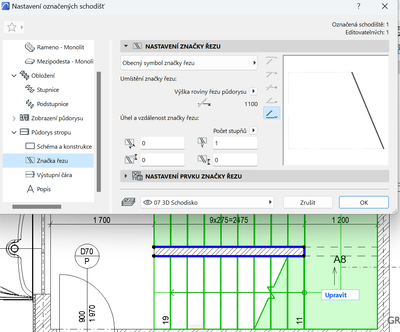
Solved! Go to Solution.
1 Solution
Accepted Solutions
Bara3
Booster
Options
- Mark as New
- Bookmark
- Subscribe
- Mute
- Subscribe to RSS Feed
- Permalink
- Report Inappropriate Content
2023-04-24 08:14 AM
Solution
4 Replies 4

runxel
Moderator
Options
- Mark as New
- Bookmark
- Subscribe
- Mute
- Subscribe to RSS Feed
- Permalink
- Report Inappropriate Content
2023-04-23 07:09 PM
2023-04-23
07:09 PM
From the looks of it you're not actually editing the floorplan symbol, but the one for the RCP (reflected ceiling plan, which is determined by MVO).
Lucas Becker | AC 29 on Mac (Sequoia) | Graphisoft Insider Panelist | Akroter.io – high-end GDL objects | Author of Runxel's Archicad Wiki | Editor at SelfGDL | Developer of the GDL plugin for Sublime Text
My List of AC shortcomings & bugs | I Will Piledrive You If You Mention AI Again |
POSIWID – The Purpose Of a System Is What It Does /// «Furthermore, I consider that Carth... yearly releases must be destroyed»
My List of AC shortcomings & bugs | I Will Piledrive You If You Mention AI Again |
POSIWID – The Purpose Of a System Is What It Does /// «Furthermore, I consider that Carth... yearly releases must be destroyed»
Bara3
Booster
Options
- Mark as New
- Bookmark
- Subscribe
- Mute
- Subscribe to RSS Feed
- Permalink
- Report Inappropriate Content
2023-04-23 10:14 PM
2023-04-23
10:14 PM
Thank you, yes, it it possible, please, where can I edit the floorplan symbol?

Barry Kelly
Moderator
Options
- Mark as New
- Bookmark
- Subscribe
- Mute
- Subscribe to RSS Feed
- Permalink
- Report Inappropriate Content
2023-04-24 02:10 AM
2023-04-24
02:10 AM
@Bara3 wrote:
Thank you, yes, it it possible, please, where can I edit the floorplan symbol?
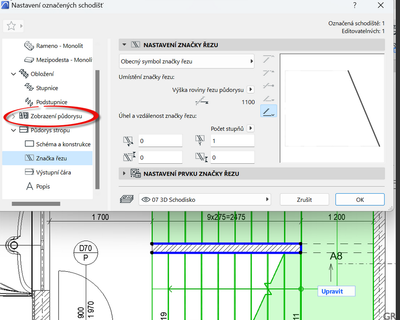
Barry.
One of the forum moderators.
Versions 6.5 to 27
i7-10700 @ 2.9Ghz, 32GB ram, GeForce RTX 2060 (6GB), Windows 10
Lenovo Thinkpad - i7-1270P 2.20 GHz, 32GB RAM, Nvidia T550, Windows 11
Versions 6.5 to 27
i7-10700 @ 2.9Ghz, 32GB ram, GeForce RTX 2060 (6GB), Windows 10
Lenovo Thinkpad - i7-1270P 2.20 GHz, 32GB RAM, Nvidia T550, Windows 11
Bara3
Booster
Options
- Mark as New
- Bookmark
- Subscribe
- Mute
- Subscribe to RSS Feed
- Permalink
- Report Inappropriate Content
2023-04-24 08:14 AM
2023-04-24
08:14 AM
Thank you, so much I have tried to find it for a long time.
Solution

Still looking?

Suggested topics
- Custom Railing Panel in Modeling
- How can I show hidden stair treads as dashed lines in a section? in Modeling
- Unable to edit overide in "Ci tools Doors _ Schedule" Object - Door and Window Schedule all Dashed in Libraries & objects
- Concrete block wall in Modeling
- (Variable) Window Problem - fixed glass in Libraries & objects
