
Turn on suggestions
Auto-suggest helps you quickly narrow down your search results by suggesting possible matches as you type.
Showing results for
EN
Turn on suggestions
Auto-suggest helps you quickly narrow down your search results by suggesting possible matches as you type.
Showing results for
- English
- :
- Forum
- :
- Project data & BIM
- :
- Re: Bug when adding windows/doors on walls, the sc...
Options
- Subscribe to RSS Feed
- Mark Topic as New
- Mark Topic as Read
- Pin this post for me
- Bookmark
- Subscribe to Topic
- Mute
- Printer Friendly Page

Alba
Participant
Options
- Mark as New
- Bookmark
- Subscribe
- Mute
- Subscribe to RSS Feed
- Permalink
- Report Inappropriate Content
2022-05-26
06:05 PM
- last edited on
2022-09-28
03:32 PM
by
 Oleksandra Vakariuk
Bug when adding windows/doors on walls, the schedule in Archicad 25 double the walls
2022-05-26
06:05 PM
Hello,
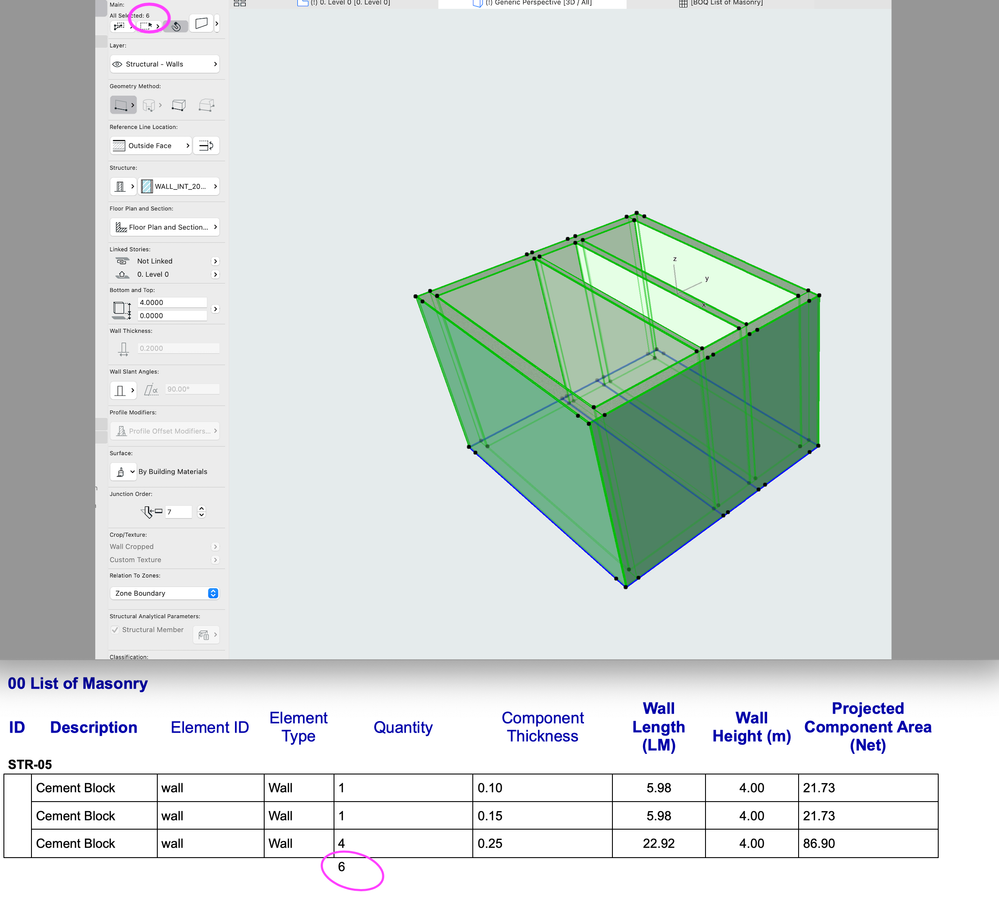
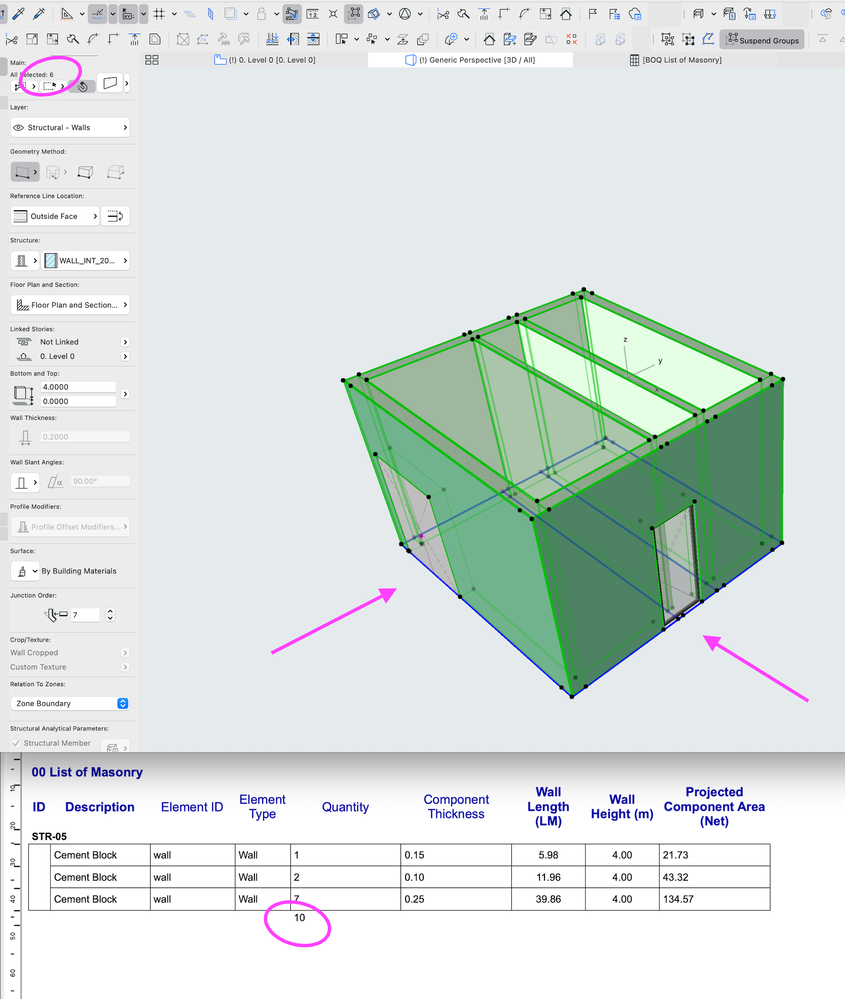
When I am creating a schedule for measuring masonry on a project, Archicad 25 multiplies the walls that have windows or doors! When I measure these same walls for the exterior finishing, the information is correct either if I have windows or not. See below the example. Thank you!
(Imac with Monterey)
Solved! Go to Solution.
2 Solutions
Accepted Solutions

Miha Nahtigal
Expert
Options
- Mark as New
- Bookmark
- Subscribe
- Mute
- Subscribe to RSS Feed
- Permalink
- Report Inappropriate Content
2022-06-01 09:08 PM
2022-06-01
09:08 PM
Check the schedule type - is it Elements or Components?
I had a problem with double beams when my schedule was under "Elements". When I moved it (created new one) under Components, it showed correct qties.
Solution

Barry Kelly
Moderator
Options
- Mark as New
- Bookmark
- Subscribe
- Mute
- Subscribe to RSS Feed
- Permalink
- Report Inappropriate Content
2022-06-02 03:56 AM
2022-06-02
03:56 AM
@Miha Nahtigal wrote:
Check the schedule type - is it Elements or Components?
Yes that looks like what it might be.
@Alba , you appear to be doing a 'Surface' schedule, but you are asking for length, height and floor area.
That will be trying to calculate the front, back and edge surfaces.
Try an 'Element' schedule if you just want wall quantities or a 'Component' schedule if you want quantities of individual skins.
Barry.
One of the forum moderators.
Versions 6.5 to 27
i7-10700 @ 2.9Ghz, 32GB ram, GeForce RTX 2060 (6GB), Windows 10
Lenovo Thinkpad - i7-1270P 2.20 GHz, 32GB RAM, Nvidia T550, Windows 11
Versions 6.5 to 27
i7-10700 @ 2.9Ghz, 32GB ram, GeForce RTX 2060 (6GB), Windows 10
Lenovo Thinkpad - i7-1270P 2.20 GHz, 32GB RAM, Nvidia T550, Windows 11
Solution
8 Replies 8
Barry Kelly
Moderator
Options
- Mark as New
- Bookmark
- Subscribe
- Mute
- Subscribe to RSS Feed
- Permalink
- Report Inappropriate Content
2022-05-27 03:34 AM
2022-05-27
03:34 AM
Can you show screen shots of the schedule settings as well please?
Barry.
One of the forum moderators.
Versions 6.5 to 27
i7-10700 @ 2.9Ghz, 32GB ram, GeForce RTX 2060 (6GB), Windows 10
Lenovo Thinkpad - i7-1270P 2.20 GHz, 32GB RAM, Nvidia T550, Windows 11
Versions 6.5 to 27
i7-10700 @ 2.9Ghz, 32GB ram, GeForce RTX 2060 (6GB), Windows 10
Lenovo Thinkpad - i7-1270P 2.20 GHz, 32GB RAM, Nvidia T550, Windows 11
 Laszlo Nagy
Community Admin
Options
- Mark as New
- Bookmark
- Subscribe
- Mute
- Subscribe to RSS Feed
- Permalink
- Report Inappropriate Content
2022-05-28 10:47 PM
2022-05-28
10:47 PM
And when you make those screenshots of the Scheme Settings Dialog, make sure both Criteria AND Schedule Field settings are visible.
Loving Archicad since 1995 - Find Archicad Tips at x.com/laszlonagy
AMD Ryzen9 5900X CPU, 64 GB RAM 3600 MHz, Nvidia GTX 1060 6GB, 500 GB NVMe SSD
2x28" (2560x1440), Windows 10 PRO ENG, Ac20-Ac29
AMD Ryzen9 5900X CPU, 64 GB RAM 3600 MHz, Nvidia GTX 1060 6GB, 500 GB NVMe SSD
2x28" (2560x1440), Windows 10 PRO ENG, Ac20-Ac29
Alba
Participant
Options
- Mark as New
- Bookmark
- Subscribe
- Mute
- Subscribe to RSS Feed
- Permalink
- Report Inappropriate Content
2022-05-29 09:21 AM
2022-05-29
09:21 AM
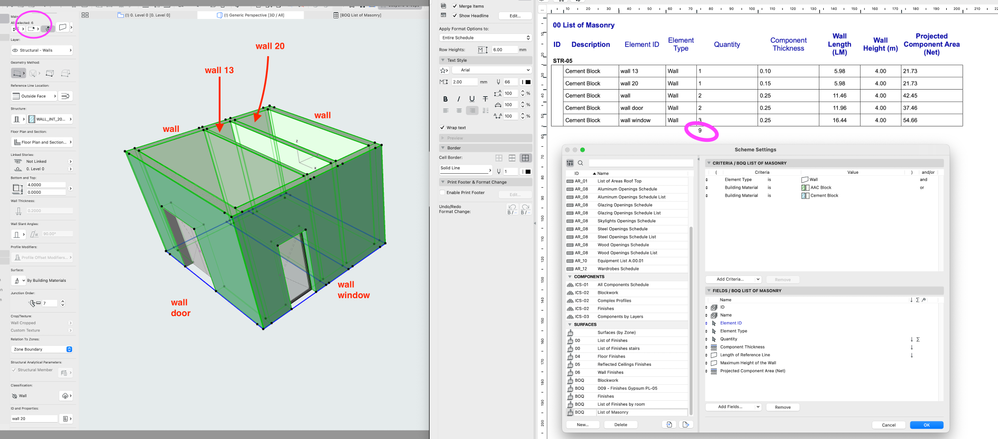
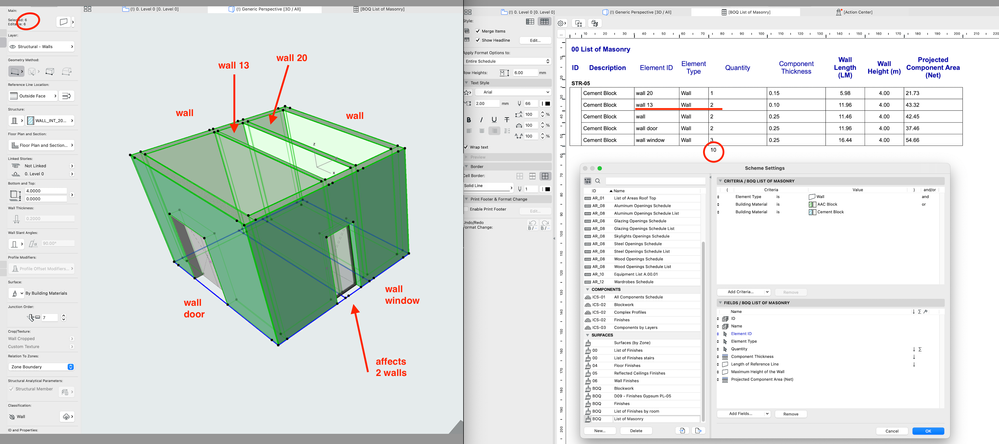
The schedule settings are below. I found out that if by chance the window/door is in front of another wall, and this one connects with our own window's wall, this one gets affected too. I added IDs to each wall so we can understand better what is correct or not.
Barry Kelly
Moderator
Options
- Mark as New
- Bookmark
- Subscribe
- Mute
- Subscribe to RSS Feed
- Permalink
- Report Inappropriate Content
2022-05-30 07:08 AM
2022-05-30
07:08 AM
Try putting brackets around the materials.
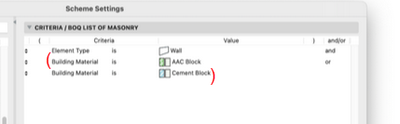
Without them you are looking for all walls that are AAC Block and anything else that is Cement block.
Rather than any wall that is either AAC Block or Cement Bock.
There is a subtle difference.
Barry.
One of the forum moderators.
Versions 6.5 to 27
i7-10700 @ 2.9Ghz, 32GB ram, GeForce RTX 2060 (6GB), Windows 10
Lenovo Thinkpad - i7-1270P 2.20 GHz, 32GB RAM, Nvidia T550, Windows 11
Versions 6.5 to 27
i7-10700 @ 2.9Ghz, 32GB ram, GeForce RTX 2060 (6GB), Windows 10
Lenovo Thinkpad - i7-1270P 2.20 GHz, 32GB RAM, Nvidia T550, Windows 11
Alba
Participant
Options
- Mark as New
- Bookmark
- Subscribe
- Mute
- Subscribe to RSS Feed
- Permalink
- Report Inappropriate Content
2022-06-01 02:19 PM
2022-06-01
02:19 PM
Hi Barry,
tried it, but unfortunately didn't solved it.
Miha Nahtigal
Expert
Options
- Mark as New
- Bookmark
- Subscribe
- Mute
- Subscribe to RSS Feed
- Permalink
- Report Inappropriate Content
2022-06-01 09:08 PM
2022-06-01
09:08 PM
Check the schedule type - is it Elements or Components?
I had a problem with double beams when my schedule was under "Elements". When I moved it (created new one) under Components, it showed correct qties.
Solution
Barry Kelly
Moderator
Options
- Mark as New
- Bookmark
- Subscribe
- Mute
- Subscribe to RSS Feed
- Permalink
- Report Inappropriate Content
2022-06-02 03:56 AM
2022-06-02
03:56 AM
@Miha Nahtigal wrote:
Check the schedule type - is it Elements or Components?
Yes that looks like what it might be.
@Alba , you appear to be doing a 'Surface' schedule, but you are asking for length, height and floor area.
That will be trying to calculate the front, back and edge surfaces.
Try an 'Element' schedule if you just want wall quantities or a 'Component' schedule if you want quantities of individual skins.
Barry.
One of the forum moderators.
Versions 6.5 to 27
i7-10700 @ 2.9Ghz, 32GB ram, GeForce RTX 2060 (6GB), Windows 10
Lenovo Thinkpad - i7-1270P 2.20 GHz, 32GB RAM, Nvidia T550, Windows 11
Versions 6.5 to 27
i7-10700 @ 2.9Ghz, 32GB ram, GeForce RTX 2060 (6GB), Windows 10
Lenovo Thinkpad - i7-1270P 2.20 GHz, 32GB RAM, Nvidia T550, Windows 11
Solution
Alba
Participant
Options
- Mark as New
- Bookmark
- Subscribe
- Mute
- Subscribe to RSS Feed
- Permalink
- Report Inappropriate Content
2022-06-15 08:34 AM
2022-06-15
08:34 AM
@Barry Kelly and @Miha Nahtigal
Thank you guys, that's exactly that! I moved the schedule from Surfaces to Components and now is giving me the correct quantities. Thank you! 🙂

Didn't find the answer?
Check other topics in this Forum
Back to ForumRead the latest accepted solutions!
Accepted SolutionsStart a new conversation!

Suggested topics
- Some free useful objects: Road signs, parametric pathway, roof crickets, crowds in Libraries & objects
- Surface / Component Schedule Bug: Automatic Column Wrapping Ignores Folded Geometry and Returns Flat in Project data & BIM
- Ci Tools Keynotes | Archicad Keynotes | Properties | Attributes in Project data & BIM
- Archicad Interactive Schedule shows a single multi-plane hip roof as four separate elements in Documentation
- Doors and Windows Schedule Automatic Dimension Button not Responding in Project data & BIM
