
Turn on suggestions
Auto-suggest helps you quickly narrow down your search results by suggesting possible matches as you type.
Showing results for
EN
Turn on suggestions
Auto-suggest helps you quickly narrow down your search results by suggesting possible matches as you type.
Showing results for
- English
- :
- Forum
- :
- Project data & BIM
- :
- I want to find the area by subtracting the fill ar...
Options
- Subscribe to RSS Feed
- Mark Topic as New
- Mark Topic as Read
- Pin this post for me
- Bookmark
- Subscribe to Topic
- Mute
- Printer Friendly Page

LeeJaeYoung
Virtuoso
Options
- Mark as New
- Bookmark
- Subscribe
- Mute
- Subscribe to RSS Feed
- Permalink
- Report Inappropriate Content
2023-04-29 01:12 PM - edited 2023-04-29 01:20 PM
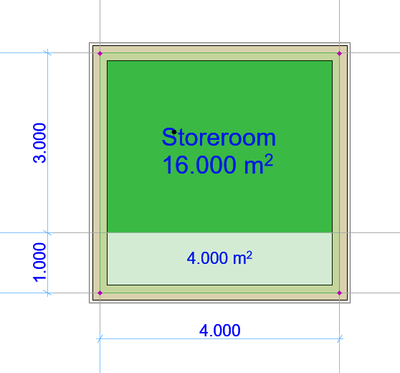
I want to find the area by subtracting the fill area from the zone area. (Gross)
2023-04-29
01:12 PM
Zone Areas and Volumes - Graphisoft Community
I want to find the area by subtracting the fill area from the zone area.
What should I do?
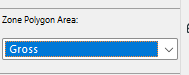
Area is Gross.
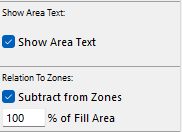
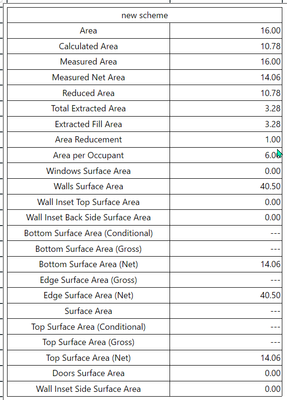
AC27 on window 11
Solved! Go to Solution.
3 Solutions
Accepted Solutions
LeeJaeYoung
Virtuoso
Options
- Mark as New
- Bookmark
- Subscribe
- Mute
- Subscribe to RSS Feed
- Permalink
- Report Inappropriate Content
2023-04-30 04:09 AM - edited 2023-04-30 04:18 AM
2023-04-30
04:09 AM
This is the answer I already received.
I want to delete it, but I don't have permission.
can't be automatic
It means that Gross's calculation method is possible only manually.
I wish it was possible even at the wall boundary.
Solved: How do I set up the zone schedule? - Graphisoft Community
In other words, if you set the line to Zone Boundary and use it, it is possible automatically.
AC27 on window 11
Solution

Barry Kelly
Moderator
Options
- Mark as New
- Bookmark
- Subscribe
- Mute
- Subscribe to RSS Feed
- Permalink
- Report Inappropriate Content
2023-05-01 03:28 AM - edited 2023-05-01 03:29 AM
2023-05-01
03:28 AM
Areas seem to be deducting fine for me.
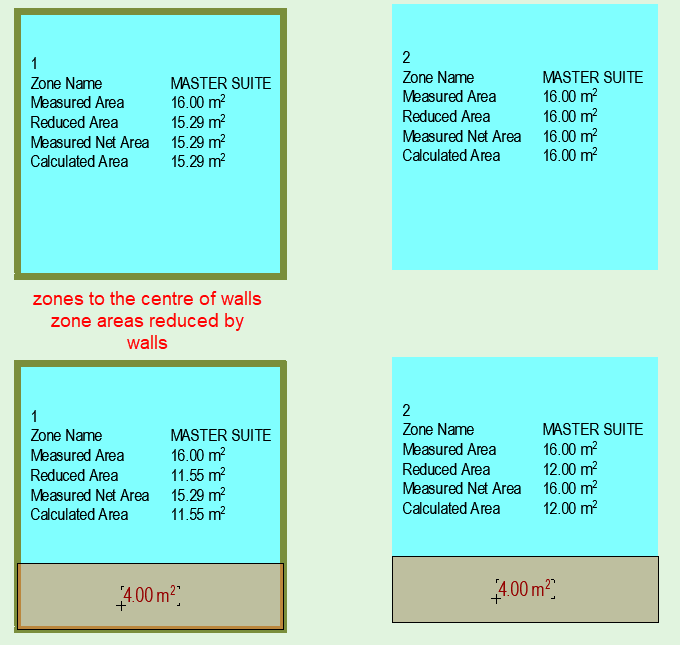
Because you are taking the zone to the centre of the walls, the zone automatically deducts the area of the walls from that zone.
There is nothing you can do about that except place the zones inside the walls.
The fill you draw to the centre of the walls will not deduct the full fill area (the 4m²), only the area inside the walls because half the wall thickness has already been deducted.
Barry.
One of the forum moderators.
Versions 6.5 to 27
i7-10700 @ 2.9Ghz, 32GB ram, GeForce RTX 2060 (6GB), Windows 10
Lenovo Thinkpad - i7-1270P 2.20 GHz, 32GB RAM, Nvidia T550, Windows 11
Versions 6.5 to 27
i7-10700 @ 2.9Ghz, 32GB ram, GeForce RTX 2060 (6GB), Windows 10
Lenovo Thinkpad - i7-1270P 2.20 GHz, 32GB RAM, Nvidia T550, Windows 11
LeeJaeYoung
Virtuoso
Options
- Mark as New
- Bookmark
- Subscribe
- Mute
- Subscribe to RSS Feed
- Permalink
- Report Inappropriate Content
2023-05-01 04:01 AM
2023-05-01
04:01 AM
thank you. ^^
However, it is my opinion that the wall should have options.
Most of the work is based on the wall. ^^
AC27 on window 11
Solution
4 Replies 4
LeeJaeYoung
Virtuoso
Options
- Mark as New
- Bookmark
- Subscribe
- Mute
- Subscribe to RSS Feed
- Permalink
- Report Inappropriate Content
2023-04-30 04:09 AM - edited 2023-04-30 04:18 AM
2023-04-30
04:09 AM
This is the answer I already received.
I want to delete it, but I don't have permission.
can't be automatic
It means that Gross's calculation method is possible only manually.
I wish it was possible even at the wall boundary.
Solved: How do I set up the zone schedule? - Graphisoft Community
In other words, if you set the line to Zone Boundary and use it, it is possible automatically.
AC27 on window 11
Solution
Barry Kelly
Moderator
Options
- Mark as New
- Bookmark
- Subscribe
- Mute
- Subscribe to RSS Feed
- Permalink
- Report Inappropriate Content
2023-05-01 03:28 AM - edited 2023-05-01 03:29 AM
2023-05-01
03:28 AM
Areas seem to be deducting fine for me.
Because you are taking the zone to the centre of the walls, the zone automatically deducts the area of the walls from that zone.
There is nothing you can do about that except place the zones inside the walls.
The fill you draw to the centre of the walls will not deduct the full fill area (the 4m²), only the area inside the walls because half the wall thickness has already been deducted.
Barry.
One of the forum moderators.
Versions 6.5 to 27
i7-10700 @ 2.9Ghz, 32GB ram, GeForce RTX 2060 (6GB), Windows 10
Lenovo Thinkpad - i7-1270P 2.20 GHz, 32GB RAM, Nvidia T550, Windows 11
Versions 6.5 to 27
i7-10700 @ 2.9Ghz, 32GB ram, GeForce RTX 2060 (6GB), Windows 10
Lenovo Thinkpad - i7-1270P 2.20 GHz, 32GB RAM, Nvidia T550, Windows 11
LeeJaeYoung
Virtuoso
Options
- Mark as New
- Bookmark
- Subscribe
- Mute
- Subscribe to RSS Feed
- Permalink
- Report Inappropriate Content
2023-05-01 04:01 AM
2023-05-01
04:01 AM
thank you. ^^
However, it is my opinion that the wall should have options.
Most of the work is based on the wall. ^^
AC27 on window 11
Solution
Barry Kelly
Moderator
Options
- Mark as New
- Bookmark
- Subscribe
- Mute
- Subscribe to RSS Feed
- Permalink
- Report Inappropriate Content
2023-05-01 04:20 AM
2023-05-01
04:20 AM
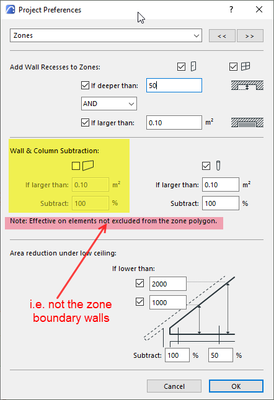
The zones give you 2 options (other than manually placing them).
To the centre of the walls - some like to not have 'gaps' in their areas.
Or to the inside of the walls which gives you the actual room size - which I would guess most people would use.
If you have free-standing wall completely inside a zone, you have the option to ignore them.
Barry.
One of the forum moderators.
Versions 6.5 to 27
i7-10700 @ 2.9Ghz, 32GB ram, GeForce RTX 2060 (6GB), Windows 10
Lenovo Thinkpad - i7-1270P 2.20 GHz, 32GB RAM, Nvidia T550, Windows 11
Versions 6.5 to 27
i7-10700 @ 2.9Ghz, 32GB ram, GeForce RTX 2060 (6GB), Windows 10
Lenovo Thinkpad - i7-1270P 2.20 GHz, 32GB RAM, Nvidia T550, Windows 11

Didn't find the answer?
Check other topics in this Forum
Back to ForumRead the latest accepted solutions!
Accepted SolutionsStart a new conversation!
Suggested topics
- Trying to calculate ACTUAL Wall Areas in Project data & BIM
- Zones for Massing Model and for Space Planning in Documentation
- Zone number in door marker - Which zone is prioritized? in Project data & BIM
- Zone Area Reduction for Low Ceilings Not Applying in Modeling
- How to calculate in a schedule the external wall surface (for painting)? in Project data & BIM
