
Turn on suggestions
Auto-suggest helps you quickly narrow down your search results by suggesting possible matches as you type.
Showing results for
EN
Turn on suggestions
Auto-suggest helps you quickly narrow down your search results by suggesting possible matches as you type.
Showing results for
- English
- :
- Forum
- :
- Project data & BIM
- :
- Schedule - single cell Format Options
Options
- Subscribe to RSS Feed
- Mark Topic as New
- Mark Topic as Read
- Pin this post for me
- Bookmark
- Subscribe to Topic
- Mute
- Printer Friendly Page

Paolo Pi
Booster
Options
- Mark as New
- Bookmark
- Subscribe
- Mute
- Subscribe to RSS Feed
- Permalink
- Report Inappropriate Content
2023-08-23 03:46 PM
Schedule - single cell Format Options
2023-08-23
03:46 PM
Hi everyone.
I am afraid I already have the answer to this question, but I want to be 100% sure.
Is it possible to change Format Options (f.ex text in Italic instead of Regular) to only selected cells of a schedule instead of an entire item (f.ex the Header or the Value cells)?
I am pretty sure it´s not possible. Please contradict me 🙂
AC25 (since AC19), windows 11
Intel Core Ultra 9 185H 2.30 GHz 64.0 GB
Intel Core Ultra 9 185H 2.30 GHz 64.0 GB
Solved! Go to Solution.
1 Solution
Accepted Solutions

Barry Kelly
Moderator
Options
- Mark as New
- Bookmark
- Subscribe
- Mute
- Subscribe to RSS Feed
- Permalink
- Report Inappropriate Content
2023-08-24 03:02 AM - edited 2023-08-24 03:03 AM
2023-08-24
03:02 AM
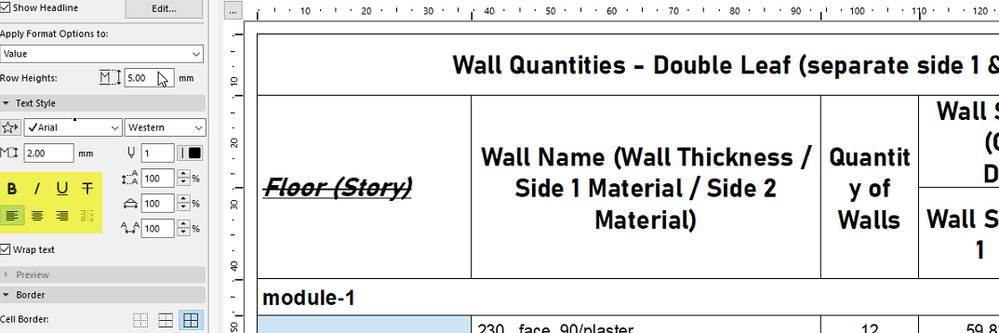
You should be able to change the bold/italic/underline and justification individually for each of the headers, but not the rest of the cells.
Font, size and colour affect all headers at the same time.
At least this is the case in version 22 - i don't have anything else open at the moment.
Barry.
One of the forum moderators.
Versions 6.5 to 27
i7-10700 @ 2.9Ghz, 32GB ram, GeForce RTX 2060 (6GB), Windows 10
Lenovo Thinkpad - i7-1270P 2.20 GHz, 32GB RAM, Nvidia T550, Windows 11
Versions 6.5 to 27
i7-10700 @ 2.9Ghz, 32GB ram, GeForce RTX 2060 (6GB), Windows 10
Lenovo Thinkpad - i7-1270P 2.20 GHz, 32GB RAM, Nvidia T550, Windows 11
10 Replies 10
Barry Kelly
Moderator
Options
- Mark as New
- Bookmark
- Subscribe
- Mute
- Subscribe to RSS Feed
- Permalink
- Report Inappropriate Content
2023-08-24 03:02 AM - edited 2023-08-24 03:03 AM
2023-08-24
03:02 AM
You should be able to change the bold/italic/underline and justification individually for each of the headers, but not the rest of the cells.
Font, size and colour affect all headers at the same time.
At least this is the case in version 22 - i don't have anything else open at the moment.
Barry.
One of the forum moderators.
Versions 6.5 to 27
i7-10700 @ 2.9Ghz, 32GB ram, GeForce RTX 2060 (6GB), Windows 10
Lenovo Thinkpad - i7-1270P 2.20 GHz, 32GB RAM, Nvidia T550, Windows 11
Versions 6.5 to 27
i7-10700 @ 2.9Ghz, 32GB ram, GeForce RTX 2060 (6GB), Windows 10
Lenovo Thinkpad - i7-1270P 2.20 GHz, 32GB RAM, Nvidia T550, Windows 11
Paolo Pi
Booster
Options
- Mark as New
- Bookmark
- Subscribe
- Mute
- Subscribe to RSS Feed
- Permalink
- Report Inappropriate Content
2023-08-24 09:35 AM
2023-08-24
09:35 AM
Thanks for your reply Barry.
Do you know if Graphisoft is taking into consideration improving these features in the schedules?
The text formatting is really bad and it would be great to have the possibility to personalize and have a nicer-looking result.
Have a nice day.
Paolo
AC25 (since AC19), windows 11
Intel Core Ultra 9 185H 2.30 GHz 64.0 GB
Intel Core Ultra 9 185H 2.30 GHz 64.0 GB
Barry Kelly
Moderator
Options
- Mark as New
- Bookmark
- Subscribe
- Mute
- Subscribe to RSS Feed
- Permalink
- Report Inappropriate Content
2023-08-24 09:57 AM
2023-08-24
09:57 AM
There are new features coming in 27, but not individual editing of cell text formats that I can see.
Other than what I showed before.
Barry.
One of the forum moderators.
Versions 6.5 to 27
i7-10700 @ 2.9Ghz, 32GB ram, GeForce RTX 2060 (6GB), Windows 10
Lenovo Thinkpad - i7-1270P 2.20 GHz, 32GB RAM, Nvidia T550, Windows 11
Versions 6.5 to 27
i7-10700 @ 2.9Ghz, 32GB ram, GeForce RTX 2060 (6GB), Windows 10
Lenovo Thinkpad - i7-1270P 2.20 GHz, 32GB RAM, Nvidia T550, Windows 11

 James B
Graphisoft
Options
- Mark as New
- Bookmark
- Subscribe
- Mute
- Subscribe to RSS Feed
- Permalink
- Report Inappropriate Content
2023-08-24 10:17 AM
2023-08-24
10:17 AM
Hi Paolo.
Would it be possible to see an example of what you’re wanting to achieve? This can help us as we make improvements in the future.
Thanks.
James Badcock
Graphisoft Staff Product Manager
Graphisoft Staff Product Manager
Paolo Pi
Booster
Options
- Mark as New
- Bookmark
- Subscribe
- Mute
- Subscribe to RSS Feed
- Permalink
- Report Inappropriate Content
2023-08-24 10:28 AM - edited 2023-08-24 10:29 AM
2023-08-24
10:28 AM
Hi James.
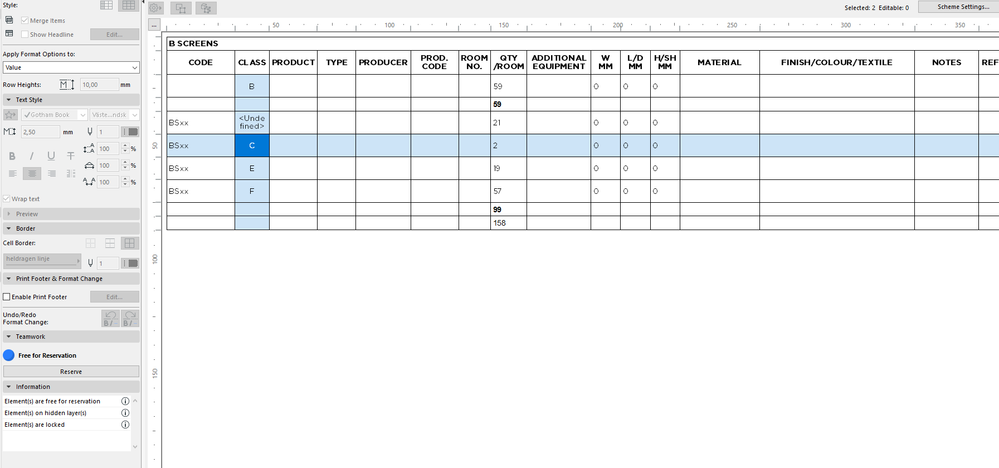
It would be great to be able to change the format in one single cell or in a raw of a schedule.
What I can do today is change the Format option of a selected Item (for example the item Value). What I would like to do is change the background color or change the text to Italic in a single specific Value cell, like the one marked in the screenshot.
Basically having the possibility to edit any single cell independently like you can do for example with Excel.
Thanks.
AC25 (since AC19), windows 11
Intel Core Ultra 9 185H 2.30 GHz 64.0 GB
Intel Core Ultra 9 185H 2.30 GHz 64.0 GB
James B
Graphisoft
Options
- Mark as New
- Bookmark
- Subscribe
- Mute
- Subscribe to RSS Feed
- Permalink
- Report Inappropriate Content
2023-08-24 10:44 AM
2023-08-24
10:44 AM
Hi Paolo.
And what is it about that particular cell that you want to highlight it differently to the other cells?
Thanks.
James Badcock
Graphisoft Staff Product Manager
Graphisoft Staff Product Manager
Paolo Pi
Booster
Options
- Mark as New
- Bookmark
- Subscribe
- Mute
- Subscribe to RSS Feed
- Permalink
- Report Inappropriate Content
2023-08-24 10:50 AM
2023-08-24
10:50 AM
I just want to highlight the cell, for example to show which part of the schedule or which information has changed after a revision.
In general to have the freedom to change the aspect (format of the text, color of the background etc...) of the cell for bare aesthetic reasons.
Thanks.
AC25 (since AC19), windows 11
Intel Core Ultra 9 185H 2.30 GHz 64.0 GB
Intel Core Ultra 9 185H 2.30 GHz 64.0 GB
Paolo Pi
Booster
Options
- Mark as New
- Bookmark
- Subscribe
- Mute
- Subscribe to RSS Feed
- Permalink
- Report Inappropriate Content
2023-08-24 10:55 AM - edited 2023-08-24 10:56 AM
2023-08-24
10:55 AM
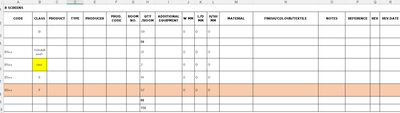
As an example, I would like to edit the schedule like this.
(this is done in Excel)
AC25 (since AC19), windows 11
Intel Core Ultra 9 185H 2.30 GHz 64.0 GB
Intel Core Ultra 9 185H 2.30 GHz 64.0 GB
James B
Graphisoft
Options
- Mark as New
- Bookmark
- Subscribe
- Mute
- Subscribe to RSS Feed
- Permalink
- Report Inappropriate Content
2023-08-24 10:55 AM
2023-08-24
10:55 AM
Hi Paolo, it seems that what you're after is probably something like rule based formatting - like Excel does. Based on a certain value, a cell is coloured/formatted accordingly. We've also seen this request come up a few times, but I'll add your example too.
James Badcock
Graphisoft Staff Product Manager
Graphisoft Staff Product Manager

Didn't find the answer?
Check other topics in this Forum
Back to ForumRead the latest accepted solutions!
Accepted SolutionsStart a new conversation!

Suggested topics
- PDF publishing in Documentation
- Should I be using Archicad 28 instead of 29? in Teamwork & BIMcloud
- Window Schedule - View from Opening Side Display Colors in Documentation
- 2D Plan Preview scale changes unexpectedly in Interactive Schedule in Project data & BIM
- Schedules - Window in Project data & BIM
