
Turn on suggestions
Auto-suggest helps you quickly narrow down your search results by suggesting possible matches as you type.
Showing results for
EN
Turn on suggestions
Auto-suggest helps you quickly narrow down your search results by suggesting possible matches as you type.
Showing results for
- English
- :
- Forum
- :
- Project data & BIM
- :
- Re: Sqft sqm schedule merge item issue
Options
- Subscribe to RSS Feed
- Mark Topic as New
- Mark Topic as Read
- Pin this post for me
- Bookmark
- Subscribe to Topic
- Mute
- Printer Friendly Page

Piotr Walerysiak
Enthusiast
Options
- Mark as New
- Bookmark
- Subscribe
- Mute
- Subscribe to RSS Feed
- Permalink
- Report Inappropriate Content
2023-08-07 10:32 AM
Sqft sqm schedule merge item issue
2023-08-07
10:32 AM
Hi All
I'm creating schedule that shows sqft & sqm areas, but i want to see only total values for every category. For sqm schedule only it is quite easy as you can use 'merge items' functionality:
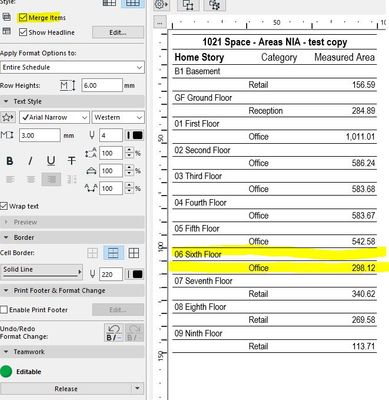
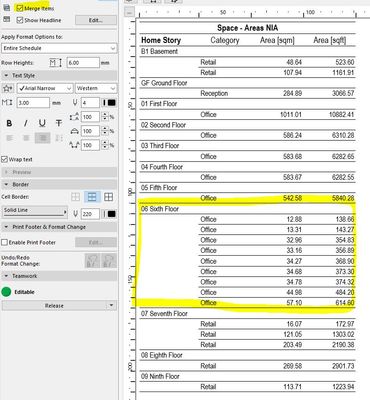
For sqft & sqm areas I use properties to calculate values, but 'merge items' option does not work:
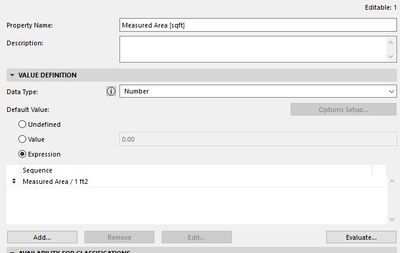
This is my setting for sqft area value:
How can I merge those values in schedule? Maybe there is some different approach to achieve it?
Kind Regards
Piotr
Solved! Go to Solution.
Solved
Labels:
1 Solution
Accepted Solutions
Piotr Walerysiak
Enthusiast
Options
- Mark as New
- Bookmark
- Subscribe
- Mute
- Subscribe to RSS Feed
- Permalink
- Report Inappropriate Content
2023-08-14 04:15 PM
2023-08-14
04:15 PM
I figured it out. The answer is to use 'merge options' that are located in header row. It was tricky to find that merging works only when below settings are applied to all columns with property values.

Solution
1 Reply 1
Piotr Walerysiak
Enthusiast
Options
- Mark as New
- Bookmark
- Subscribe
- Mute
- Subscribe to RSS Feed
- Permalink
- Report Inappropriate Content
2023-08-14 04:15 PM
2023-08-14
04:15 PM
I figured it out. The answer is to use 'merge options' that are located in header row. It was tricky to find that merging works only when below settings are applied to all columns with property values.
Solution

Didn't find the answer?
Check other topics in this Forum
Back to ForumRead the latest accepted solutions!
Accepted SolutionsStart a new conversation!

Suggested topics
- Missing elevations of doors when making a door schedule in Documentation
- Issues with the Window Schedule's Annotations being offset or incorrect in Project data & BIM
- 2D Plan Preview scale changes unexpectedly in Interactive Schedule in Project data & BIM
- Component Schedule Expression Limitation (Need Help plz) in Project data & BIM
- Component Schedule issue in Project data & BIM
