
Turn on suggestions
Auto-suggest helps you quickly narrow down your search results by suggesting possible matches as you type.
Showing results for
EN
Turn on suggestions
Auto-suggest helps you quickly narrow down your search results by suggesting possible matches as you type.
Showing results for
- English
- :
- Forum
- :
- Project data & BIM
- :
- Re: door/window schedule
Options
- Subscribe to RSS Feed
- Mark Topic as New
- Mark Topic as Read
- Pin this post for me
- Bookmark
- Subscribe to Topic
- Mute
- Printer Friendly Page

LeeJaeYoung
Virtuoso
Options
- Mark as New
- Bookmark
- Subscribe
- Mute
- Subscribe to RSS Feed
- Permalink
- Report Inappropriate Content
2022-07-20
03:56 PM
- last edited on
2023-05-19
11:48 PM
by
 Gordana Radonic
door/window schedule
2022-07-20
03:56 PM
a.mod ->
b.mod -> (hotlink) building.pln (hotlink) <- park.pln
c.mod ->
1. I want to get the door/window schedule contained in a.mod. How do I set it up?


this is schedule in a.mod

2. Is it possible to create a door/window schedule in a.mod?
but I can't bring
AC27 on window 11
4 Replies 4

Andrii Levko
Expert
Options
- Mark as New
- Bookmark
- Subscribe
- Mute
- Subscribe to RSS Feed
- Permalink
- Report Inappropriate Content
2022-07-20 04:30 PM - edited 2022-07-20 04:40 PM
2022-07-20
04:30 PM
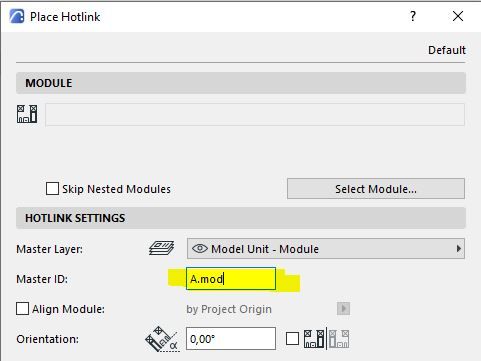
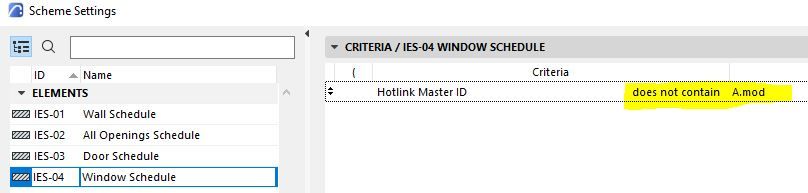
In my opinion, the easiest way is to assign a Master ID to each hotlink (like exemple "A.mod" for file a.mod and so on for everyone mod files), and then in the schedule settings, select the Hotlink Master ID in the criteria, and choose "does not contain" for a.mod, or b.mod, or c.mod, or park.
Conversely, if you want the schedule to contain only a.mod elements, select "contain" for a.mod
Andrii
AC 8.1 - 28 INT/POL 3001
Win11
AC 8.1 - 28 INT/POL 3001
Win11
LeeJaeYoung
Virtuoso
Options
- Mark as New
- Bookmark
- Subscribe
- Mute
- Subscribe to RSS Feed
- Permalink
- Report Inappropriate Content
2022-07-20 04:36 PM - edited 2022-07-20 04:41 PM
2022-07-20
04:36 PM

to zone does not appear
this is schedule in a.mod
2. Is it possible to create a door/window schedule in a.mod?
but I can't bring
AC27 on window 11
Andrii Levko
Expert
Options
- Mark as New
- Bookmark
- Subscribe
- Mute
- Subscribe to RSS Feed
- Permalink
- Report Inappropriate Content
2022-07-20 04:54 PM - edited 2022-07-20 05:04 PM
2022-07-20
04:54 PM
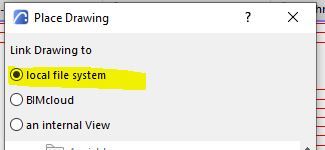
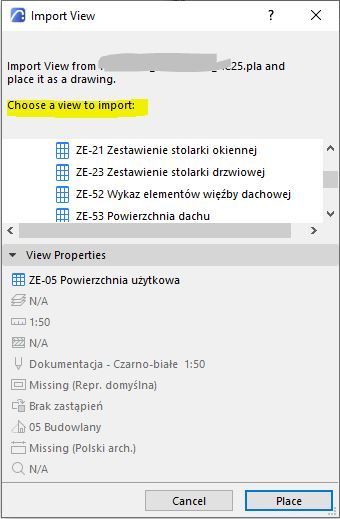
Or you can create a schedule in the mod file and upload schedules view maps on layouts into the main file by right-clicking "Place Drawing" and then selecting "Local file system" and choose the file where you have prepared the schedule and choose view to import.
Andrii
AC 8.1 - 28 INT/POL 3001
Win11
AC 8.1 - 28 INT/POL 3001
Win11
LeeJaeYoung
Virtuoso
Options
- Mark as New
- Bookmark
- Subscribe
- Mute
- Subscribe to RSS Feed
- Permalink
- Report Inappropriate Content
2022-07-20 05:03 PM
2022-07-20
05:03 PM
thank you
layer on ^^
AC27 on window 11

Didn't find the answer?
Check other topics in this Forum
Back to ForumRead the latest accepted solutions!
Accepted SolutionsStart a new conversation!

Suggested topics
- automatic sill line in window schedule in Modeling
- Some free useful objects: Road signs, parametric pathway, roof crickets, crowds in Libraries & objects
- Composite wall labels in wall type schedules - please in Documentation
- Surface / Component Schedule Bug: Automatic Column Wrapping Ignores Folded Geometry and Returns Flat in Project data & BIM
- Missing elevations of doors when making a door schedule in Documentation
