
Turn on suggestions
Auto-suggest helps you quickly narrow down your search results by suggesting possible matches as you type.
Showing results for
EN
Turn on suggestions
Auto-suggest helps you quickly narrow down your search results by suggesting possible matches as you type.
Showing results for
- English
- :
- Forum
- :
- Visualization
- :
- How do I cover an entire wall surface with a jpeg ...
Options
- Subscribe to RSS Feed
- Mark Topic as New
- Mark Topic as Read
- Pin this post for me
- Bookmark
- Subscribe to Topic
- Mute
- Printer Friendly Page

Anonymous
Not applicable
Options
- Mark as New
- Bookmark
- Subscribe
- Mute
- Subscribe to RSS Feed
- Permalink
- Report Inappropriate Content
2011-09-07
07:52 AM
- last edited on
2023-05-11
12:51 PM
by
 Noemi Balogh
How do I cover an entire wall surface with a jpeg for mural?
2011-09-07
07:52 AM
Material Library & use jpeg as "new material" to be used to "paint" wall surface? ( this causes repeating pattern ).
3 Replies 3
Anonymous
Not applicable
Options
- Mark as New
- Bookmark
- Subscribe
- Mute
- Subscribe to RSS Feed
- Permalink
- Report Inappropriate Content
2011-09-07 10:09 AM
2011-09-07
10:09 AM
You can set the size of the image in the material settings.
Anonymous
Not applicable
Options
- Mark as New
- Bookmark
- Subscribe
- Mute
- Subscribe to RSS Feed
- Permalink
- Report Inappropriate Content
2011-09-08 11:03 PM
2011-09-08
11:03 PM
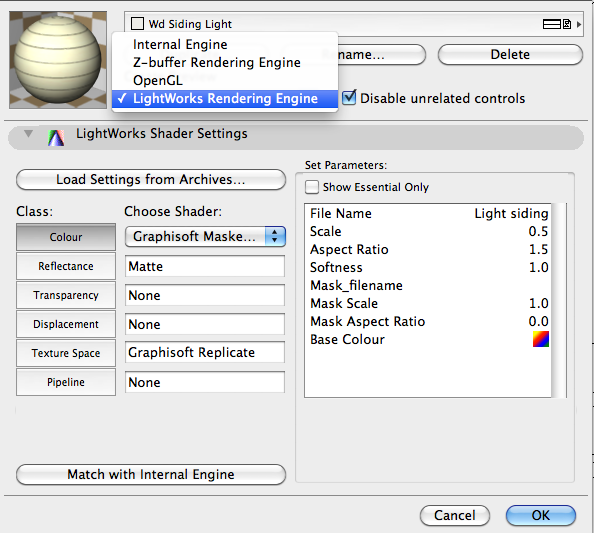
Yes, Thanks, but when I did this, the image does cover entire wall & is displayed in 3D View Window, but when I render it in ArchiCAD 14 the image does not appear...?
Anonymous
Not applicable
Options
- Mark as New
- Bookmark
- Subscribe
- Mute
- Subscribe to RSS Feed
- Permalink
- Report Inappropriate Content
2011-09-09 01:42 AM
2011-09-09
01:42 AM
In your material's settings you have to click on the "Match with Internal Engine" button in the Lightworks Rendering Engine dropdown.
Didn't find the answer?
Check other topics in this Forum
Back to ForumRead the latest accepted solutions!
Accepted SolutionsStart a new conversation!

Suggested topics
- Custom profile frame changed to mesh won't allow to change the material in Modeling
- Changing the color of a garage door? in Libraries & objects
- Material and Surface Control in Complex Profiles in Modeling
- How to paint from bottom walls to ceiling? in Modeling
- Door / Window Surfaces called up in Properties in Project data & BIM
