
Turn on suggestions
Auto-suggest helps you quickly narrow down your search results by suggesting possible matches as you type.
Showing results for
EN
Turn on suggestions
Auto-suggest helps you quickly narrow down your search results by suggesting possible matches as you type.
Showing results for
- English
- :
- Forum
- :
- Visualization
- :
- Re: Viewcube in Archicad
Options
- Subscribe to RSS Feed
- Mark Topic as New
- Mark Topic as Read
- Pin this post for me
- Bookmark
- Subscribe to Topic
- Mute
- Printer Friendly Page

13senpai
Contributor
Options
- Mark as New
- Bookmark
- Subscribe
- Mute
- Subscribe to RSS Feed
- Permalink
- Report Inappropriate Content
2023-07-12 02:03 AM
Viewcube in Archicad
2023-07-12
02:03 AM
1 Solution
Accepted Solutions

Karl Ottenstein
Moderator Emeritus
Options
- Mark as New
- Bookmark
- Subscribe
- Mute
- Subscribe to RSS Feed
- Permalink
- Report Inappropriate Content
2023-07-12 05:47 AM - edited 2023-07-12 05:49 AM
2023-07-12
05:47 AM
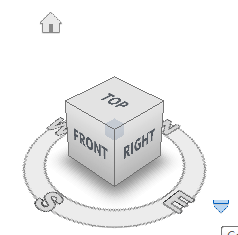
Maybe you'll find the Navigator Preview useful. Windows >Palettes enable it... and optionally dock it to your Navigator palette or wherever on-screen.
When in axometric mode (non perspective) you'll see this:

Just drag the tiny camera icon around the circle to rotate your model in the 3D window to the desired position. Assuming North is the top of your workspace, then the screenshot shows a view from the south/front.
The two flyout menus (">" buttons) give you more options... e.g., Top view:
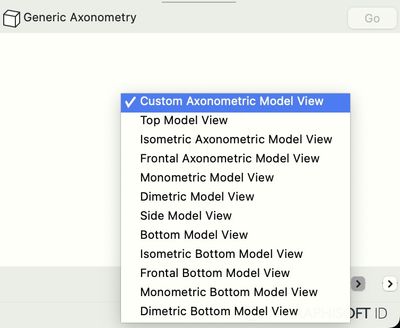
When in perspective mode, the Nav Preview has a different appearance and options.
PS The Revit viewcube graphic is certainly attractive and intuitive. So, perhaps if you have a wish for more functionality than the Nav Preview you might wish for improvements to Nav Preview similar to that... in the "Wishes" forum.
Vote for Wish: Copy/Paste in 3D
AC 29 USA and earlier • hardware key • macOS Tahoe 26.7 MacBook Pro M2 Max 12CPU/30GPU cores, 32GB
AC 29 USA and earlier • hardware key • macOS Tahoe 26.7 MacBook Pro M2 Max 12CPU/30GPU cores, 32GB
6 Replies 6

Barry Kelly
Moderator
Options
- Mark as New
- Bookmark
- Subscribe
- Mute
- Subscribe to RSS Feed
- Permalink
- Report Inappropriate Content
2023-07-12 02:37 AM - edited 2023-07-12 02:38 AM
2023-07-12
02:37 AM
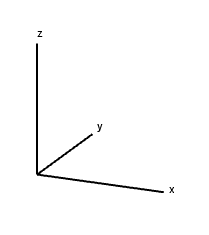
We have Project and User Origins that show the X, Y & Z axii.
Barry.
One of the forum moderators.
Versions 6.5 to 27
i7-10700 @ 2.9Ghz, 32GB ram, GeForce RTX 2060 (6GB), Windows 10
Lenovo Thinkpad - i7-1270P 2.20 GHz, 32GB RAM, Nvidia T550, Windows 11
Versions 6.5 to 27
i7-10700 @ 2.9Ghz, 32GB ram, GeForce RTX 2060 (6GB), Windows 10
Lenovo Thinkpad - i7-1270P 2.20 GHz, 32GB RAM, Nvidia T550, Windows 11

Lingwisyer
Guru
Options
- Mark as New
- Bookmark
- Subscribe
- Mute
- Subscribe to RSS Feed
- Permalink
- Report Inappropriate Content
2023-07-12 03:37 AM
2023-07-12
03:37 AM
I am guessing they are wanting the quick orbit functionality of the View Cube where you can click on a face or vertex to rotate to that view. If that is the case, this should be made a Wish.
| AC22-29 AUS 3200 | Help Those Help You - Add a Signature |
| Self-taught, bend it till it breaks | Creating a Thread |
| Win11 | i9 10850K | 64GB | RX6600 | Win11 | 7800X3D | 32GB | RTX5070TI |
Barry Kelly
Moderator
Options
- Mark as New
- Bookmark
- Subscribe
- Mute
- Subscribe to RSS Feed
- Permalink
- Report Inappropriate Content
2023-07-12 03:45 AM
2023-07-12
03:45 AM
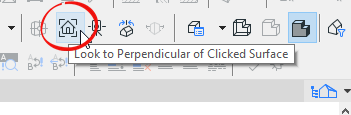
In that case we have 'Look to Face' which can look perpendicular to any face in the 3D model, not just the six sides of a cube.
Barry.
One of the forum moderators.
Versions 6.5 to 27
i7-10700 @ 2.9Ghz, 32GB ram, GeForce RTX 2060 (6GB), Windows 10
Lenovo Thinkpad - i7-1270P 2.20 GHz, 32GB RAM, Nvidia T550, Windows 11
Versions 6.5 to 27
i7-10700 @ 2.9Ghz, 32GB ram, GeForce RTX 2060 (6GB), Windows 10
Lenovo Thinkpad - i7-1270P 2.20 GHz, 32GB RAM, Nvidia T550, Windows 11
13senpai
Contributor
Options
- Mark as New
- Bookmark
- Subscribe
- Mute
- Subscribe to RSS Feed
- Permalink
- Report Inappropriate Content
2023-07-12 04:38 AM
2023-07-12
04:38 AM
Yea, exactly.
Revit's viewcube is very useful because you can just click a corner of the cube and then the 3D view aligns to that corner. Very handy if you want to make an axonometric view.
Karl Ottenstein
Moderator Emeritus
Options
- Mark as New
- Bookmark
- Subscribe
- Mute
- Subscribe to RSS Feed
- Permalink
- Report Inappropriate Content
2023-07-12 05:47 AM - edited 2023-07-12 05:49 AM
2023-07-12
05:47 AM
Maybe you'll find the Navigator Preview useful. Windows >Palettes enable it... and optionally dock it to your Navigator palette or wherever on-screen.
When in axometric mode (non perspective) you'll see this:
Just drag the tiny camera icon around the circle to rotate your model in the 3D window to the desired position. Assuming North is the top of your workspace, then the screenshot shows a view from the south/front.
The two flyout menus (">" buttons) give you more options... e.g., Top view:
When in perspective mode, the Nav Preview has a different appearance and options.
PS The Revit viewcube graphic is certainly attractive and intuitive. So, perhaps if you have a wish for more functionality than the Nav Preview you might wish for improvements to Nav Preview similar to that... in the "Wishes" forum.
Vote for Wish: Copy/Paste in 3D
AC 29 USA and earlier • hardware key • macOS Tahoe 26.7 MacBook Pro M2 Max 12CPU/30GPU cores, 32GB
AC 29 USA and earlier • hardware key • macOS Tahoe 26.7 MacBook Pro M2 Max 12CPU/30GPU cores, 32GB

DGSketcher
Legend
Options
- Mark as New
- Bookmark
- Subscribe
- Mute
- Subscribe to RSS Feed
- Permalink
- Report Inappropriate Content
2023-07-12 10:19 AM
2023-07-12
10:19 AM
Thanks Karl, so many gems buried in the interface that are easily forgotten unless you use them regularly! I need to dust that one off. 😎
Apple iMac Intel i9 / macOS Sonoma / AC27UKI (most recent builds.. if they work)

Didn't find the answer?
Check other topics in this Forum
Back to ForumRead the latest accepted solutions!
Accepted SolutionsStart a new conversation!

Suggested topics
- reduce subscription fees to remain relevant in Licensing
- Finally fixed a bug that Graphisoft was not able to fix for 5+ years in about 30 min in General discussions
- After 3 years with Archicad, I'm honestly disappointed in General discussions
- Wrap Keynotes still not fixed after over two years in Documentation
- MacOS27 in General discussions
