
Turn on suggestions
Auto-suggest helps you quickly narrow down your search results by suggesting possible matches as you type.
Showing results for
EN
Turn on suggestions
Auto-suggest helps you quickly narrow down your search results by suggesting possible matches as you type.
Showing results for
- English
- :
- Developer Hub
- :
- Archicad C++ API
- :
- Re: 3D Node Issue??
Options
- Subscribe to RSS Feed
- Mark Topic as New
- Mark Topic as Read
- Pin this post for me
- Bookmark
- Subscribe to Topic
- Mute
- Printer Friendly Page

StevanSA
Newcomer
Options
- Mark as New
- Bookmark
- Subscribe
- Mute
- Subscribe to RSS Feed
- Permalink
- Report Inappropriate Content
2022-08-31
11:47 AM
- last edited on
2024-09-17
01:53 PM
by
 Doreena Deng
3D Node Issue??
2022-08-31
11:47 AM
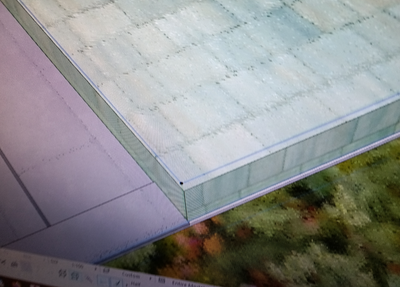
Has anyone ever experienced this issue? when i move into 3D, none of the nodes align with the element created. As shown in the image the nodes are in a completely separate position. Please assist with a fix, im hoping it is just a setting.


Solved! Go to Solution.
1 Solution
Accepted Solutions

Miha_M
Advisor
Options
- Mark as New
- Bookmark
- Subscribe
- Mute
- Subscribe to RSS Feed
- Permalink
- Report Inappropriate Content
2022-08-31 01:55 PM
2022-08-31
01:55 PM
This is probably a "far from origin" problem.
Far From Origin - Troubleshooting Guide - Graphisoft Community
| Archicad 4.5 - 29
| HP Z840 | 2× E5-2643 v4 | 64 GB RAM | Quadro M5000 | Windows 10 Pro x64
| HP Z4 G4 | W-2245 | 64 GB RAM | RTX A4000 | Windows 11
3 Replies 3
Miha_M
Advisor
Options
- Mark as New
- Bookmark
- Subscribe
- Mute
- Subscribe to RSS Feed
- Permalink
- Report Inappropriate Content
2022-08-31 01:55 PM
2022-08-31
01:55 PM
This is probably a "far from origin" problem.
Far From Origin - Troubleshooting Guide - Graphisoft Community
| Archicad 4.5 - 29
| HP Z840 | 2× E5-2643 v4 | 64 GB RAM | Quadro M5000 | Windows 10 Pro x64
| HP Z4 G4 | W-2245 | 64 GB RAM | RTX A4000 | Windows 11

JeffH
Expert
Options
- Mark as New
- Bookmark
- Subscribe
- Mute
- Subscribe to RSS Feed
- Permalink
- Report Inappropriate Content
2022-08-31 07:15 PM
2022-08-31
07:15 PM
"Far From Origin" is my guess as well.
AC24 / AC26 / AC27
Win10
Win10

mmagrini
Participant
Options
- Mark as New
- Bookmark
- Subscribe
- Mute
- Subscribe to RSS Feed
- Permalink
- Report Inappropriate Content
2022-08-31 08:56 PM
2022-08-31
08:56 PM
That's definitely a "Far from Origin" problem.

Didn't find the answer?
Check other topics in this Forum
Back to ForumRead the latest accepted solutions!
Accepted SolutionsStart a new conversation!

Suggested topics
- DXF fill outlines are imported as separate polylines instead of Fill contours in Archicad C++ API
- Associative elevation dimension to a beam top on Interior Elevation. Hand tool keeps it, API cannot. in Archicad C++ API
- API can create a View Map view outside the navigator hierarchy- impossible to delete in Archicad C++ API
- Try to Create associative Dimensions with tapir and claude in Archicad Python API
- Developer registration may not be approved – Add-On works in Demo but not FULL in Archicad C++ API
