
Turn on suggestions
Auto-suggest helps you quickly narrow down your search results by suggesting possible matches as you type.
Showing results for
EN
Turn on suggestions
Auto-suggest helps you quickly narrow down your search results by suggesting possible matches as you type.
Showing results for
- English
- :
- Forum
- :
- Documentation
- :
- AC 25 "Webdings" font
Options
- Subscribe to RSS Feed
- Mark Topic as New
- Mark Topic as Read
- Pin this post for me
- Bookmark
- Subscribe to Topic
- Mute
- Printer Friendly Page

Domagoj Lukinic
Booster
Options
- Mark as New
- Bookmark
- Subscribe
- Mute
- Subscribe to RSS Feed
- Permalink
- Report Inappropriate Content
2023-09-20 09:59 AM - edited 2023-09-20 10:00 AM
AC 25 "Webdings" font
2023-09-20
09:59 AM
Hi all!
Have a problem with "Webdings" font in AC 25
When I open text and put the symbol everything is OK, but when you exit out of the text it is not showing correctly...
I tried to make a GDL symbol but same thing happens... Is there any bypass / solution to this?
P.S. I tried to do the same thing in AC 26 and it works but I don't want to convert my file to newer version.
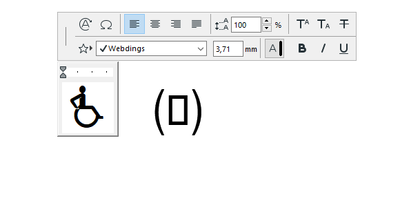
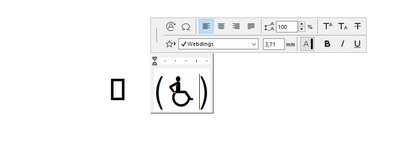
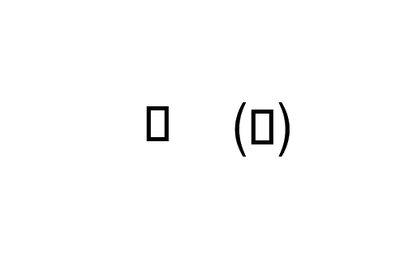
Solved! Go to Solution.
1 Solution
Accepted Solutions

Barry Kelly
Moderator
Options
- Mark as New
- Bookmark
- Subscribe
- Mute
- Subscribe to RSS Feed
- Permalink
- Report Inappropriate Content
2023-09-20 10:59 AM
2023-09-20
10:59 AM
I have no idea why it would not work on your one particular machine - especially when it does work with 26.
I always say make sure you have the latest build, but I don't think that is the cause either.
Seems doubly odd that you can see it in the text editor but not on the screen.
Sounds like an e-mail to your local Archicad support people if you have a support agreement.
Barry.
One of the forum moderators.
Versions 6.5 to 27
i7-10700 @ 2.9Ghz, 32GB ram, GeForce RTX 2060 (6GB), Windows 10
Lenovo Thinkpad - i7-1270P 2.20 GHz, 32GB RAM, Nvidia T550, Windows 11
Versions 6.5 to 27
i7-10700 @ 2.9Ghz, 32GB ram, GeForce RTX 2060 (6GB), Windows 10
Lenovo Thinkpad - i7-1270P 2.20 GHz, 32GB RAM, Nvidia T550, Windows 11
4 Replies 4
Barry Kelly
Moderator
Options
- Mark as New
- Bookmark
- Subscribe
- Mute
- Subscribe to RSS Feed
- Permalink
- Report Inappropriate Content
2023-09-20 10:27 AM
2023-09-20
10:27 AM
I am not sure what could be the problem.It is working fine for me in 25.

Do you have the latest update for 25? (build 7000).
What happens if you save a 26 file back as a 25?
It can't be a font issue if it is working for you in 26 on the same machine.
Barry.
One of the forum moderators.
Versions 6.5 to 27
i7-10700 @ 2.9Ghz, 32GB ram, GeForce RTX 2060 (6GB), Windows 10
Lenovo Thinkpad - i7-1270P 2.20 GHz, 32GB RAM, Nvidia T550, Windows 11
Versions 6.5 to 27
i7-10700 @ 2.9Ghz, 32GB ram, GeForce RTX 2060 (6GB), Windows 10
Lenovo Thinkpad - i7-1270P 2.20 GHz, 32GB RAM, Nvidia T550, Windows 11
Domagoj Lukinic
Booster
Options
- Mark as New
- Bookmark
- Subscribe
- Mute
- Subscribe to RSS Feed
- Permalink
- Report Inappropriate Content
2023-09-20 10:47 AM
2023-09-20
10:47 AM
Ok my AC is at build 3011, however my colleague has the same build and it works fine.
I tried to save a 26 back to 25.
In 26 shows up OK in 25 NO...
Barry Kelly
Moderator
Options
- Mark as New
- Bookmark
- Subscribe
- Mute
- Subscribe to RSS Feed
- Permalink
- Report Inappropriate Content
2023-09-20 10:59 AM
2023-09-20
10:59 AM
I have no idea why it would not work on your one particular machine - especially when it does work with 26.
I always say make sure you have the latest build, but I don't think that is the cause either.
Seems doubly odd that you can see it in the text editor but not on the screen.
Sounds like an e-mail to your local Archicad support people if you have a support agreement.
Barry.
One of the forum moderators.
Versions 6.5 to 27
i7-10700 @ 2.9Ghz, 32GB ram, GeForce RTX 2060 (6GB), Windows 10
Lenovo Thinkpad - i7-1270P 2.20 GHz, 32GB RAM, Nvidia T550, Windows 11
Versions 6.5 to 27
i7-10700 @ 2.9Ghz, 32GB ram, GeForce RTX 2060 (6GB), Windows 10
Lenovo Thinkpad - i7-1270P 2.20 GHz, 32GB RAM, Nvidia T550, Windows 11
Domagoj Lukinic
Booster
Options
- Mark as New
- Bookmark
- Subscribe
- Mute
- Subscribe to RSS Feed
- Permalink
- Report Inappropriate Content
2023-09-20 11:04 AM - edited 2023-09-20 11:14 AM
2023-09-20
11:04 AM
Yes ok, thank you four your troubles.
I also tried to launch ac 25 in default profile and template but still no luck 🤷

Still looking?

Suggested topics
- zone name size in Project data & BIM
- How to find the element or component that uses this missing font so I can change it in Documentation
- Helvetica texts in Master Layout and GDL objects suddenly not showing on published PDFs in Documentation
- Print Dialog Box with Tiny Font in Installation & update
- Built-in Drawing Title Problem in Archicad 29 in Libraries & objects
