
Turn on suggestions
Auto-suggest helps you quickly narrow down your search results by suggesting possible matches as you type.
Showing results for
EN
Turn on suggestions
Auto-suggest helps you quickly narrow down your search results by suggesting possible matches as you type.
Showing results for
- English
- :
- Forum
- :
- Documentation
- :
- Re: Dimensions from DWG drawings
Options
- Subscribe to RSS Feed
- Mark Topic as New
- Mark Topic as Read
- Pin this post for me
- Bookmark
- Subscribe to Topic
- Mute
- Printer Friendly Page

Mariano_BAMA
Contributor
Options
- Mark as New
- Bookmark
- Subscribe
- Mute
- Subscribe to RSS Feed
- Permalink
- Report Inappropriate Content
2021-09-02
06:37 PM
- last edited on
2023-05-17
01:17 AM
by
 Gordana Radonic
Dimensions from DWG drawings
2021-09-02
06:37 PM
Hi All,
I have imported, as xref, a DWG file, and I set in a worksheet document.
I need to manipulate the file and I noticed that all the dimensions are not scalable. I mean they remain as they would be in a paper space and not in the model.
The consequence is that when I re-scale the drawings all the figures of the dimensions are enormous, instead all the text are re-sized.
Is there any way that I fix this matter? Or Do I need to delete the dimensions and re-make them in the view map?
Many thanks in advance
Regards
Mariano
Solved! Go to Solution.
1 Solution
Accepted Solutions

DGSketcher
Legend
Options
- Mark as New
- Bookmark
- Subscribe
- Mute
- Subscribe to RSS Feed
- Permalink
- Report Inappropriate Content
2021-09-06 11:48 PM
2021-09-06
11:48 PM
If you need to access & edit the model space part of the DWG then you may want to consider using the merge option which is possibly more suited to your immediate needs...
You can merge into a new/separate PLN file and if necessary Hotlink that into your main project file.
Apple iMac Intel i9 / macOS Sonoma / AC27UKI (most recent builds.. if they work)
Solution
6 Replies 6

Mick_NZ
Contributor
Options
- Mark as New
- Bookmark
- Subscribe
- Mute
- Subscribe to RSS Feed
- Permalink
- Report Inappropriate Content
2021-09-02 08:04 PM
2021-09-02
08:04 PM
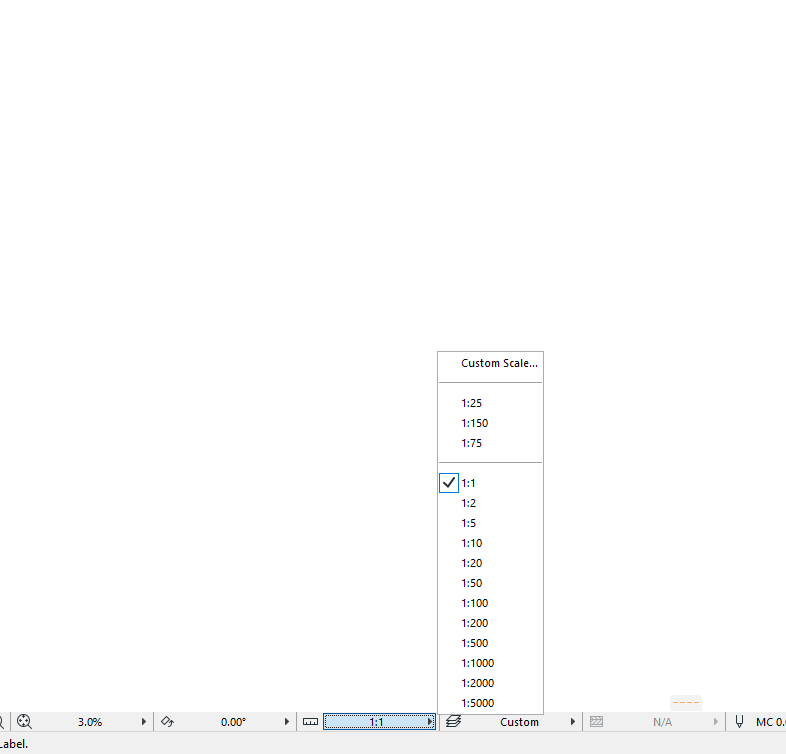
Try the view scale, this is likely to be the issue 🙂 Go to the bottom of the view screen, and 4th tab from the left in is the scale - alter this to select a scale that works for your view and the text/dimensions should scale accordingly, hope this helps.
AC 13 - 27, Twinmotion
Windows 11 pro
i7 10700k, 2070 super, 64gb DDR4
Windows 11 pro
i7 10700k, 2070 super, 64gb DDR4

Eduardo Rolon
Moderator
Options
- Mark as New
- Bookmark
- Subscribe
- Mute
- Subscribe to RSS Feed
- Permalink
- Report Inappropriate Content
2021-09-02 10:07 PM
2021-09-02
10:07 PM
Usually you don't X-REF files into AC since then you get a bunch of autocad cruft in the file.
Best way is to place the file in the worksheet using File-> External Content -> Place External Drawing then if you need to change the scale you will get the error but relinking (or right click Update) should fix the text size.
You can try relinking the X-Ref or Updating to see if it works too.
Eduardo Rolón AIA NCARB
AC29 US/INT -> AC08
AC29 US/INT -> AC08
Mac Studio M4 Max 64GB ram, OS X 10.XX latest
Mariano_BAMA
Contributor
Options
- Mark as New
- Bookmark
- Subscribe
- Mute
- Subscribe to RSS Feed
- Permalink
- Report Inappropriate Content
2021-09-06 10:37 AM
2021-09-06
10:37 AM
Thanks Mick_NZ
I tried already this solution, unfortunately no all the texts seem to re-scale accordingly.
Thanks anyway much appreciate.
Mariano
Mariano_BAMA
Contributor
Options
- Mark as New
- Bookmark
- Subscribe
- Mute
- Subscribe to RSS Feed
- Permalink
- Report Inappropriate Content
2021-09-06 10:48 AM
2021-09-06
10:48 AM
Hi Eduardo,
thanks for your reply, I will try to apply your solution and I let you know.
However and for what I understood, using your approach I cannot locate the file on ITM - Irish Transverse Mercator - Coordinates, which is no more no less the Irish version of the international coordinates. - UTM -
Unfortunately it is a standard use, in Ireland to work inside this system, and all the others consultants work with them and they send to me file in DWG.
I will try and see what happened
Thanks anyway
Mariano
DGSketcher
Legend
Options
- Mark as New
- Bookmark
- Subscribe
- Mute
- Subscribe to RSS Feed
- Permalink
- Report Inappropriate Content
2021-09-06 11:48 PM
2021-09-06
11:48 PM
If you need to access & edit the model space part of the DWG then you may want to consider using the merge option which is possibly more suited to your immediate needs...
You can merge into a new/separate PLN file and if necessary Hotlink that into your main project file.
Apple iMac Intel i9 / macOS Sonoma / AC27UKI (most recent builds.. if they work)
Solution
Mariano_BAMA
Contributor
Options
- Mark as New
- Bookmark
- Subscribe
- Mute
- Subscribe to RSS Feed
- Permalink
- Report Inappropriate Content
2021-09-08 11:06 AM
2021-09-08
11:06 AM
Thanks DGSketcher, good advice.

Still looking?

Suggested topics
- Archicad 29 Dimension Lagging issue in Documentation
- Is there a way to hyperlink files in order to place their drawings into a common layout book? in Documentation
- Importing DWG as Drawing & Fills in Collaboration with other software
- TIP: Visual Check for custom Dimension Texts in Documentation
- elevation dimension in rcp in Modeling
