
Turn on suggestions
Auto-suggest helps you quickly narrow down your search results by suggesting possible matches as you type.
Showing results for
EN
Turn on suggestions
Auto-suggest helps you quickly narrow down your search results by suggesting possible matches as you type.
Showing results for
- English
- :
- Forum
- :
- Documentation
- :
- Re: Drag view on layout
Options
- Subscribe to RSS Feed
- Mark Topic as New
- Mark Topic as Read
- Pin this post for me
- Bookmark
- Subscribe to Topic
- Mute
- Printer Friendly Page

Foti
Enthusiast
Options
- Mark as New
- Bookmark
- Subscribe
- Mute
- Subscribe to RSS Feed
- Permalink
- Report Inappropriate Content
2022-11-29 02:34 AM
Drag view on layout
2022-11-29
02:34 AM
Hello
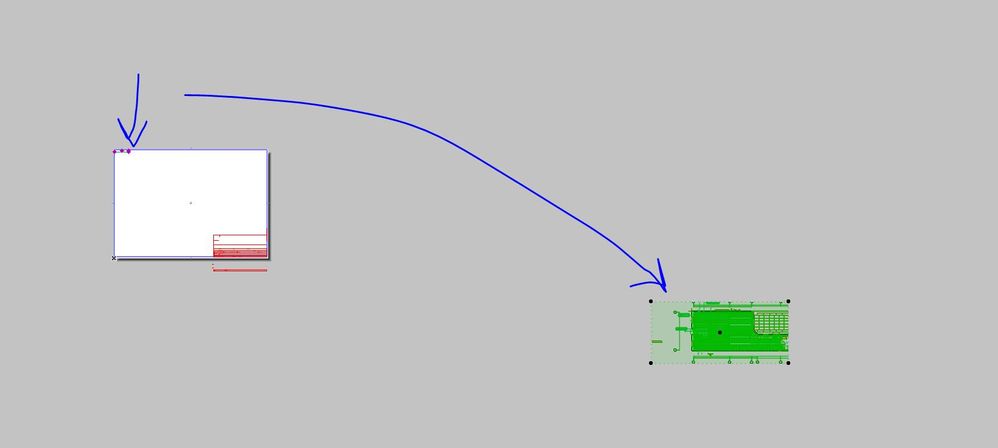
When I drag a view on a new sheet, the name of that view is always some random location and the text is always window sill. I am sure i did change it once but not sure how that got saved. Is there a way to reset all that?
Foti B.
AC25
PC Precison 5760, Xeon 11955, 64GB, Nvidia RTX A3000
AC25
PC Precison 5760, Xeon 11955, 64GB, Nvidia RTX A3000
Solved! Go to Solution.
2 Solutions
Accepted Solutions

danielleL
Contributor
Options
- Mark as New
- Bookmark
- Subscribe
- Mute
- Subscribe to RSS Feed
- Permalink
- Report Inappropriate Content
2022-11-29 08:21 AM
2022-11-29
08:21 AM
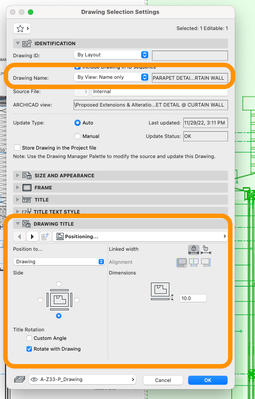
I am not sure if there is a way to reset but my workaround is to use the 'pick perimeter' tool (Alt+click) and that would become your default Drawing settings.
Just be sure that your Drawing Settings are set-up the way you want it. I think your setting should be like the one shown in the screen-cap below.
Hope this helps!
---------
ArchiCAD 18-26 | Twinmotion 2022
Mac Mini (M1, 2020) | macOS Monterey | Apple M1
HP Victus | Windows 11 | 16.0 GB RAM | AMD Ryzen 7 5800H with Radeon Graphics 3.20 GHz
ArchiCAD 18-26 | Twinmotion 2022
Mac Mini (M1, 2020) | macOS Monterey | Apple M1
HP Victus | Windows 11 | 16.0 GB RAM | AMD Ryzen 7 5800H with Radeon Graphics 3.20 GHz
Solution

DGSketcher
Legend
Options
- Mark as New
- Bookmark
- Subscribe
- Mute
- Subscribe to RSS Feed
- Permalink
- Report Inappropriate Content
2022-12-02 12:03 PM
2022-12-02
12:03 PM
The quick way to reset the ID & Name values to default is to go into the Drawing Manager, select the Views you want to change and the click on Settings at the bottom of the dialog window.
Apple iMac Intel i9 / macOS Sonoma / AC27UKI (most recent builds.. if they work)
4 Replies 4

Lingwisyer
Guru
Options
- Mark as New
- Bookmark
- Subscribe
- Mute
- Subscribe to RSS Feed
- Permalink
- Report Inappropriate Content
2022-11-29 04:12 AM
2022-11-29
04:12 AM
Open the settings for the Drawing Tool and check the Title and relevant settings.
Ling.
https://community.Graphisoft.com/t5/What-s-new/Creating-a-Thread/td-p/361315
| AC22-29 AUS 3200 | Help Those Help You - Add a Signature |
| Self-taught, bend it till it breaks | Creating a Thread |
| Win11 | i9 10850K | 64GB | RX6600 | Win11 | 7800X3D | 32GB | RTX5070TI |
danielleL
Contributor
Options
- Mark as New
- Bookmark
- Subscribe
- Mute
- Subscribe to RSS Feed
- Permalink
- Report Inappropriate Content
2022-11-29 08:21 AM
2022-11-29
08:21 AM
I am not sure if there is a way to reset but my workaround is to use the 'pick perimeter' tool (Alt+click) and that would become your default Drawing settings.
Just be sure that your Drawing Settings are set-up the way you want it. I think your setting should be like the one shown in the screen-cap below.
Hope this helps!
---------
ArchiCAD 18-26 | Twinmotion 2022
Mac Mini (M1, 2020) | macOS Monterey | Apple M1
HP Victus | Windows 11 | 16.0 GB RAM | AMD Ryzen 7 5800H with Radeon Graphics 3.20 GHz
ArchiCAD 18-26 | Twinmotion 2022
Mac Mini (M1, 2020) | macOS Monterey | Apple M1
HP Victus | Windows 11 | 16.0 GB RAM | AMD Ryzen 7 5800H with Radeon Graphics 3.20 GHz
Solution
Foti
Enthusiast
Options
- Mark as New
- Bookmark
- Subscribe
- Mute
- Subscribe to RSS Feed
- Permalink
- Report Inappropriate Content
2022-12-02 04:00 AM
2022-12-02
04:00 AM
I knew it was something simple, hat setting was changed, thank you 🙂
Foti B.
AC25
PC Precison 5760, Xeon 11955, 64GB, Nvidia RTX A3000
AC25
PC Precison 5760, Xeon 11955, 64GB, Nvidia RTX A3000
DGSketcher
Legend
Options
- Mark as New
- Bookmark
- Subscribe
- Mute
- Subscribe to RSS Feed
- Permalink
- Report Inappropriate Content
2022-12-02 12:03 PM
2022-12-02
12:03 PM
The quick way to reset the ID & Name values to default is to go into the Drawing Manager, select the Views you want to change and the click on Settings at the bottom of the dialog window.
Apple iMac Intel i9 / macOS Sonoma / AC27UKI (most recent builds.. if they work)

Still looking?

Suggested topics
- Is there a way to hyperlink files in order to place their drawings into a common layout book? in Documentation
- MEP29 pipe slope in layout in Documentation
- Viewport with open Tab turning items red in Documentation
- template for version 29 view references problems in Project data & BIM
- Project origin error, intangible second project origin in 3D view in Modeling
