
Turn on suggestions
Auto-suggest helps you quickly narrow down your search results by suggesting possible matches as you type.
Showing results for
EN
Turn on suggestions
Auto-suggest helps you quickly narrow down your search results by suggesting possible matches as you type.
Showing results for
- English
- :
- Forum
- :
- Documentation
- :
- Re: Dragging a view from the Navigator
Options
- Subscribe to RSS Feed
- Mark Topic as New
- Mark Topic as Read
- Pin this post for me
- Bookmark
- Subscribe to Topic
- Mute
- Printer Friendly Page

Rex Maximilian
Mentor
Options
- Mark as New
- Bookmark
- Subscribe
- Mute
- Subscribe to RSS Feed
- Permalink
- Report Inappropriate Content
2023-03-30 02:13 AM
Dragging a view from the Navigator
2023-03-30
02:13 AM
Why is it every time I try to drag a view from the Navigator/Organizer onto the sheet, it first activates the view? Then I have to go back to the sheet to drag it. It's been doing this for years and is frustrating.
Does anyone else experience this?
Rex Maximilian, Honolulu, USA - www.rexmaximilian.com
ArchiCAD 28/29 (user since 3.4, 1991)
16" MacBook Pro; M4 Max (2024), 48GB RAM, 1 TB SSD, 32-Core GPU
Apple Vision Pro w/ BIMx
Creator of the Maximilian ArchiCAD Template System
ArchiCAD 28/29 (user since 3.4, 1991)
16" MacBook Pro; M4 Max (2024), 48GB RAM, 1 TB SSD, 32-Core GPU
Apple Vision Pro w/ BIMx
Creator of the Maximilian ArchiCAD Template System
6 Replies 6

Barry Kelly
Moderator
Options
- Mark as New
- Bookmark
- Subscribe
- Mute
- Subscribe to RSS Feed
- Permalink
- Report Inappropriate Content
2023-03-30 03:01 AM
2023-03-30
03:01 AM
No.
I can select the view in the view map and drag to an open layout.
It does not open the actual view.
I am not a Mac user but I have to double click the view to open it.
Just selecting does not open it.
Is your Mac set up differently so that just selecting the view opens it?
Barry.
One of the forum moderators.
Versions 6.5 to 27
i7-10700 @ 2.9Ghz, 32GB ram, GeForce RTX 2060 (6GB), Windows 10
Lenovo Thinkpad - i7-1270P 2.20 GHz, 32GB RAM, Nvidia T550, Windows 11
Versions 6.5 to 27
i7-10700 @ 2.9Ghz, 32GB ram, GeForce RTX 2060 (6GB), Windows 10
Lenovo Thinkpad - i7-1270P 2.20 GHz, 32GB RAM, Nvidia T550, Windows 11

Lee Hankins
Virtuoso
Options
- Mark as New
- Bookmark
- Subscribe
- Mute
- Subscribe to RSS Feed
- Permalink
- Report Inappropriate Content
2023-03-30 07:43 AM
2023-03-30
07:43 AM
I experience this occasionally. It’s almost like Archicad thinks you have double-clicked.
Lee Hankins
ArchiCAD 4.5 - Archicad 29
macOS Tahoe (26.0)
ArchiCAD 4.5 - Archicad 29
macOS Tahoe (26.0)
Rex Maximilian
Mentor
Options
- Mark as New
- Bookmark
- Subscribe
- Mute
- Subscribe to RSS Feed
- Permalink
- Report Inappropriate Content
2023-03-30 08:01 AM
2023-03-30
08:01 AM
It happens 90% of the time for me. Maybe I can try to tweak some mouse double-click speed settings?
Rex Maximilian, Honolulu, USA - www.rexmaximilian.com
ArchiCAD 28/29 (user since 3.4, 1991)
16" MacBook Pro; M4 Max (2024), 48GB RAM, 1 TB SSD, 32-Core GPU
Apple Vision Pro w/ BIMx
Creator of the Maximilian ArchiCAD Template System
ArchiCAD 28/29 (user since 3.4, 1991)
16" MacBook Pro; M4 Max (2024), 48GB RAM, 1 TB SSD, 32-Core GPU
Apple Vision Pro w/ BIMx
Creator of the Maximilian ArchiCAD Template System
Rex Maximilian
Mentor
Options
- Mark as New
- Bookmark
- Subscribe
- Mute
- Subscribe to RSS Feed
- Permalink
- Report Inappropriate Content
2023-03-30 08:02 AM
2023-03-30
08:02 AM
It must be either a setting to always refresh a view before placing it on a sheet in the ArchiCAD settings, or maybe something weird with my mouse. I'll have to look into it.
Rex Maximilian, Honolulu, USA - www.rexmaximilian.com
ArchiCAD 28/29 (user since 3.4, 1991)
16" MacBook Pro; M4 Max (2024), 48GB RAM, 1 TB SSD, 32-Core GPU
Apple Vision Pro w/ BIMx
Creator of the Maximilian ArchiCAD Template System
ArchiCAD 28/29 (user since 3.4, 1991)
16" MacBook Pro; M4 Max (2024), 48GB RAM, 1 TB SSD, 32-Core GPU
Apple Vision Pro w/ BIMx
Creator of the Maximilian ArchiCAD Template System
Barry Kelly
Moderator
Options
- Mark as New
- Bookmark
- Subscribe
- Mute
- Subscribe to RSS Feed
- Permalink
- Report Inappropriate Content
2023-03-30 08:36 AM - edited 2023-03-30 08:36 AM
2023-03-30
08:36 AM
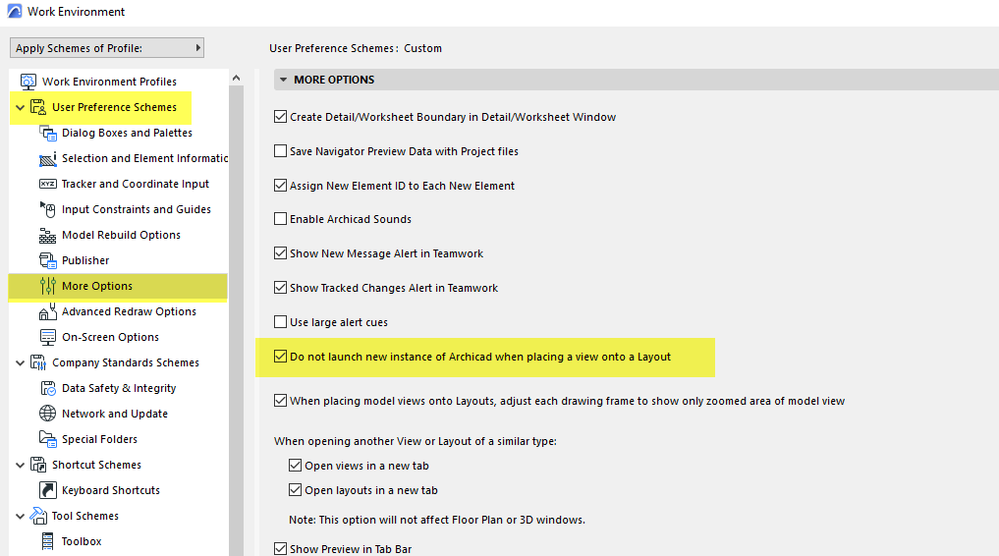
There is this setting in the Work Environment.
But that is about launching a new Archicad, not just opening the view.
Either way, I just turned it off and saw no difference.
I can't think of a setting anywhere else.
Barry
One of the forum moderators.
Versions 6.5 to 27
i7-10700 @ 2.9Ghz, 32GB ram, GeForce RTX 2060 (6GB), Windows 10
Lenovo Thinkpad - i7-1270P 2.20 GHz, 32GB RAM, Nvidia T550, Windows 11
Versions 6.5 to 27
i7-10700 @ 2.9Ghz, 32GB ram, GeForce RTX 2060 (6GB), Windows 10
Lenovo Thinkpad - i7-1270P 2.20 GHz, 32GB RAM, Nvidia T550, Windows 11

Frillex
Advocate
Options
- Mark as New
- Bookmark
- Subscribe
- Mute
- Subscribe to RSS Feed
- Permalink
- Report Inappropriate Content
2023-03-30 11:24 AM
2023-03-30
11:24 AM
Same for me, only occasionally and usually when working with a slow file.
AC 26, OS MONTEREY

Still looking?

