
Turn on suggestions
Auto-suggest helps you quickly narrow down your search results by suggesting possible matches as you type.
Showing results for
EN
Turn on suggestions
Auto-suggest helps you quickly narrow down your search results by suggesting possible matches as you type.
Showing results for
- English
- :
- Forum
- :
- Documentation
- :
- Incorrect pen colours
Options
- Subscribe to RSS Feed
- Mark Topic as New
- Mark Topic as Read
- Pin this post for me
- Bookmark
- Subscribe to Topic
- Mute
- Printer Friendly Page

Mahalath
Contributor
Options
- Mark as New
- Bookmark
- Subscribe
- Mute
- Subscribe to RSS Feed
- Permalink
- Report Inappropriate Content
2022-08-22
08:34 AM
- last edited on
2022-09-29
12:25 PM
by
 Oleksandra Vakariuk
Incorrect pen colours
2022-08-22
08:34 AM
We have just upgraded to Archicad 26 but everything on the Master layout is in bright red, even though clicking on them tells me it is the correct line weight and in black - how to fix please?
All the drawings etc are fine.
Thanks.
(Have posted as reply to someone else's comment regarding fonts but putting here separately as well so someone hopefully see this)
Solved! Go to Solution.
2 Solutions
Accepted Solutions
Mahalath
Contributor
Options
- Mark as New
- Bookmark
- Subscribe
- Mute
- Subscribe to RSS Feed
- Permalink
- Report Inappropriate Content
2022-08-22 08:37 AM
Solution

Barry Kelly
Moderator
Options
- Mark as New
- Bookmark
- Subscribe
- Mute
- Subscribe to RSS Feed
- Permalink
- Report Inappropriate Content
2022-08-22 08:38 AM
2022-08-22
08:38 AM
Best to always start a new post if not really related to the other issue.
I replied there but will reply here as well.
That is an option in your Work Environment settings.
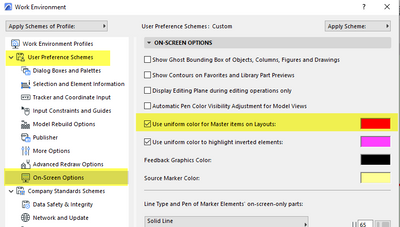
Barry.
One of the forum moderators.
Versions 6.5 to 27
i7-10700 @ 2.9Ghz, 32GB ram, GeForce RTX 2060 (6GB), Windows 10
Lenovo Thinkpad - i7-1270P 2.20 GHz, 32GB RAM, Nvidia T550, Windows 11
Versions 6.5 to 27
i7-10700 @ 2.9Ghz, 32GB ram, GeForce RTX 2060 (6GB), Windows 10
Lenovo Thinkpad - i7-1270P 2.20 GHz, 32GB RAM, Nvidia T550, Windows 11
Solution
2 Replies 2
Mahalath
Contributor
Options
- Mark as New
- Bookmark
- Subscribe
- Mute
- Subscribe to RSS Feed
- Permalink
- Report Inappropriate Content
2022-08-22 08:37 AM
2022-08-22
08:37 AM
Sorted thanks.
Solution
Barry Kelly
Moderator
Options
- Mark as New
- Bookmark
- Subscribe
- Mute
- Subscribe to RSS Feed
- Permalink
- Report Inappropriate Content
2022-08-22 08:38 AM
2022-08-22
08:38 AM
Best to always start a new post if not really related to the other issue.
I replied there but will reply here as well.
That is an option in your Work Environment settings.
Barry.
One of the forum moderators.
Versions 6.5 to 27
i7-10700 @ 2.9Ghz, 32GB ram, GeForce RTX 2060 (6GB), Windows 10
Lenovo Thinkpad - i7-1270P 2.20 GHz, 32GB RAM, Nvidia T550, Windows 11
Versions 6.5 to 27
i7-10700 @ 2.9Ghz, 32GB ram, GeForce RTX 2060 (6GB), Windows 10
Lenovo Thinkpad - i7-1270P 2.20 GHz, 32GB RAM, Nvidia T550, Windows 11
Solution

Still looking?

Suggested topics
- MEP AC29 Incorrect behavior of the Z mark in the tracking display when editing the Z mark of a pipe in Modeling
- Surface / Component Schedule Bug: Automatic Column Wrapping Ignores Folded Geometry and Returns Flat in Project data & BIM
- elevation dimension in rcp in Modeling
- Archicad export coloured SOLIDS to rhino? in Collaboration with other software
- Issues with the Window Schedule's Annotations being offset or incorrect in Project data & BIM
