
Turn on suggestions
Auto-suggest helps you quickly narrow down your search results by suggesting possible matches as you type.
Showing results for
EN
Turn on suggestions
Auto-suggest helps you quickly narrow down your search results by suggesting possible matches as you type.
Showing results for
- English
- :
- Forum
- :
- Documentation
- :
- Re: Library pieces not loading.
Options
- Subscribe to RSS Feed
- Mark Topic as New
- Mark Topic as Read
- Pin this post for me
- Bookmark
- Subscribe to Topic
- Mute
- Printer Friendly Page

JessicaBoll08
Contributor
Options
- Mark as New
- Bookmark
- Subscribe
- Mute
- Subscribe to RSS Feed
- Permalink
- Report Inappropriate Content
2022-10-18 09:56 PM
Library pieces not loading.
2022-10-18
09:56 PM
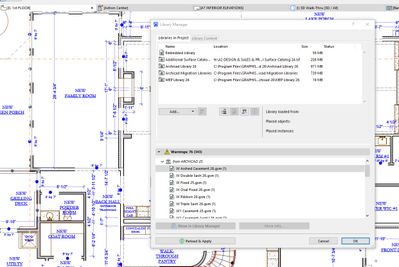
I recently had to reinstall Archicad 26 and now one of my drawings will not show the window or doors. I have reload the libraries, migrated the libraries. It looks like there are objects that are missing have a (1) after them, and I have no idea how to fix it. I cannot even open the missing object to change them to something else.
Solved! Go to Solution.
1 Solution
Accepted Solutions

 Nick Cornia
Graphisoft Alumni
Options
- Mark as New
- Bookmark
- Subscribe
- Mute
- Subscribe to RSS Feed
- Permalink
- Report Inappropriate Content
2022-10-18 11:37 PM
2022-10-18
11:37 PM
Hi Jessica,
From the list of Missing objects I can see those come from the USA Library. One thing that can happen is one might install an alternate "Language Version" of Archicad on their computer. And in this case the "Archicad Library 26" folder name is identical, so the program doesn't complain. However, the contents of that folder are quite different for different language versions, and this would cause items go missing.
To determine the language version of Archicad you have installed on your computer:
1. Please launch Archicad 26
2. Start a New project from the default template just so you can access the interface.
3. Next, go to Help > License Information and see if the language version is “English (United States)”.
If you are seeing “English (International)”, "English (Sweden)" or some other language version, then you will need to uninstall the current version of Archicad and download and install the correct Language version for your region here: https://Graphisoft.com/downloads/Archicad/install/AC26/USA/
I hope this helps.
Best regards,
11 Replies 11

Lee Hankins
Virtuoso
Options
- Mark as New
- Bookmark
- Subscribe
- Mute
- Subscribe to RSS Feed
- Permalink
- Report Inappropriate Content
2022-10-18 11:03 PM
2022-10-18
11:03 PM
Something is weird because the Library Manager is reporting Library Parts are missing from a Library called ‘Archicad 25’ but all the objects seem to be 26 parts. Has someone customised the library?
Lee Hankins
ArchiCAD 4.5 - Archicad 29
macOS Tahoe (26.0)
ArchiCAD 4.5 - Archicad 29
macOS Tahoe (26.0)
JessicaBoll08
Contributor
Options
- Mark as New
- Bookmark
- Subscribe
- Mute
- Subscribe to RSS Feed
- Permalink
- Report Inappropriate Content
2022-10-18 11:04 PM
2022-10-18
11:04 PM
No, the library is not custom. I am not sure what happened.
Lee Hankins
Virtuoso
Options
- Mark as New
- Bookmark
- Subscribe
- Mute
- Subscribe to RSS Feed
- Permalink
- Report Inappropriate Content
2022-10-18 11:06 PM
2022-10-18
11:06 PM
The Library Parts all have unique ID numbers unless they are really old so even if they’ve been moved to a custom library Archicad should still recognise them. This has got me stumped. Hopefully someone can help.
Lee Hankins
ArchiCAD 4.5 - Archicad 29
macOS Tahoe (26.0)
ArchiCAD 4.5 - Archicad 29
macOS Tahoe (26.0)
Lee Hankins
Virtuoso
Options
- Mark as New
- Bookmark
- Subscribe
- Mute
- Subscribe to RSS Feed
- Permalink
- Report Inappropriate Content
2022-10-18 11:08 PM
2022-10-18
11:08 PM
You could try removing all of the Libraries, add them again and hit reload and apply if you haven’t already. It may just be a funny glitch.
Lee Hankins
ArchiCAD 4.5 - Archicad 29
macOS Tahoe (26.0)
ArchiCAD 4.5 - Archicad 29
macOS Tahoe (26.0)
JessicaBoll08
Contributor
Options
- Mark as New
- Bookmark
- Subscribe
- Mute
- Subscribe to RSS Feed
- Permalink
- Report Inappropriate Content
2022-10-18 11:15 PM
2022-10-18
11:15 PM
Didn't work....
Lee Hankins
Virtuoso
Options
- Mark as New
- Bookmark
- Subscribe
- Mute
- Subscribe to RSS Feed
- Permalink
- Report Inappropriate Content
2022-10-18 11:35 PM
2022-10-18
11:35 PM
Sorry, I can’t think what it can be. Hopefully @Barry Kelly or @Karl Ottenstein might be able to help?
Lee Hankins
ArchiCAD 4.5 - Archicad 29
macOS Tahoe (26.0)
ArchiCAD 4.5 - Archicad 29
macOS Tahoe (26.0)
Nick Cornia
Graphisoft Alumni
Options
- Mark as New
- Bookmark
- Subscribe
- Mute
- Subscribe to RSS Feed
- Permalink
- Report Inappropriate Content
2022-10-18 11:37 PM
2022-10-18
11:37 PM
Hi Jessica,
From the list of Missing objects I can see those come from the USA Library. One thing that can happen is one might install an alternate "Language Version" of Archicad on their computer. And in this case the "Archicad Library 26" folder name is identical, so the program doesn't complain. However, the contents of that folder are quite different for different language versions, and this would cause items go missing.
To determine the language version of Archicad you have installed on your computer:
1. Please launch Archicad 26
2. Start a New project from the default template just so you can access the interface.
3. Next, go to Help > License Information and see if the language version is “English (United States)”.
If you are seeing “English (International)”, "English (Sweden)" or some other language version, then you will need to uninstall the current version of Archicad and download and install the correct Language version for your region here: https://Graphisoft.com/downloads/Archicad/install/AC26/USA/
I hope this helps.
Best regards,
JessicaBoll08
Contributor
Options
- Mark as New
- Bookmark
- Subscribe
- Mute
- Subscribe to RSS Feed
- Permalink
- Report Inappropriate Content
2022-10-18 11:42 PM
2022-10-18
11:42 PM
Okay, I do have the international version installed. But the link to the USA version is not working. I am only able to find the download for the international version.
Lee Hankins
Virtuoso
Options
- Mark as New
- Bookmark
- Subscribe
- Mute
- Subscribe to RSS Feed
- Permalink
- Report Inappropriate Content
2022-10-18 11:48 PM
2022-10-18
11:48 PM
https://Graphisoft.com/us/solutions/Archicad/Archicad-26#download
Lee Hankins
ArchiCAD 4.5 - Archicad 29
macOS Tahoe (26.0)
ArchiCAD 4.5 - Archicad 29
macOS Tahoe (26.0)

Still looking?

Suggested topics
- loaded libraries, missing library parts in Libraries & objects
- Library Parts appear as "Missing" even when loaded in Library Manager in Libraries & objects
- My libraries are not loading after an upgrade of AC 29.1.0. URGENT, have a presentation next week in Installation & update
- Consolidate .lcf + .libpack systems in migrated projects in Libraries & objects
- Library Loading Report - Missing Sub-Elements in Libraries & objects
