
Turn on suggestions
Auto-suggest helps you quickly narrow down your search results by suggesting possible matches as you type.
Showing results for
EN
Turn on suggestions
Auto-suggest helps you quickly narrow down your search results by suggesting possible matches as you type.
Showing results for
- English
- :
- Forum
- :
- Documentation
- :
- Re: Roof rafter dimensions in Schedule of Elements
Options
- Subscribe to RSS Feed
- Mark Topic as New
- Mark Topic as Read
- Pin this post for me
- Bookmark
- Subscribe to Topic
- Mute
- Printer Friendly Page

Voytek
Enthusiast
Options
- Mark as New
- Bookmark
- Subscribe
- Mute
- Subscribe to RSS Feed
- Permalink
- Report Inappropriate Content
2021-09-18 02:17 PM
Roof rafter dimensions in Schedule of Elements
2021-09-18
02:17 PM
Could some please advise how do I get dimensions of a roof rafter, such as: (1) Profile Height (rafter height), (2) Profile Thickness (rafter width) and (2) Lumber Size (rafter length) in Schedule of Elements. The rafter is sourced from Archicad Library 25 > Roof Construction 25 > Rafter 25. These dimensions are shown under PROFILES SETTINGS > Dimensions...
So far, I could only generate a Schedule showing: Profile Thickness (corresponding with the rafter width) and "Height" (which does not correspond with rafter height).
AC 4.55 to AC 29 USA Studio - Windows 11 Pro - HP ZBook Fury G1i 18 inch Mobile Workstation, Intel® Core™ Ultra 9 285HX128 GB RAM2 TB SSD18" WQXGA, 165 HzNVIDIA® RTX PRO™ 5000 PC Display 2560x1600
Solved! Go to Solution.
Solved
Read-Only
1 Solution
Accepted Solutions

Barry Kelly
Moderator
Options
- Mark as New
- Bookmark
- Subscribe
- Mute
- Subscribe to RSS Feed
- Permalink
- Report Inappropriate Content
2021-09-19 07:01 AM
2021-09-19
07:01 AM
If these are parameters in your rafter objects,
Then in the schedule settings, there is an option to add parameters.
You then need to browse for the rafter object and the parameters you want to add.
If you can't figure it out, let me know - I don't have Archicad available at the moment so can't show screen shots.
Barry.
One of the forum moderators.
Versions 6.5 to 27
i7-10700 @ 2.9Ghz, 32GB ram, GeForce RTX 2060 (6GB), Windows 10
Lenovo Thinkpad - i7-1270P 2.20 GHz, 32GB RAM, Nvidia T550, Windows 11
Versions 6.5 to 27
i7-10700 @ 2.9Ghz, 32GB ram, GeForce RTX 2060 (6GB), Windows 10
Lenovo Thinkpad - i7-1270P 2.20 GHz, 32GB RAM, Nvidia T550, Windows 11
5 Replies 5
Barry Kelly
Moderator
Options
- Mark as New
- Bookmark
- Subscribe
- Mute
- Subscribe to RSS Feed
- Permalink
- Report Inappropriate Content
2021-09-19 07:01 AM
2021-09-19
07:01 AM
If these are parameters in your rafter objects,
Then in the schedule settings, there is an option to add parameters.
You then need to browse for the rafter object and the parameters you want to add.
If you can't figure it out, let me know - I don't have Archicad available at the moment so can't show screen shots.
Barry.
One of the forum moderators.
Versions 6.5 to 27
i7-10700 @ 2.9Ghz, 32GB ram, GeForce RTX 2060 (6GB), Windows 10
Lenovo Thinkpad - i7-1270P 2.20 GHz, 32GB RAM, Nvidia T550, Windows 11
Versions 6.5 to 27
i7-10700 @ 2.9Ghz, 32GB ram, GeForce RTX 2060 (6GB), Windows 10
Lenovo Thinkpad - i7-1270P 2.20 GHz, 32GB RAM, Nvidia T550, Windows 11
Voytek
Enthusiast
Options
- Mark as New
- Bookmark
- Subscribe
- Mute
- Subscribe to RSS Feed
- Permalink
- Report Inappropriate Content
2021-09-21 09:23 AM
2021-09-21
09:23 AM
Thank you Barry. It worked. Much appreciated.
Voytek
AC 4.55 to AC 29 USA Studio - Windows 11 Pro - HP ZBook Fury G1i 18 inch Mobile Workstation, Intel® Core™ Ultra 9 285HX128 GB RAM2 TB SSD18" WQXGA, 165 HzNVIDIA® RTX PRO™ 5000 PC Display 2560x1600

qingdom
Enthusiast
Options
- Mark as New
- Bookmark
- Subscribe
- Mute
- Subscribe to RSS Feed
- Permalink
- Report Inappropriate Content
2022-10-06 11:48 AM
2022-10-06
11:48 AM
Hi Barry,
I am trying now to schedule the same as Voytek, can you please detail the process?
I didn't really understand exactly.
AC27 INT | WIN10
Barry Kelly
Moderator
Options
- Mark as New
- Bookmark
- Subscribe
- Mute
- Subscribe to RSS Feed
- Permalink
- Report Inappropriate Content
2022-10-07 03:10 AM
2022-10-07
03:10 AM
In the schedule scheme settings, click on the little arrow next to the 'Add Fields' button.
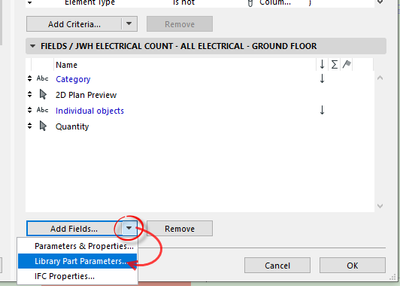
This will allow you to add library part parameters.
You just have to search for the library part and then the parameters that you want.
Barry.
One of the forum moderators.
Versions 6.5 to 27
i7-10700 @ 2.9Ghz, 32GB ram, GeForce RTX 2060 (6GB), Windows 10
Lenovo Thinkpad - i7-1270P 2.20 GHz, 32GB RAM, Nvidia T550, Windows 11
Versions 6.5 to 27
i7-10700 @ 2.9Ghz, 32GB ram, GeForce RTX 2060 (6GB), Windows 10
Lenovo Thinkpad - i7-1270P 2.20 GHz, 32GB RAM, Nvidia T550, Windows 11
qingdom
Enthusiast
Options
- Mark as New
- Bookmark
- Subscribe
- Mute
- Subscribe to RSS Feed
- Permalink
- Report Inappropriate Content
2022-10-07 11:11 AM
2022-10-07
11:11 AM
This is great, didn't know it exist. Thank you.
AC27 INT | WIN10

Still looking?

Suggested topics
- Surface / Component Schedule Bug: Automatic Column Wrapping Ignores Folded Geometry and Returns Flat in Project data & BIM
- Archicad Interactive Schedule shows a single multi-plane hip roof as four separate elements in Documentation
- Doors and Windows Schedule Automatic Dimension Button not Responding in Project data & BIM
- ArchiTurn (beta) — swept path analysis directly in Archicad: does the vehicle fit or not? in General discussions
- 2D Plan Preview scale changes unexpectedly in Interactive Schedule in Project data & BIM
