
Turn on suggestions
Auto-suggest helps you quickly narrow down your search results by suggesting possible matches as you type.
Showing results for
EN
Turn on suggestions
Auto-suggest helps you quickly narrow down your search results by suggesting possible matches as you type.
Showing results for
- English
- :
- Forum
- :
- Documentation
- :
- Re: Wire model glitch??
Options
- Subscribe to RSS Feed
- Mark Topic as New
- Mark Topic as Read
- Pin this post for me
- Bookmark
- Subscribe to Topic
- Mute
- Printer Friendly Page

BCbibi72
Newcomer
Options
- Mark as New
- Bookmark
- Subscribe
- Mute
- Subscribe to RSS Feed
- Permalink
- Report Inappropriate Content
2021-09-14 02:33 PM
Wire model glitch??
2021-09-14
02:33 PM
I encountered a sort of glitch in the matrix. While working on my 3D renderings my model defaulted to the wire model overlay, thus it shows none of my textures.
Is there any way I can fix this other than completely re-doing the project??
I have tried to just change 3D Style settings back to 'Simple shading with Shadows' but it remains a wire model (no matter what i have tried)
Please help!!
5 Replies 5

Rajesh Patil
Expert
Options
- Mark as New
- Bookmark
- Subscribe
- Mute
- Subscribe to RSS Feed
- Permalink
- Report Inappropriate Content
2021-09-14 02:45 PM
2021-09-14
02:45 PM
Check layer status, may be all layers set to Wire frame mode instead of solid mode. Share screenshots for both 3D window and layer settings in 3D window.
Rajesh Patil
AC 09-27 | INT | WIN11 64
Dell Inspiron 7591, Core i9, 9880H 2.30GHz, 16.0GB, NVidia GeForce GTX1650, 4.0GB, SSD Internal 500GB, Dell SSD External 250GB
AC 09-27 | INT | WIN11 64
Dell Inspiron 7591, Core i9, 9880H 2.30GHz, 16.0GB, NVidia GeForce GTX1650, 4.0GB, SSD Internal 500GB, Dell SSD External 250GB
BCbibi72
Newcomer
Options
- Mark as New
- Bookmark
- Subscribe
- Mute
- Subscribe to RSS Feed
- Permalink
- Report Inappropriate Content
2021-09-14 02:49 PM
2021-09-14
02:49 PM
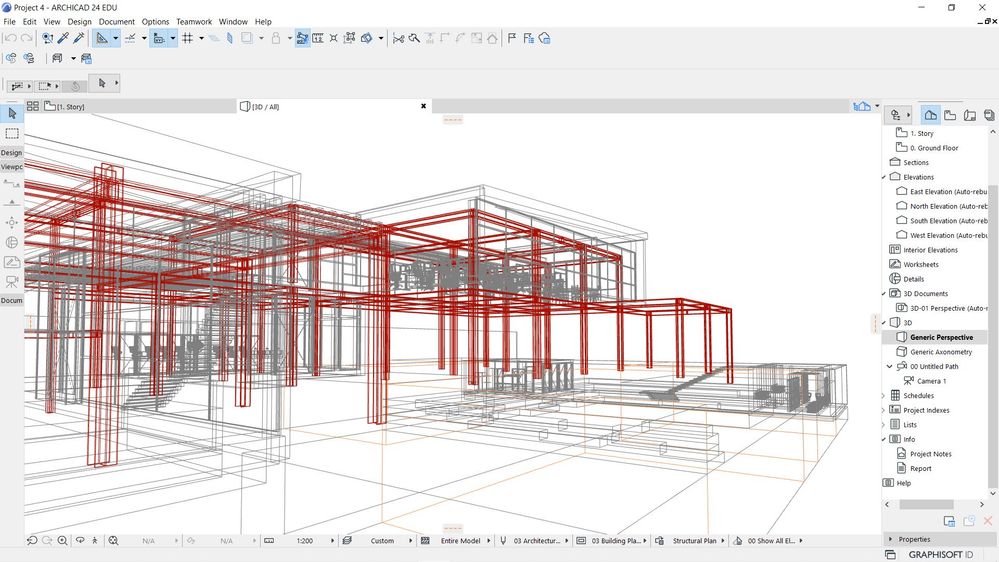
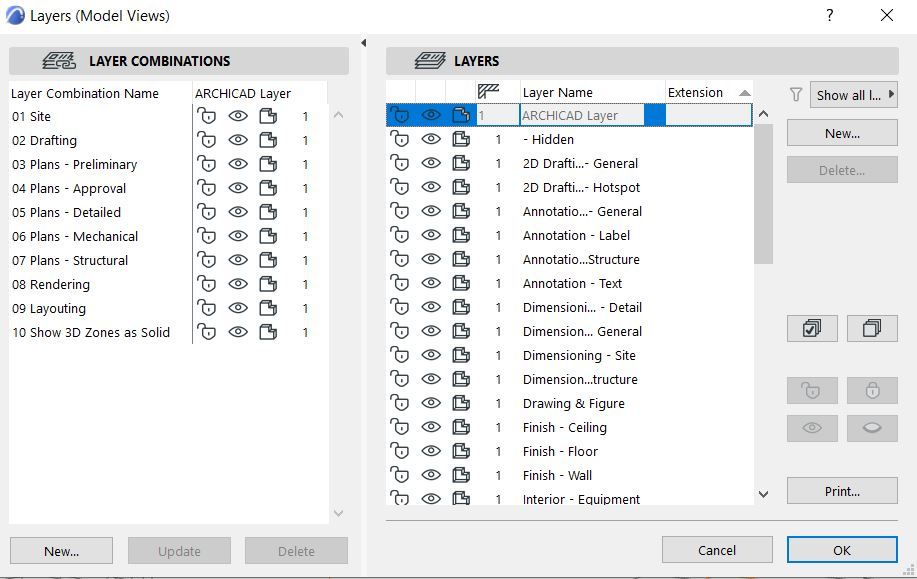
BCbibi72
Newcomer
Options
- Mark as New
- Bookmark
- Subscribe
- Mute
- Subscribe to RSS Feed
- Permalink
- Report Inappropriate Content
2021-09-14 02:50 PM
2021-09-14
02:50 PM
It seems as if the settings are correct, for what i am trying to achieve...
Rajesh Patil
Expert
Options
- Mark as New
- Bookmark
- Subscribe
- Mute
- Subscribe to RSS Feed
- Permalink
- Report Inappropriate Content
2021-09-14 02:53 PM - edited 2021-09-14 02:59 PM
2021-09-14
02:53 PM
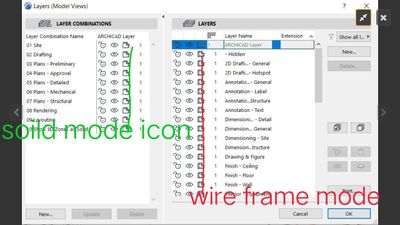
All layers are in wire frame mode, check third icon from left of layer name, or icon next to show hide layer eyelid. Select all layers and click on that cube sort of third icon to change in solid mode.
Rajesh Patil
AC 09-27 | INT | WIN11 64
Dell Inspiron 7591, Core i9, 9880H 2.30GHz, 16.0GB, NVidia GeForce GTX1650, 4.0GB, SSD Internal 500GB, Dell SSD External 250GB
AC 09-27 | INT | WIN11 64
Dell Inspiron 7591, Core i9, 9880H 2.30GHz, 16.0GB, NVidia GeForce GTX1650, 4.0GB, SSD Internal 500GB, Dell SSD External 250GB

 Marcus Scott
Graphisoft
Options
- Mark as New
- Bookmark
- Subscribe
- Mute
- Subscribe to RSS Feed
- Permalink
- Report Inappropriate Content
2021-09-14 04:29 PM - edited 2021-09-14 04:30 PM
2021-09-14
04:29 PM
Head to the View Menu > 3D View Options > 3D Styles set the 3D Engine to OpenGL (AC24) click OK and the model will be rendered with textures if it's not already.

Still looking?

Suggested topics
- Ci Doors + Windows : Wall Hole Glitch in Libraries & objects
- 3D Model is not showing in Modeling
- Physically based rendering display problem in AC28 in Visualization
- Solid Element Operations not working after Design Option "Accept & Merge" in Modeling
- Inside Casing Display Issue in Libraries & objects
