
Turn on suggestions
Auto-suggest helps you quickly narrow down your search results by suggesting possible matches as you type.
Showing results for
EN
Turn on suggestions
Auto-suggest helps you quickly narrow down your search results by suggesting possible matches as you type.
Showing results for
- English
- :
- Forum
- :
- Documentation
- :
- Re: document
Options
- Subscribe to RSS Feed
- Mark Topic as New
- Mark Topic as Read
- Pin this post for me
- Bookmark
- Subscribe to Topic
- Mute
- Printer Friendly Page

Rox22V
Participant
Options
- Mark as New
- Bookmark
- Subscribe
- Mute
- Subscribe to RSS Feed
- Permalink
- Report Inappropriate Content
2022-10-12 11:50 PM
document
2022-10-12
11:50 PM
Does anyone know how I make the furniture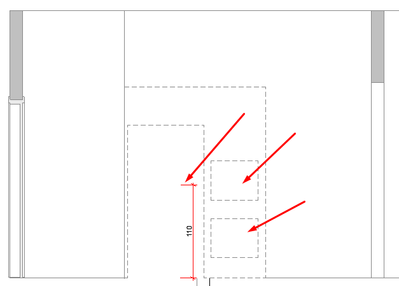
Solved! Go to Solution.
1 Solution
Accepted Solutions

Barry Kelly
Moderator
Options
- Mark as New
- Bookmark
- Subscribe
- Mute
- Subscribe to RSS Feed
- Permalink
- Report Inappropriate Content
2022-10-13 03:03 AM
2022-10-13
03:03 AM
You could set the furniture to use a transparent material and turn transparency in in your elevation.
But that may not be the solution you are looking for.
If that does work, you could set up a Graphic Override to change the material (surface) of furniture object when viewed in section/elevation.
Otherwise it is a case of 2D linework to depict the electrical outlets.
Barry.
One of the forum moderators.
Versions 6.5 to 27
i7-10700 @ 2.9Ghz, 32GB ram, GeForce RTX 2060 (6GB), Windows 10
Lenovo Thinkpad - i7-1270P 2.20 GHz, 32GB RAM, Nvidia T550, Windows 11
Versions 6.5 to 27
i7-10700 @ 2.9Ghz, 32GB ram, GeForce RTX 2060 (6GB), Windows 10
Lenovo Thinkpad - i7-1270P 2.20 GHz, 32GB RAM, Nvidia T550, Windows 11
1 Reply 1
Barry Kelly
Moderator
Options
- Mark as New
- Bookmark
- Subscribe
- Mute
- Subscribe to RSS Feed
- Permalink
- Report Inappropriate Content
2022-10-13 03:03 AM
2022-10-13
03:03 AM
You could set the furniture to use a transparent material and turn transparency in in your elevation.
But that may not be the solution you are looking for.
If that does work, you could set up a Graphic Override to change the material (surface) of furniture object when viewed in section/elevation.
Otherwise it is a case of 2D linework to depict the electrical outlets.
Barry.
One of the forum moderators.
Versions 6.5 to 27
i7-10700 @ 2.9Ghz, 32GB ram, GeForce RTX 2060 (6GB), Windows 10
Lenovo Thinkpad - i7-1270P 2.20 GHz, 32GB RAM, Nvidia T550, Windows 11
Versions 6.5 to 27
i7-10700 @ 2.9Ghz, 32GB ram, GeForce RTX 2060 (6GB), Windows 10
Lenovo Thinkpad - i7-1270P 2.20 GHz, 32GB RAM, Nvidia T550, Windows 11

Still looking?

Suggested topics
- Recommendations for 3D Scanners for As-Built Documentation and Virtual Walkthroughs in Collaboration with other software
- Label glitch in Project data & BIM
- Mastering AI in AI solutions
- Rounded Wall Corner displays correctly in Floor Plan but glitches in 3D Document in Modeling
- Number of Section Elevation and Detail Markers (Total Number of Viewpoints) in Documentation
