
Turn on suggestions
Auto-suggest helps you quickly narrow down your search results by suggesting possible matches as you type.
Showing results for
EN
Turn on suggestions
Auto-suggest helps you quickly narrow down your search results by suggesting possible matches as you type.
Showing results for
- English
- :
- Forum
- :
- Documentation
- :
- simbolic cut of wooden roof elements in section
Options
- Subscribe to RSS Feed
- Mark Topic as New
- Mark Topic as Read
- Pin this post for me
- Bookmark
- Subscribe to Topic
- Mute
- Printer Friendly Page

Rastisan
Booster
Options
- Mark as New
- Bookmark
- Subscribe
- Mute
- Subscribe to RSS Feed
- Permalink
- Report Inappropriate Content
2023-04-14
08:05 PM
- last edited on
2025-01-02
03:02 PM
by
 Molinda Prey
simbolic cut of wooden roof elements in section
2023-04-14
08:05 PM
Hi,
can anyone advise me how to do these "X" cut symbols on cut wooden columns (see floor plan below)...
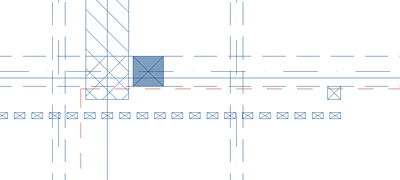
... to be be visible also in beams and other linear wooden roof elements in section below:
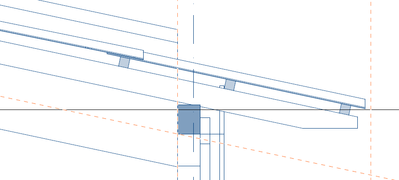
How to change them from a solid grey fill (defined by material properties) to the "X" symbol.
I have checked section settings, model view settings and element settings (floor plan and section) and I cannot find the right control.
The "X" symbolic cut are turned on in floor plan in element settings (floor plan and section), but there is no equivalent control in section.
Advice much appreciated, regards.
Solved! Go to Solution.
Solved
Labels:
- Labels:
-
Annotation
-
Labels
2 Solutions
Accepted Solutions

David O
Booster
Options
- Mark as New
- Bookmark
- Subscribe
- Mute
- Subscribe to RSS Feed
- Permalink
- Report Inappropriate Content
2023-04-21 01:05 PM
2023-04-21
01:05 PM
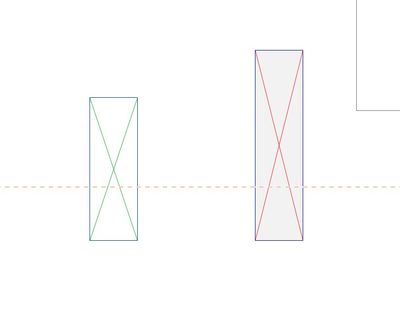
Do you just want to add them in 2D in the sections etc, if so use this 2D symbol, you can change the line colours & background colours & fills as well, the object can be stretched or you can set the sizes you require in the attributes dialogue box.
I hope it helps
Regards
David
Solution
David O
Booster
Options
- Mark as New
- Bookmark
- Subscribe
- Mute
- Subscribe to RSS Feed
- Permalink
- Report Inappropriate Content
2023-04-21 01:07 PM
Solution
3 Replies 3
David O
Booster
Options
- Mark as New
- Bookmark
- Subscribe
- Mute
- Subscribe to RSS Feed
- Permalink
- Report Inappropriate Content
2023-04-21 01:05 PM
2023-04-21
01:05 PM
Do you just want to add them in 2D in the sections etc, if so use this 2D symbol, you can change the line colours & background colours & fills as well, the object can be stretched or you can set the sizes you require in the attributes dialogue box.
I hope it helps
Regards
David
Solution
David O
Booster
Options
- Mark as New
- Bookmark
- Subscribe
- Mute
- Subscribe to RSS Feed
- Permalink
- Report Inappropriate Content
2023-04-21 01:07 PM
2023-04-21
01:07 PM
Sorry I forgot to add the image to show what I mean
Solution
Rastisan
Booster
Options
- Mark as New
- Bookmark
- Subscribe
- Mute
- Subscribe to RSS Feed
- Permalink
- Report Inappropriate Content
2023-06-10 06:42 PM
2023-06-10
06:42 PM
thank you David!

Still looking?

Suggested topics
- How to structure prompts for AI Visualizer in Archicad 30 in AI solutions
- How can I show hidden stair treads as dashed lines in a section? in Modeling
- Drafting aid object for geometry layouts in Modeling
- Viewport with open Tab turning items red in Documentation
- Actual projected view of hotlinked elements - Floor cut plane does not affect ifc in Collaboration with other software
