
Turn on suggestions
Auto-suggest helps you quickly narrow down your search results by suggesting possible matches as you type.
Showing results for
EN
Turn on suggestions
Auto-suggest helps you quickly narrow down your search results by suggesting possible matches as you type.
Showing results for
- English
- :
- Developer Hub
- :
- GDL
- :
- Is there a tool / object for making a mesh with a ...
Options
- Subscribe to RSS Feed
- Mark Topic as New
- Mark Topic as Read
- Pin this post for me
- Bookmark
- Subscribe to Topic
- Mute
- Printer Friendly Page

gedzior84
Booster
Options
- Mark as New
- Bookmark
- Subscribe
- Mute
- Subscribe to RSS Feed
- Permalink
- Report Inappropriate Content
2020-08-30
09:12 AM
- last edited on
2024-09-15
02:55 AM
by
 Laszlo Nagy
Is there a tool / object for making a mesh with a specified thickness?
2020-08-30
09:12 AM
Hello.
As in the topic, I wanted to ask you guys if there exists any tool that would allow me to create a mesh with a specified thickness, or layers.
For example, I have a terrain to model, but the ground has layers: 3cm of grass, 10cm of ground, and some other layers. The terrain is not flat - it has some holes and bumps. Is it possible to create this with one tool/object, not using layered slabs, roofs, and shells?
As in the topic, I wanted to ask you guys if there exists any tool that would allow me to create a mesh with a specified thickness, or layers.
For example, I have a terrain to model, but the ground has layers: 3cm of grass, 10cm of ground, and some other layers. The terrain is not flat - it has some holes and bumps. Is it possible to create this with one tool/object, not using layered slabs, roofs, and shells?

Labels:
- Labels:
-
Library (GDL)
64 Replies 64

Barry Kelly
Moderator
Options
- Mark as New
- Bookmark
- Subscribe
- Mute
- Subscribe to RSS Feed
- Permalink
- Report Inappropriate Content
2021-08-26 09:48 AM
2021-08-26
09:48 AM
A. wrote:Thank you.
Here is that tool for Archicad 22. So whoever has 22 or 23 can easily open it.
Barry.
One of the forum moderators.
Versions 6.5 to 27
i7-10700 @ 2.9Ghz, 32GB ram, GeForce RTX 2060 (6GB), Windows 10
Lenovo Thinkpad - i7-1270P 2.20 GHz, 32GB RAM, Nvidia T550, Windows 11
Versions 6.5 to 27
i7-10700 @ 2.9Ghz, 32GB ram, GeForce RTX 2060 (6GB), Windows 10
Lenovo Thinkpad - i7-1270P 2.20 GHz, 32GB RAM, Nvidia T550, Windows 11

Botonis
Mentor
Options
- Mark as New
- Bookmark
- Subscribe
- Mute
- Subscribe to RSS Feed
- Permalink
- Report Inappropriate Content
2022-11-23 03:57 PM
2022-11-23
03:57 PM
Any help would be appreciated. I am constantly getting this error message for both 25 and 26 even in a new file.
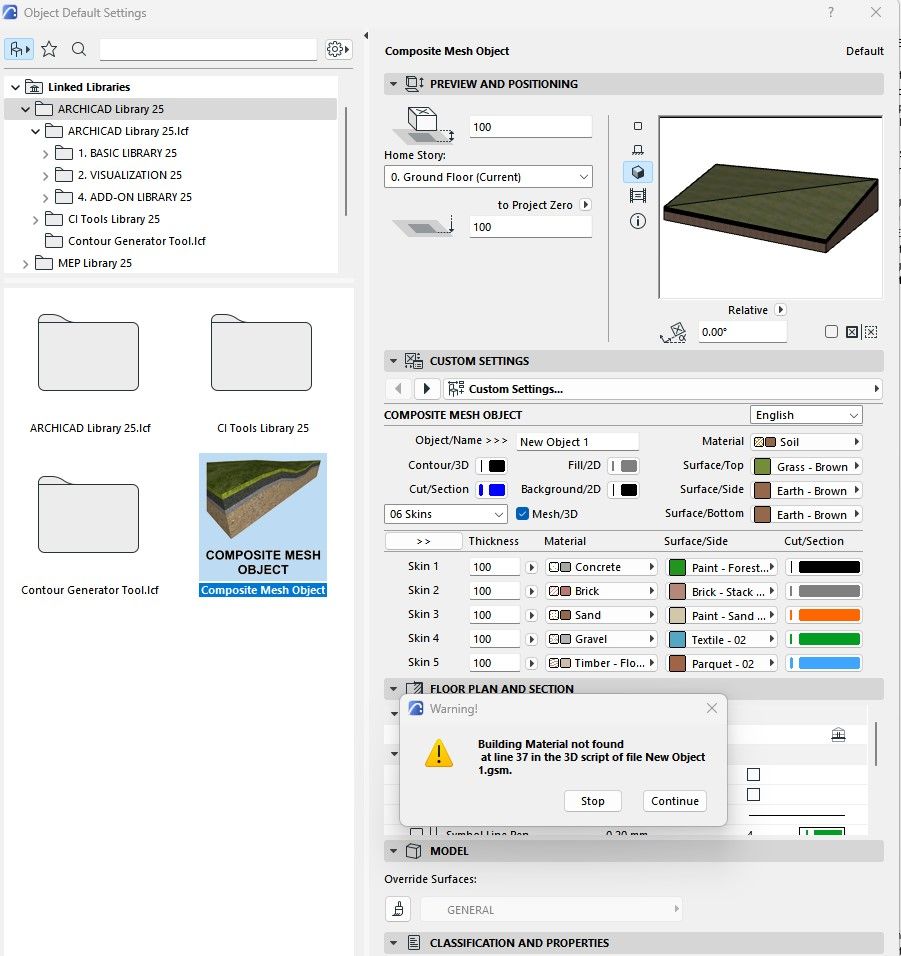
Thanks.
Civil Engineer, Enviromental Design MSc. BS ArchitectsVR.
Graphisoft Insider Panelist-Archicad 29. Windows 11. Intel Xeon 2699x2,64 GB RAM, Nvidia ny or personal website3080Ti. 2 Monitors.
Graphisoft Insider Panelist-Archicad 29. Windows 11. Intel Xeon 2699x2,64 GB RAM, Nvidia ny or personal website3080Ti. 2 Monitors.

Jess210190
Participant
Options
- Mark as New
- Bookmark
- Subscribe
- Mute
- Subscribe to RSS Feed
- Permalink
- Report Inappropriate Content
2024-04-04 11:36 AM
2024-04-04
11:36 AM
Hello everyone,
I love this object and I use it in all my projects.
But, small problem with the AC27 version. Hatching does not follow on each layer. It is the replacement hatch that takes over, so we no longer see the layers.
Is it possible to update the program in 27?

stukheil sobich arch
Participant
Options
- Mark as New
- Bookmark
- Subscribe
- Mute
- Subscribe to RSS Feed
- Permalink
- Report Inappropriate Content
2024-08-14 05:20 PM
2024-08-14
05:20 PM
Hello everybody,
yeas please this is the issue of AC 27, please bring the topic back because this tool is so needed.
stukheil sobich arch
Participant
Options
- Mark as New
- Bookmark
- Subscribe
- Mute
- Subscribe to RSS Feed
- Permalink
- Report Inappropriate Content
2024-08-14 05:21 PM
2024-08-14
05:21 PM
Hello!
First of all, thanks for an amazing tool!
As it is stated, the tool diesnt work well with the AC 27 version because in the section, You cannot see the material fills.
Would it be possible to do a little update for AC 27?
Thanks so much!

Monsieur_405
Participant
Options
- Mark as New
- Bookmark
- Subscribe
- Mute
- Subscribe to RSS Feed
- Permalink
- Report Inappropriate Content
2024-08-15 04:10 AM
2024-08-15
04:10 AM
I would steer clear of the mesh to roof tool, simply because when in floor plan view your once smooth mesh will be a series of roofs. A much simpler and cleaner way to do it is to simply copy the 1st mesh, drag it your desired dimension down, change the material to whatever. THEN, copy that mesh down a desired amount and turn it into soil.

gZax
Booster
Options
- Mark as New
- Bookmark
- Subscribe
- Mute
- Subscribe to RSS Feed
- Permalink
- Report Inappropriate Content
2024-09-13 02:02 PM
2024-09-13
02:02 PM
I confirm that the skins are not visible on sections in AC 28 and 27. Any thoughts???


Giorgis
AC27 Intel Mac - Ventura
AC27 Intel Mac - Ventura
gZax
Booster
Options
- Mark as New
- Bookmark
- Subscribe
- Mute
- Subscribe to RSS Feed
- Permalink
- Report Inappropriate Content
2024-09-14 04:28 PM
2024-09-14
04:28 PM
Ok after some digging I discovered that v9 works fine with Archicad 27. I started from that version added all the previous translations plus Greek. I also checked this version with AC28 TP and it works. Skins now show in Sections on newer Archicad versions.

AC28
PS: Someone with better knowledge may have time to compare this version with the versions 10-12 of the object. I am curious to find what exactly broke the functionality. By searching docs in GDL Center I didn't find any reference about changes in GDL versions in that would justify this behavior.
Giorgis
AC27 Intel Mac - Ventura
AC27 Intel Mac - Ventura
Botonis
Mentor
Options
- Mark as New
- Bookmark
- Subscribe
- Mute
- Subscribe to RSS Feed
- Permalink
- Report Inappropriate Content
2024-09-23 10:26 AM
2024-09-23
10:26 AM
Thanks @gZax .
The objects is not giving errors any more!!!
What is missing from the settings are the options for 2d fill on the floor plan. Any chance for this addition?
Greetings Giorgi!!!
Civil Engineer, Enviromental Design MSc. BS ArchitectsVR.
Graphisoft Insider Panelist-Archicad 29. Windows 11. Intel Xeon 2699x2,64 GB RAM, Nvidia ny or personal website3080Ti. 2 Monitors.
Graphisoft Insider Panelist-Archicad 29. Windows 11. Intel Xeon 2699x2,64 GB RAM, Nvidia ny or personal website3080Ti. 2 Monitors.
gZax
Booster
Options
- Mark as New
- Bookmark
- Subscribe
- Mute
- Subscribe to RSS Feed
- Permalink
- Report Inappropriate Content
2024-09-29 12:46 PM
2024-09-29
12:46 PM
You have to save the mesh object with surface fill enabled on the floor plan settings to be saved inside the 2d script. This is called by the Composite Mesh Object.
Wait for my next version... I have it half.baked for override fill on floorplan and it works fine. It needs some work on translations and some gui and parameters sripts...
Giorgis
AC27 Intel Mac - Ventura
AC27 Intel Mac - Ventura

Didn't find the answer?
Check other topics in this Forum
Back to ForumRead the latest accepted solutions!
Accepted SolutionsStart a new conversation!
