
Turn on suggestions
Auto-suggest helps you quickly narrow down your search results by suggesting possible matches as you type.
Showing results for
EN
Turn on suggestions
Auto-suggest helps you quickly narrow down your search results by suggesting possible matches as you type.
Showing results for
- English
- :
- Forum
- :
- Libraries & objects
- :
- Re: Bay Window Object? Can not snap to any of it's...
Options
- Subscribe to RSS Feed
- Mark Topic as New
- Mark Topic as Read
- Pin this post for me
- Bookmark
- Subscribe to Topic
- Mute
- Printer Friendly Page
rob2218
Enthusiast
Options
- Mark as New
- Bookmark
- Subscribe
- Mute
- Subscribe to RSS Feed
- Permalink
- Report Inappropriate Content
2014-09-24
09:33 PM
- last edited on
2023-05-24
12:32 PM
by
 Rubia Torres
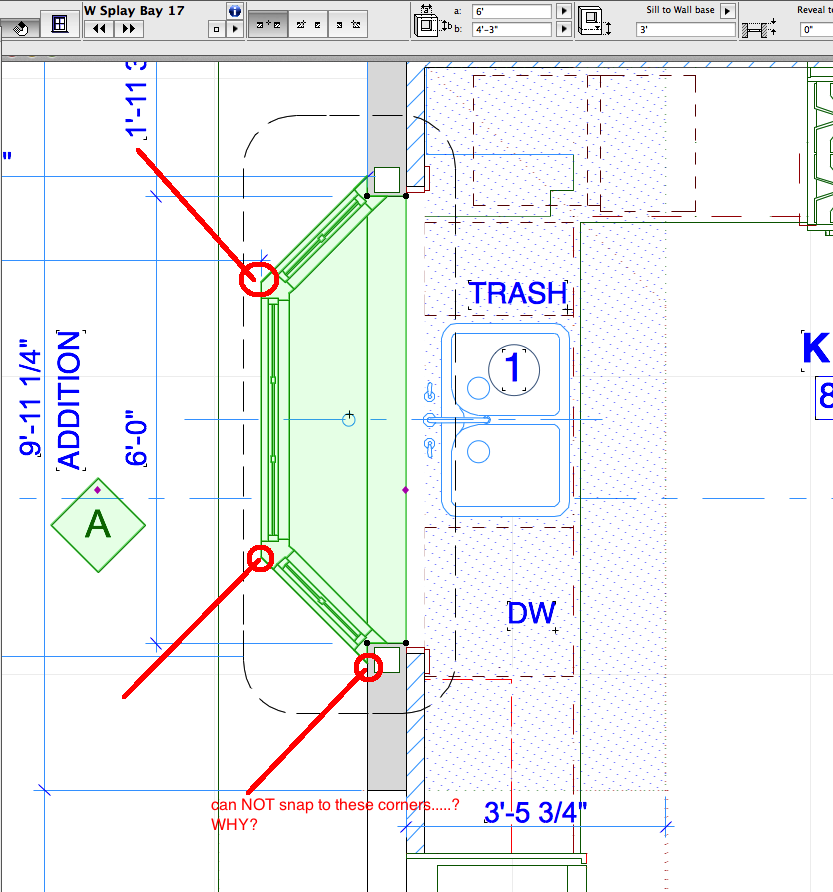
Bay Window Object? Can not snap to any of it's corners? why?
2014-09-24
09:33 PM
I can NOT snap to any of it's corners......WHY?
...Bobby Hollywood live from...
i>u
Edgewater, FL!
SOFTWARE VERSION:
Archicad 22, Archicad 23
Windows7 -OS, MAC Maverick OS
i>u
Edgewater, FL!
SOFTWARE VERSION:
Archicad 22, Archicad 23
Windows7 -OS, MAC Maverick OS
3 Replies 3
rob2218
Enthusiast
Options
- Mark as New
- Bookmark
- Subscribe
- Mute
- Subscribe to RSS Feed
- Permalink
- Report Inappropriate Content
2014-09-24 09:40 PM

 NCornia
Graphisoft Alumni
Options
- Mark as New
- Bookmark
- Subscribe
- Mute
- Subscribe to RSS Feed
- Permalink
- Report Inappropriate Content
2014-09-25 01:17 AM
2014-09-25
01:17 AM
Rob,
thanks for the graphic. I tested the "W Splay Bay 17" window and there are additional nodes and graphic hotspots that should be there. I will create a case in tech support and email some details to you to investigate further.
Best regards,
thanks for the graphic. I tested the "W Splay Bay 17" window and there are additional nodes and graphic hotspots that should be there. I will create a case in tech support and email some details to you to investigate further.
Best regards,
Nicholas Cornia
Technical Support Team - GRAPHISOFT North America
Tutorials
GRAPHISOFT Help Center
Technical Support Team - GRAPHISOFT North America
Tutorials
GRAPHISOFT Help Center
rob2218
Enthusiast
Options
- Mark as New
- Bookmark
- Subscribe
- Mute
- Subscribe to RSS Feed
- Permalink
- Report Inappropriate Content
2014-09-25 01:29 AM
2014-09-25
01:29 AM
please sir.....do tell how to activate those "added hotspots so's I can use them.
I also wanted to be able to "snap to intersection" on those bay window 2D lifework but if I draw a line say 'thru' the bay window glass where it intersects the bay window graphics.....i can't see to hit the "intersection" between the line and the object.
I also wanted to be able to "snap to intersection" on those bay window 2D lifework but if I draw a line say 'thru' the bay window glass where it intersects the bay window graphics.....i can't see to hit the "intersection" between the line and the object.
NCornia wrote:
Rob,
thanks for the graphic. I tested the "W Splay Bay 17" window and there are additional nodes and graphic hotspots that should be there. I will create a case in tech support and email some details to you to investigate further.
Best regards,
...Bobby Hollywood live from...
i>u
Edgewater, FL!
SOFTWARE VERSION:
Archicad 22, Archicad 23
Windows7 -OS, MAC Maverick OS
i>u
Edgewater, FL!
SOFTWARE VERSION:
Archicad 22, Archicad 23
Windows7 -OS, MAC Maverick OS

Didn't find the answer?
Check other topics in this Forum
Back to ForumRead the latest accepted solutions!
Accepted SolutionsStart a new conversation!

Suggested topics
- Missing elevations of doors when making a door schedule in Documentation
- Detailing | Better methods of 2d drafting, creation of Blocks , Detail Elements , 2d Objects in Documentation
- W Lesene 27, complex profile wall fill direction problem in Modeling
- gdl custom object snaps back to older version upon opening the file in Libraries & objects
- Drag and Drop from Plan Window to Library Object Script Window Not Working in Libraries & objects
