
Turn on suggestions
Auto-suggest helps you quickly narrow down your search results by suggesting possible matches as you type.
Showing results for
EN
Turn on suggestions
Auto-suggest helps you quickly narrow down your search results by suggesting possible matches as you type.
Showing results for
- English
- :
- Forum
- :
- Libraries & objects
- :
- Re: Custom Component alert
Options
- Subscribe to RSS Feed
- Mark Topic as New
- Mark Topic as Read
- Pin this post for me
- Bookmark
- Subscribe to Topic
- Mute
- Printer Friendly Page

R Muller
Advocate
Options
- Mark as New
- Bookmark
- Subscribe
- Mute
- Subscribe to RSS Feed
- Permalink
- Report Inappropriate Content
2008-08-15 11:03 PM
Custom Component alert
2008-08-15
11:03 PM
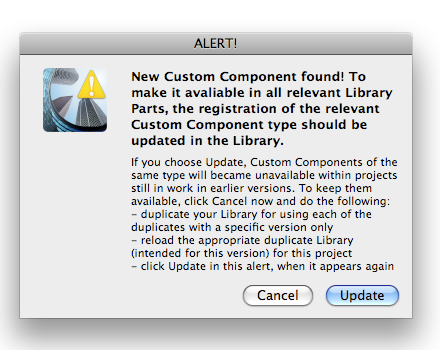
How would a new custom component be "found"? Where could it come from? If I say "update" will all the custom dimensions for my curtain wall mullions, etc. be clobbered?
R Muller
AC 28 USA (20+ years on ArchiCAD)
MBP 64GB Apple M1 Max OS 15 Sequoia
AC 28 USA (20+ years on ArchiCAD)
MBP 64GB Apple M1 Max OS 15 Sequoia
5 Replies 5

Rod Jurich
Contributor
Options
- Mark as New
- Bookmark
- Subscribe
- Mute
- Subscribe to RSS Feed
- Permalink
- Report Inappropriate Content
2008-08-16 03:28 AM
2008-08-16
03:28 AM
R wrote:Implies you are on 12.
/.. my curtain wall mullions, /..

Helps to know for sure and have you any Cadimage Tools loaded.
If so, I suspect it may come from their camp.
Rod Jurich
AC4.55 - AC14 INT (4204) | | OBJECTiVE |
AC4.55 - AC14 INT (4204) | | OBJECTiVE |
R Muller
Advocate
Options
- Mark as New
- Bookmark
- Subscribe
- Mute
- Subscribe to RSS Feed
- Permalink
- Report Inappropriate Content
2008-08-16 03:32 AM
2008-08-16
03:32 AM
Yes, I'm on AC12. I don't have any CadImage Tools installed.
R Muller
AC 28 USA (20+ years on ArchiCAD)
MBP 64GB Apple M1 Max OS 15 Sequoia
AC 28 USA (20+ years on ArchiCAD)
MBP 64GB Apple M1 Max OS 15 Sequoia

 Link
Link
Graphisoft Partner
Options
- Mark as New
- Bookmark
- Subscribe
- Mute
- Subscribe to RSS Feed
- Permalink
- Report Inappropriate Content
2008-08-18 07:57 AM
2008-08-18
07:57 AM
I'm sure this happens when you load a custom component made in a previous AC Version with another custom component made with the current AC version, that both have the same names.
I
Cheers,
Link.
I
Cheers,
Link.
R Muller
Advocate
Options
- Mark as New
- Bookmark
- Subscribe
- Mute
- Subscribe to RSS Feed
- Permalink
- Report Inappropriate Content
2008-08-18 08:28 AM
2008-08-18
08:28 AM
As far as I know, I have only 1 custom component (a door panel) which I recently created in AC12 as an experiment. I wanted to use it with the new curtain wall tool, and it didn't work. I'm not sure if it is stored as part of the model I used it in, or if it is in my library, or what.
The message seemed to come up after I saved the model, somebody else worked on it, and then I opened it again.
If I do get it to work, how do I make sure that everybody on the team has access to it? Is it a library part that can go in our standard office library?
The message seemed to come up after I saved the model, somebody else worked on it, and then I opened it again.
If I do get it to work, how do I make sure that everybody on the team has access to it? Is it a library part that can go in our standard office library?
R Muller
AC 28 USA (20+ years on ArchiCAD)
MBP 64GB Apple M1 Max OS 15 Sequoia
AC 28 USA (20+ years on ArchiCAD)
MBP 64GB Apple M1 Max OS 15 Sequoia
Link
Graphisoft Partner
Options
- Mark as New
- Bookmark
- Subscribe
- Mute
- Subscribe to RSS Feed
- Permalink
- Report Inappropriate Content
2008-08-19 05:48 AM
2008-08-19
05:48 AM
R wrote:Yes, it should go in your office library. Follow the instructions on the warning dialog.
If I do get it to work, how do I make sure that everybody on the team has access to it? Is it a library part that can go in our standard office library?
Cheers,
Link.

Didn't find the answer?
Check other topics in this Forum
Back to ForumRead the latest accepted solutions!
Accepted SolutionsStart a new conversation!

Suggested topics
- Component Schedule Expression Limitation (Need Help plz) in Project data & BIM
- Custom Poket doors in Libraries & objects
- Archicad - Excel compatibility in Documentation
- Updating Pre-28 Custom Company Library Objects to be Compatibility with the LibPack Model. in Libraries & objects
- In Custom BIM Component, how to control surfaces associated with Object, in BIM Library. in Libraries & objects
