
Turn on suggestions
Auto-suggest helps you quickly narrow down your search results by suggesting possible matches as you type.
Showing results for
EN
Turn on suggestions
Auto-suggest helps you quickly narrow down your search results by suggesting possible matches as you type.
Showing results for
- English
- :
- Forum
- :
- Libraries & objects
- :
- Re: Door Textures Rotated 90 degrees
Options
- Subscribe to RSS Feed
- Mark Topic as New
- Mark Topic as Read
- Pin this post for me
- Bookmark
- Subscribe to Topic
- Mute
- Printer Friendly Page

MLWheeler
Booster
Options
- Mark as New
- Bookmark
- Subscribe
- Mute
- Subscribe to RSS Feed
- Permalink
- Report Inappropriate Content
2023-09-29
05:16 PM
- last edited on
2024-10-30
01:21 AM
by
 Laszlo Nagy
Door Textures Rotated 90 degrees
2023-09-29
05:16 PM
Can we have a conversation about this? Seems like it's been an issue for over 10 years with no obvious answers to fix.
I am using AC25 library doors (In AC25 Solo), one pocket, one hinged -- both doors have the texture rotated 90 degrees.
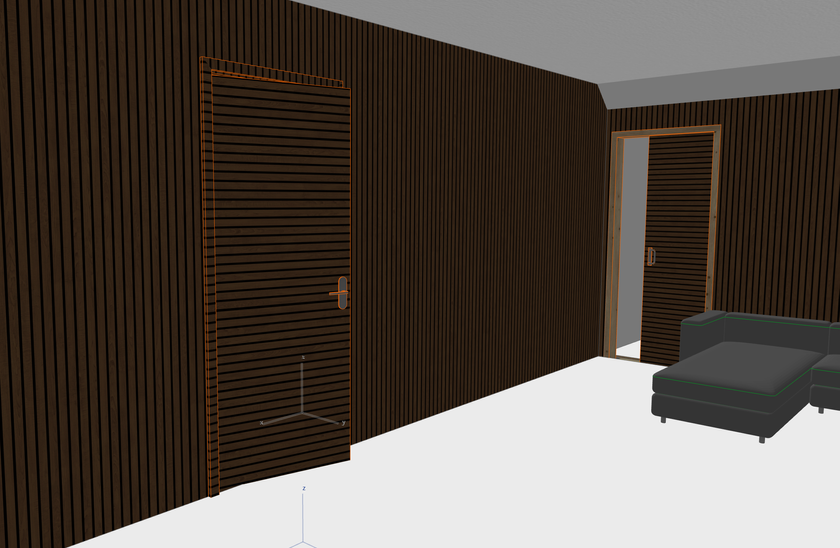
Also same behaviour for architrave - texture runs perpendicular to material direction.
My room has vertical timber acoustic panelling for which I have set up custom surface, material and composites for walls; however, when I apply the surface to my doors, it displays perpendicular to the walls.
As others have said before, yes, I could setup a duplicate surface and rotate it 90 degrees, but is this really the best solution to this issue? What am I missing?
Thanks
Marcus
UKI v.25 & 26 Solo - Windows 10
Labels:
- Labels:
-
Default Archicad Libraries
25 Replies 25

Barry Kelly
Moderator
Options
- Mark as New
- Bookmark
- Subscribe
- Mute
- Subscribe to RSS Feed
- Permalink
- Report Inappropriate Content
2024-10-28 06:55 AM
2024-10-28
06:55 AM
Thanks @AllanP
Yes, the VERT/COOR commands control the texture mapping.
The problem is you need to edit the default Graphisoft Library objects to fix it.
That is not a recommended (and sometimes not easy) task to to.
Barry.
One of the forum moderators.
Versions 6.5 to 27
i7-10700 @ 2.9Ghz, 32GB ram, GeForce RTX 2060 (6GB), Windows 10
Lenovo Thinkpad - i7-1270P 2.20 GHz, 32GB RAM, Nvidia T550, Windows 11
Versions 6.5 to 27
i7-10700 @ 2.9Ghz, 32GB ram, GeForce RTX 2060 (6GB), Windows 10
Lenovo Thinkpad - i7-1270P 2.20 GHz, 32GB RAM, Nvidia T550, Windows 11

Lingwisyer
Guru
Options
- Mark as New
- Bookmark
- Subscribe
- Mute
- Subscribe to RSS Feed
- Permalink
- Report Inappropriate Content
a month ago
a month ago
I was just reminded about this, and it is kind of disappointing that things like this were not resolved in the Libpack overhaul...
| AC22-29 AUS 3200 | Help Those Help You - Add a Signature |
| Self-taught, bend it till it breaks | Creating a Thread |
| Win11 | i9 10850K | 64GB | RX6600 | Win11 | 7800X3D | 32GB | RTX5070TI |
Barry Kelly
Moderator
Options
- Mark as New
- Bookmark
- Subscribe
- Mute
- Subscribe to RSS Feed
- Permalink
- Report Inappropriate Content
a month ago
a month ago
Yes it is disappointing.
My understanding was that the library packs would make it much easier and more frequent for individual packs to be updated rather than the one or two annual full library updates.
That never seems to eventuated.
Barry.
One of the forum moderators.
Versions 6.5 to 27
i7-10700 @ 2.9Ghz, 32GB ram, GeForce RTX 2060 (6GB), Windows 10
Lenovo Thinkpad - i7-1270P 2.20 GHz, 32GB RAM, Nvidia T550, Windows 11
Versions 6.5 to 27
i7-10700 @ 2.9Ghz, 32GB ram, GeForce RTX 2060 (6GB), Windows 10
Lenovo Thinkpad - i7-1270P 2.20 GHz, 32GB RAM, Nvidia T550, Windows 11

MitchD
Enthusiast
Options
- Mark as New
- Bookmark
- Subscribe
- Mute
- Subscribe to RSS Feed
- Permalink
- Report Inappropriate Content
a month ago
- last edited
a month ago
by
Laszlo Nagy
a month ago
i've discovered recently, that the slab top surface direction will generally follow the direction of the longest side. it won't update if the slab changes however.
both these slabs are using identical surfaces, but were drawn with the long side in different directions.

ArchiCAD 29 /// Win 11 Pro - Ultra 7 155H - 32GB RAM - RTX 4060 8GB /// Win 11 Pro - i7 12700 - 64GB RAM - RTX 3070 Ti 8GB
Barry Kelly
Moderator
Options
- Mark as New
- Bookmark
- Subscribe
- Mute
- Subscribe to RSS Feed
- Permalink
- Report Inappropriate Content
a month ago - last edited a month ago
a month ago
But now look at those slabs in plan with the cover fill from surface turned on.
This is my vertical colorbond roof material.
Fine in plan and in my own door objects.
Not so good in 3D as you mention.

Barry.
One of the forum moderators.
Versions 6.5 to 27
i7-10700 @ 2.9Ghz, 32GB ram, GeForce RTX 2060 (6GB), Windows 10
Lenovo Thinkpad - i7-1270P 2.20 GHz, 32GB RAM, Nvidia T550, Windows 11
Versions 6.5 to 27
i7-10700 @ 2.9Ghz, 32GB ram, GeForce RTX 2060 (6GB), Windows 10
Lenovo Thinkpad - i7-1270P 2.20 GHz, 32GB RAM, Nvidia T550, Windows 11
Barry Kelly
Moderator
Options
- Mark as New
- Bookmark
- Subscribe
- Mute
- Subscribe to RSS Feed
- Permalink
- Report Inappropriate Content
a month ago
a month ago
And the weird thing is you can align the texture in 3D without affecting the plan.

Barry.
One of the forum moderators.
Versions 6.5 to 27
i7-10700 @ 2.9Ghz, 32GB ram, GeForce RTX 2060 (6GB), Windows 10
Lenovo Thinkpad - i7-1270P 2.20 GHz, 32GB RAM, Nvidia T550, Windows 11
Versions 6.5 to 27
i7-10700 @ 2.9Ghz, 32GB ram, GeForce RTX 2060 (6GB), Windows 10
Lenovo Thinkpad - i7-1270P 2.20 GHz, 32GB RAM, Nvidia T550, Windows 11

- « Previous
- Next »
- « Previous
- Next »
Didn't find the answer?
Check other topics in this Forum
Back to ForumRead the latest accepted solutions!
Accepted SolutionsStart a new conversation!

Suggested topics
