
Turn on suggestions
Auto-suggest helps you quickly narrow down your search results by suggesting possible matches as you type.
Showing results for
EN
Turn on suggestions
Auto-suggest helps you quickly narrow down your search results by suggesting possible matches as you type.
Showing results for
- English
- :
- Forum
- :
- Libraries & objects
- :
- Elevation Marker – Problem!
Options
- Subscribe to RSS Feed
- Mark Topic as New
- Mark Topic as Read
- Pin this post for me
- Bookmark
- Subscribe to Topic
- Mute
- Printer Friendly Page

Anonymous
Not applicable
Options
- Mark as New
- Bookmark
- Subscribe
- Mute
- Subscribe to RSS Feed
- Permalink
- Report Inappropriate Content
2007-01-24 08:42 PM
Elevation Marker – Problem!
2007-01-24
08:42 PM
pen 1
text2 0,0,txt
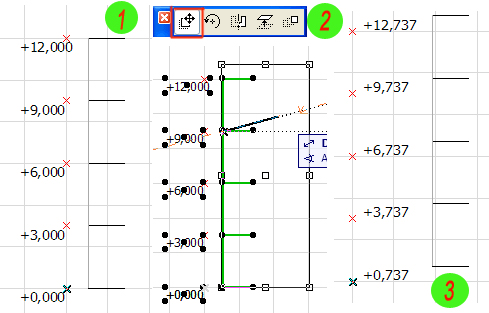
How to fix values «txt» that at moving they not change?
6 Replies 6
Anonymous
Not applicable
Options
- Mark as New
- Bookmark
- Subscribe
- Mute
- Subscribe to RSS Feed
- Permalink
- Report Inappropriate Content
2007-01-24 11:59 PM
2007-01-24
11:59 PM
Create two variables such as "Text":
dimText1
dimText2
Write in the Master a script:
dimText1 always shows current SYMB_POS_Y.
dimText2 will show SYMB_POS_Y, only when the library part will be placed on the plan or a section.
If this script will is included in a library part which can to be stretched, after extension dimText2 again will show SYMB_POS_Y.
dimText1
dimText2
Write in the Master a script:
HOTSPOT2 0, 0

DEFINE STYLE "dimText1"   Arial, 3, 8, 0
DEFINE STYLE "dimText2"   Arial, 3, 2, 0

Identify = ""
Identify = STR("%m", SYMB_POS_Y)

IF glob_context < 20 AND glob_context <> 5 THEN
	PARAMETERS dimText2 = Identify
ENDIF

dimText1 = STR("%m", SYMB_POS_Y)

STYLE "dimText1"
	TEXT2 0, 0, dimText1
STYLE "dimText2"
	TEXT2 0, 0, dimText2
In АС10 this script works. It works as follows.dimText1 always shows current SYMB_POS_Y.
dimText2 will show SYMB_POS_Y, only when the library part will be placed on the plan or a section.
If this script will is included in a library part which can to be stretched, after extension dimText2 again will show SYMB_POS_Y.

Frank Beister
Moderator
Options
- Mark as New
- Bookmark
- Subscribe
- Mute
- Subscribe to RSS Feed
- Permalink
- Report Inappropriate Content
2007-01-25 10:59 AM
2007-01-25
10:59 AM
But it is not possible to store the XY-Position the object originally was positioned, isn't it? You have minimal to stretch it one time to store the position into dimtext2.
bim author since 1994 | bim manager since 2018 | author of selfGDL.de | openGDL | skewed archicad user hall of fame | author of bim-all-doors.gsm
... und im Übrigen bin ich der Meinung, dass Trockenbauwände einschichtig zu modellieren sind.
... und im Übrigen bin ich der Meinung, dass Trockenbauwände einschichtig zu modellieren sind.
Anonymous
Not applicable
Options
- Mark as New
- Bookmark
- Subscribe
- Mute
- Subscribe to RSS Feed
- Permalink
- Report Inappropriate Content
2007-01-25 10:20 PM
2007-01-25
10:20 PM
Greeting, F. Beister.
I am not confident that correctly has translated your message. But I shall try to answer.
I have taken a mentioned below script from " Object Label ", but it is possible to write it easier.
Ask more simple phrases, please, if I have not understood your question.
I am not confident that correctly has translated your message. But I shall try to answer.
F. wrote:Yes. It is not possible to store. dimText2 accepts value from Identify during that moment when the object will be placed on the plan. Repeatedly it can accept value when the object will be stretched. To check up my words, add in a script one more point: HOTSPOT2 A, B
But it is not possible to store the XY-Position the object originally was positioned, isn't it? You have minimal to stretch it one time to store the position into dimtext2.
I have taken a mentioned below script from " Object Label ", but it is possible to write it easier.
HOTSPOT2 0, 0
HOTSPOT2 A, B

DEFINE STYLE "dimText1"   Arial, 3, 8, 0
DEFINE STYLE "dimText2"   Arial, 3, 2, 0

dimText1 = STR("%m", SYMB_POS_Y)

PARAMETERS dimText2 = dimText1

STYLE "dimText1"
	TEXT2 0, 0, dimText1
STYLE "dimText2"
	TEXT2 0, 0, dimText2
It is possible to apply " IF glob_context <> 5 THEN PARAMETERS dimText2 = dimText1 " to see dimText2 in a settings dialog.Ask more simple phrases, please, if I have not understood your question.
Frank Beister
Moderator
Options
- Mark as New
- Bookmark
- Subscribe
- Mute
- Subscribe to RSS Feed
- Permalink
- Report Inappropriate Content
2007-01-26 09:12 AM
2007-01-26
09:12 AM
There are limitations about the usage of SYMB_POS_X and SYMB_POS_Y. Both are 0 if you are in GLOB_CONTEXT=5. Unfortunatly the PARAMETERS-statement works normally only if GLOB_CONTEXT=5. What's new for me is, that obvisiously there is a situation, when PARAMETERS do work and the both parameters have the correct value. It has to be in Floor plan situation, but I have no idea how to check this situation by environment parameters.
I have changed your script to store all global position parameters separete:
[log-format: time•script-type•context•global parameter•local parameter]
Selection in Object dialog box:
08:47:46 • Parameter-Script • Settings • SYMB=0,000/0,000/0,392 • ePOS=0,000/0,000/0,000
08:47:46 • Interface-Script • Settings • SYMB=0,000/0,000/0,392 • ePOS=0,000/0,000/0,000
08:47:46 • Interface-Script • Settings • SYMB=0,000/0,000/0,392 • ePOS=0,000/0,000/0,000
08:47:46 • 2D-Skript-Script • Settings • SYMB=0,000/0,000/0,392 • ePOS=0,000/0,000/0,000
Built 2D view after closing dialog:
08:47:48 • 2D-Skript-Script • Floor-plan • SYMB=0,773/0,000/0,392 • ePOS=0,000/0,000/0,000
08:47:48 • Parameter-Script • Settings • SYMB=0,000/0,000/0,392 • ePOS=0,000/0,000/0,000
08:47:48 • Parameter-Script • Settings • SYMB=0,000/0,000/0,392 • ePOS=0,000/0,000/0,000
08:47:48 • Parameter-Script • Settings • SYMB=0,000/0,000/0,392 • ePOS=0,000/0,000/0,000
08:47:48 • Parameter-Script • Settings • SYMB=0,000/0,000/0,392 • ePOS=0,000/0,000/0,000
Resizing the object:
08:48:00 • 2D-Skript-Script • Floor-plan-Edit • SYMB=0,773/0,000/0,392 • ePOS=0,000/0,000/0,000
08:48:00 • 2D-Skript-Script • Floor-plan-Edit • SYMB=0,773/0,000/0,392 • ePOS=0,000/0,000/0,000
08:48:00 • 2D-Skript-Script • Floor-plan • SYMB=0,773/0,000/0,392 • ePOS=0,000/0,000/0,000
08:48:00 • 2D-Skript-Script • Floor-plan-Edit • SYMB=0,773/0,000/0,392 • ePOS=0,000/0,000/0,000
08:48:00 • 2D-Skript-Script • Floor-plan-Edit • SYMB=0,773/0,000/0,392 • ePOS=0,000/0,000/0,000
08:48:00 • 2D-Skript-Script • Floor-plan • SYMB=0,773/0,000/0,392 • ePOS=0,000/0,000/0,000
08:48:00 • 2D-Skript-Script • Floor-plan-Edit • SYMB=0,773/0,000/0,392 • ePOS=0,000/0,000/0,000
08:48:00 • 2D-Skript-Script • Floor-plan-Edit • SYMB=0,773/0,000/0,392 • ePOS=0,000/0,000/0,000
08:48:00 • 2D-Skript-Script • Floor-plan • SYMB=0,773/0,000/0,392 • ePOS=0,000/0,000/0,000
08:48:00 • 2D-Skript-Script • Floor-plan-Edit • SYMB=0,773/0,000/0,392 • ePOS=0,000/0,000/0,000
08:48:00 • 2D-Skript-Script • Floor-plan-Edit • SYMB=0,773/0,000/0,392 • ePOS=0,000/0,000/0,000
08:48:00 • 2D-Skript-Script • Floor-plan • SYMB=0,773/0,000/0,392 • ePOS=0,000/0,000/0,000
08:48:00 • Parameter-Script • Floor-plan • SYMB=0,773/0,000/0,392 • ePOS=0,000/0,000/0,000
08:48:00 • Parameter-Script • Floor-plan • SYMB=0,773/0,000/0,392 • ePOS=0,773/0,000/0,392
08:48:02 • 2D-Skript-Script • Floor-plan-Edit • SYMB=0,773/0,000/0,392 • ePOS=0,000/0,000/0,000
08:48:02 • 2D-Skript-Script • Floor-plan-Edit • SYMB=0,773/0,000/0,392 • ePOS=0,000/0,000/0,000
08:48:02 • 2D-Skript-Script • Floor-plan • SYMB=0,773/0,000/0,392 • ePOS=0,000/0,000/0,000
08:48:02 • Parameter-Script • Floor-plan • SYMB=0,773/0,000/0,392 • ePOS=0,000/0,000/0,000
08:48:03 • Parameter-Script • Floor-plan • SYMB=0,773/0,000/0,392 • ePOS=0,773/0,000/0,392
08:48:03 • Parameter-Script • Floor-plan • SYMB=0,773/0,000/0,392 • ePOS=0,773/0,000/0,392
08:48:03 • Parameter-Script • Floor-plan • SYMB=0,773/0,000/0,392 • ePOS=0,773/0,000/0,392
08:48:03 • Parameter-Script • Floor-plan • SYMB=0,773/0,000/0,392 • ePOS=0,773/0,000/0,392
08:48:03 • Parameter-Script • Floor-plan • SYMB=0,773/0,000/0,392 • ePOS=0,773/0,000/0,392
08:48:03 • 2D-Skript-Script • Floor-plan • SYMB=0,773/0,000/0,392 • ePOS=0,773/0,000/0,392
08:48:03 • Parameter-Script • Settings • SYMB=0,000/0,000/0,392 • ePOS=0,773/0,000/0,392
08:48:03 • Parameter-Script • Settings • SYMB=0,000/0,000/0,392 • ePOS=0,773/0,000/0,392
My goal is to store the global position of an object in the moment it is placed in floor plan. This position may never change afterwards! For this I do not see a way. Do you?
Funny thing beside: SYMB_POS_Z has ALWAYS a correct value!
I have changed your script to store all global position parameters separete:
HOTSPOT2 0, 0, 01
HOTSPOT2 a, b, 02

DEFINE STYLE "oben"   Arial, 3, 8, 0
DEFINE STYLE "unten"   Arial, 3, 2, 0

IF GLOB_CONTEXT>1 AND GLOB_CONTEXT<5 THEN
  PARAMETERS ePOSx=SYMB_POS_X, ePOSy=SYMB_POS_Y, ePOSz=SYMB_POS_Z
  ENDIF

STYLE "oben"
   TEXT2 a/2, b/2, STR("%m", SYMB_POS_X)+"/"+STR("%m", SYMB_POS_Y)+"/"+STR("%m", SYMB_POS_Z)
STYLE "unten"
   TEXT2 a/2, b/2, STR("%m", ePOSx)+"/"+STR("%m", ePOSy)+"/"+STR("%m", ePOSz)
I have loged the environment parameters when object is inserted into plan:[log-format: time•script-type•context•global parameter•local parameter]
Selection in Object dialog box:
08:47:46 • Parameter-Script • Settings • SYMB=0,000/0,000/0,392 • ePOS=0,000/0,000/0,000
08:47:46 • Interface-Script • Settings • SYMB=0,000/0,000/0,392 • ePOS=0,000/0,000/0,000
08:47:46 • Interface-Script • Settings • SYMB=0,000/0,000/0,392 • ePOS=0,000/0,000/0,000
08:47:46 • 2D-Skript-Script • Settings • SYMB=0,000/0,000/0,392 • ePOS=0,000/0,000/0,000
Built 2D view after closing dialog:
08:47:48 • 2D-Skript-Script • Floor-plan • SYMB=0,773/0,000/0,392 • ePOS=0,000/0,000/0,000
08:47:48 • Parameter-Script • Settings • SYMB=0,000/0,000/0,392 • ePOS=0,000/0,000/0,000
08:47:48 • Parameter-Script • Settings • SYMB=0,000/0,000/0,392 • ePOS=0,000/0,000/0,000
08:47:48 • Parameter-Script • Settings • SYMB=0,000/0,000/0,392 • ePOS=0,000/0,000/0,000
08:47:48 • Parameter-Script • Settings • SYMB=0,000/0,000/0,392 • ePOS=0,000/0,000/0,000
Resizing the object:
08:48:00 • 2D-Skript-Script • Floor-plan-Edit • SYMB=0,773/0,000/0,392 • ePOS=0,000/0,000/0,000
08:48:00 • 2D-Skript-Script • Floor-plan-Edit • SYMB=0,773/0,000/0,392 • ePOS=0,000/0,000/0,000
08:48:00 • 2D-Skript-Script • Floor-plan • SYMB=0,773/0,000/0,392 • ePOS=0,000/0,000/0,000
08:48:00 • 2D-Skript-Script • Floor-plan-Edit • SYMB=0,773/0,000/0,392 • ePOS=0,000/0,000/0,000
08:48:00 • 2D-Skript-Script • Floor-plan-Edit • SYMB=0,773/0,000/0,392 • ePOS=0,000/0,000/0,000
08:48:00 • 2D-Skript-Script • Floor-plan • SYMB=0,773/0,000/0,392 • ePOS=0,000/0,000/0,000
08:48:00 • 2D-Skript-Script • Floor-plan-Edit • SYMB=0,773/0,000/0,392 • ePOS=0,000/0,000/0,000
08:48:00 • 2D-Skript-Script • Floor-plan-Edit • SYMB=0,773/0,000/0,392 • ePOS=0,000/0,000/0,000
08:48:00 • 2D-Skript-Script • Floor-plan • SYMB=0,773/0,000/0,392 • ePOS=0,000/0,000/0,000
08:48:00 • 2D-Skript-Script • Floor-plan-Edit • SYMB=0,773/0,000/0,392 • ePOS=0,000/0,000/0,000
08:48:00 • 2D-Skript-Script • Floor-plan-Edit • SYMB=0,773/0,000/0,392 • ePOS=0,000/0,000/0,000
08:48:00 • 2D-Skript-Script • Floor-plan • SYMB=0,773/0,000/0,392 • ePOS=0,000/0,000/0,000
08:48:00 • Parameter-Script • Floor-plan • SYMB=0,773/0,000/0,392 • ePOS=0,000/0,000/0,000
08:48:00 • Parameter-Script • Floor-plan • SYMB=0,773/0,000/0,392 • ePOS=0,773/0,000/0,392
08:48:02 • 2D-Skript-Script • Floor-plan-Edit • SYMB=0,773/0,000/0,392 • ePOS=0,000/0,000/0,000
08:48:02 • 2D-Skript-Script • Floor-plan-Edit • SYMB=0,773/0,000/0,392 • ePOS=0,000/0,000/0,000
08:48:02 • 2D-Skript-Script • Floor-plan • SYMB=0,773/0,000/0,392 • ePOS=0,000/0,000/0,000
08:48:02 • Parameter-Script • Floor-plan • SYMB=0,773/0,000/0,392 • ePOS=0,000/0,000/0,000
08:48:03 • Parameter-Script • Floor-plan • SYMB=0,773/0,000/0,392 • ePOS=0,773/0,000/0,392
08:48:03 • Parameter-Script • Floor-plan • SYMB=0,773/0,000/0,392 • ePOS=0,773/0,000/0,392
08:48:03 • Parameter-Script • Floor-plan • SYMB=0,773/0,000/0,392 • ePOS=0,773/0,000/0,392
08:48:03 • Parameter-Script • Floor-plan • SYMB=0,773/0,000/0,392 • ePOS=0,773/0,000/0,392
08:48:03 • Parameter-Script • Floor-plan • SYMB=0,773/0,000/0,392 • ePOS=0,773/0,000/0,392
08:48:03 • 2D-Skript-Script • Floor-plan • SYMB=0,773/0,000/0,392 • ePOS=0,773/0,000/0,392
08:48:03 • Parameter-Script • Settings • SYMB=0,000/0,000/0,392 • ePOS=0,773/0,000/0,392
08:48:03 • Parameter-Script • Settings • SYMB=0,000/0,000/0,392 • ePOS=0,773/0,000/0,392
My goal is to store the global position of an object in the moment it is placed in floor plan. This position may never change afterwards! For this I do not see a way. Do you?
Funny thing beside: SYMB_POS_Z has ALWAYS a correct value!
bim author since 1994 | bim manager since 2018 | author of selfGDL.de | openGDL | skewed archicad user hall of fame | author of bim-all-doors.gsm
... und im Übrigen bin ich der Meinung, dass Trockenbauwände einschichtig zu modellieren sind.
... und im Übrigen bin ich der Meinung, dass Trockenbauwände einschichtig zu modellieren sind.
Anonymous
Not applicable
Options
- Mark as New
- Bookmark
- Subscribe
- Mute
- Subscribe to RSS Feed
- Permalink
- Report Inappropriate Content
2007-01-26 07:51 PM
2007-01-26
07:51 PM
My way the following. I apply the same method as well as with texts of the sizes.
When we want, that the text of the size did not change, we switch in position "Custom Text" in Dimension Text Setting. Then we change the size of object, but the text in size remains without changes.
It is habitual for user ArchiCAD. In a library part it is possible to apply this method also.
Part of a script from my library part "Level Dimension".
Variables such as "Text":
txtOption
customTextDimY
When we want, that the text of the size did not change, we switch in position "Custom Text" in Dimension Text Setting. Then we change the size of object, but the text in size remains without changes.
It is habitual for user ArchiCAD. In a library part it is possible to apply this method also.
Part of a script from my library part "Level Dimension".
Variables such as "Text":
txtOption
customTextDimY
VALUES "txtOption" "Measured value", "Custom Text"

DEFINE STYLE "dimText"  nameFont, sizeFont, anchor, typeFont

TextDimY = STR("%m", SYMB_POS_Y)

IF GLOB_CONTEXT <> 5 AND txtOption = "Measured value" THEN
	PARAMETERS customTextDimY = TextDimY
ENDIF

IF txtOption = "Measured value" THEN
	dimText = TextDimY
	LOCK "customTextDimY"
ELSE
	dimText = customTextDimY
ENDIF

STYLE "dimText"
   TEXT2 0, 0, dimText
Anonymous
Not applicable
Options
- Mark as New
- Bookmark
- Subscribe
- Mute
- Subscribe to RSS Feed
- Permalink
- Report Inappropriate Content
2007-01-29 06:19 PM
Didn't find the answer?
Check other topics in this Forum
Back to ForumRead the latest accepted solutions!
Accepted SolutionsStart a new conversation!

Suggested topics
- Number of Section Elevation and Detail Markers (Total Number of Viewpoints) in Documentation
- Surface texture in elevation won't publish to pdf in Documentation
- Unlinked section marker unavailable in Teamwork in Documentation
- Creating HLA drawings for PHPP calcs in Sustainable design
- template for version 29 view references problems in Project data & BIM
