
Turn on suggestions
Auto-suggest helps you quickly narrow down your search results by suggesting possible matches as you type.
Showing results for
EN
Turn on suggestions
Auto-suggest helps you quickly narrow down your search results by suggesting possible matches as you type.
Showing results for
- English
- :
- Forum
- :
- Libraries & objects
- :
- Re: editing the default archicad title
Options
- Subscribe to RSS Feed
- Mark Topic as New
- Mark Topic as Read
- Pin this post for me
- Bookmark
- Subscribe to Topic
- Mute
- Printer Friendly Page

Otavio Augusto
Enthusiast
Options
- Mark as New
- Bookmark
- Subscribe
- Mute
- Subscribe to RSS Feed
- Permalink
- Report Inappropriate Content
2023-07-05 12:05 AM
editing the default archicad title
2023-07-05
12:05 AM
Hello again, i'm trying to edit the default ArchiCAD title so we can have a more personalized one, but i can't find where i can change the alignment of the title text and the scale text in its GDL code.
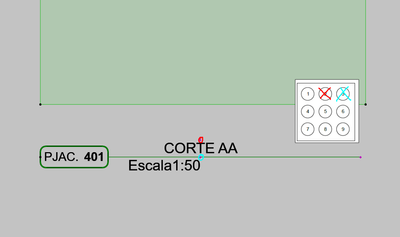
I found where to change its position, but i can't seem to find where the alignment is. Can a kind soul help me here?
Solved! Go to Solution.
Solved
Labels:
- Labels:
-
Default Archicad Libraries
1 Solution
Accepted Solutions

Robert Nichols
Advocate
Options
- Mark as New
- Bookmark
- Subscribe
- Mute
- Subscribe to RSS Feed
- Permalink
- Report Inappropriate Content
2023-07-05 12:36 AM - edited 2023-07-05 12:39 AM
2023-07-05
12:36 AM
That would be in a text style definition. Look for the following code (or something similar):
define style "styleDrawingScale" gs_drawing_scale_font_type,
gs_drawing_scale_font_size,
anchorDrawingScale,
drawingScaleFontStyle
anchorDrawScale is the variable you are interested. It uses a code derived from a 9-square box. The value 1 means a text bounding box is anchored in upper-left corner. 9 means text is anchored in lower-right corner. 5 means the text box is anchored in the very center, vertically and horizontally, of the text bounding box. I'm sure you can figure out the remainder.
Mac Studio, 32gb ram, ArchiCAD v26 (Apple Silicon) MacOS 13
2 Replies 2
Robert Nichols
Advocate
Options
- Mark as New
- Bookmark
- Subscribe
- Mute
- Subscribe to RSS Feed
- Permalink
- Report Inappropriate Content
2023-07-05 12:36 AM - edited 2023-07-05 12:39 AM
2023-07-05
12:36 AM
That would be in a text style definition. Look for the following code (or something similar):
define style "styleDrawingScale" gs_drawing_scale_font_type,
gs_drawing_scale_font_size,
anchorDrawingScale,
drawingScaleFontStyle
anchorDrawScale is the variable you are interested. It uses a code derived from a 9-square box. The value 1 means a text bounding box is anchored in upper-left corner. 9 means text is anchored in lower-right corner. 5 means the text box is anchored in the very center, vertically and horizontally, of the text bounding box. I'm sure you can figure out the remainder.
Mac Studio, 32gb ram, ArchiCAD v26 (Apple Silicon) MacOS 13
Otavio Augusto
Enthusiast
Options
- Mark as New
- Bookmark
- Subscribe
- Mute
- Subscribe to RSS Feed
- Permalink
- Report Inappropriate Content
2023-07-05 07:44 PM
2023-07-05
07:44 PM
Perfect @Robert Nichols, it was exactly that!
Thanks very much!!!

Didn't find the answer?
Check other topics in this Forum
Back to ForumRead the latest accepted solutions!
Accepted SolutionsStart a new conversation!

Suggested topics
- Some free useful objects: Road signs, parametric pathway, roof crickets, crowds in Libraries & objects
- Button to activate or deactivate 3d editting plane. in Project data & BIM
- Railing and Curtain Wall in Modeling
- Archicad 26 incorrectly keeps Shift modifier active after the physical key is released in General discussions
- Morph rotate - Editing plane in Modeling
