
Turn on suggestions
Auto-suggest helps you quickly narrow down your search results by suggesting possible matches as you type.
Showing results for
EN
Turn on suggestions
Auto-suggest helps you quickly narrow down your search results by suggesting possible matches as you type.
Showing results for
Options
- Subscribe to RSS Feed
- Mark Topic as New
- Mark Topic as Read
- Pin this post for me
- Bookmark
- Subscribe to Topic
- Mute
- Printer Friendly Page

KeesW
Advocate
Options
- Mark as New
- Bookmark
- Subscribe
- Mute
- Subscribe to RSS Feed
- Permalink
- Report Inappropriate Content
2022-01-19
02:54 AM
- last edited on
2022-09-28
08:38 PM
by
 Oleksandra Vakariuk
Adding holes to wall bracket plates
2022-01-19
02:54 AM
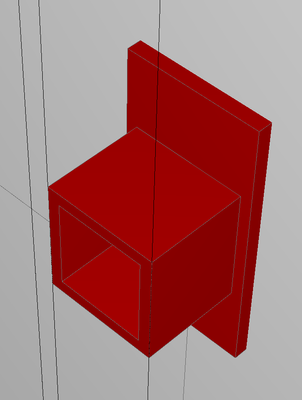
I am completing drawings for a small job requiring plated wall brackets. I've created the sketch but want to add 4 holes in the backing plate for fixing it to the wall. I've used the wall tool for the backing plate and am not sure of the easiest way to add the holes.
Cornelis (Kees) Wegman
cornelis wegman architects
AC 5 - 26 Dell XPS 8940 Win 10 16GB 1TB SSD 2TB HD RTX 3070 GPU
Laptop: AC 24 - 26 Win 10 16GB 1TB SSD RTX 3070 GPU
cornelis wegman architects
AC 5 - 26 Dell XPS 8940 Win 10 16GB 1TB SSD 2TB HD RTX 3070 GPU
Laptop: AC 24 - 26 Win 10 16GB 1TB SSD RTX 3070 GPU
6 Replies 6

ryejuan
Advisor
Options
- Mark as New
- Bookmark
- Subscribe
- Mute
- Subscribe to RSS Feed
- Permalink
- Report Inappropriate Content
2022-01-19 03:36 AM
2022-01-19
03:36 AM
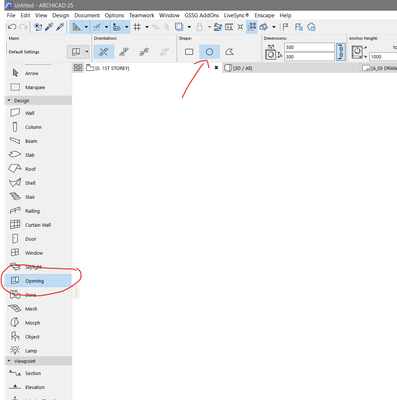
you can use the opening tool for the 4 holes that you need.
In the end what is your Objective? ArchiCAD 9 onwards
CPU: i9-14900K @ 3.2Ghz; GPU: GeForce RTX 5080 super (16GB); SSD: XPG GAMMIX S70 1TB; RAM: 64GB @ 4200MT/s.
WINDOWS 11 PRO
CPU: i9-14900K @ 3.2Ghz; GPU: GeForce RTX 5080 super (16GB); SSD: XPG GAMMIX S70 1TB; RAM: 64GB @ 4200MT/s.
WINDOWS 11 PRO
KeesW
Advocate
Options
- Mark as New
- Bookmark
- Subscribe
- Mute
- Subscribe to RSS Feed
- Permalink
- Report Inappropriate Content
2022-01-19 03:38 AM
2022-01-19
03:38 AM
Opening tool? Where is that?
Cornelis (Kees) Wegman
cornelis wegman architects
AC 5 - 26 Dell XPS 8940 Win 10 16GB 1TB SSD 2TB HD RTX 3070 GPU
Laptop: AC 24 - 26 Win 10 16GB 1TB SSD RTX 3070 GPU
cornelis wegman architects
AC 5 - 26 Dell XPS 8940 Win 10 16GB 1TB SSD 2TB HD RTX 3070 GPU
Laptop: AC 24 - 26 Win 10 16GB 1TB SSD RTX 3070 GPU
ryejuan
Advisor
Options
- Mark as New
- Bookmark
- Subscribe
- Mute
- Subscribe to RSS Feed
- Permalink
- Report Inappropriate Content
2022-01-19 03:41 AM
2022-01-19
03:41 AM
screenshot below for your reference.
In the end what is your Objective? ArchiCAD 9 onwards
CPU: i9-14900K @ 3.2Ghz; GPU: GeForce RTX 5080 super (16GB); SSD: XPG GAMMIX S70 1TB; RAM: 64GB @ 4200MT/s.
WINDOWS 11 PRO
CPU: i9-14900K @ 3.2Ghz; GPU: GeForce RTX 5080 super (16GB); SSD: XPG GAMMIX S70 1TB; RAM: 64GB @ 4200MT/s.
WINDOWS 11 PRO
KeesW
Advocate
Options
- Mark as New
- Bookmark
- Subscribe
- Mute
- Subscribe to RSS Feed
- Permalink
- Report Inappropriate Content
2022-01-19 05:39 AM
2022-01-19
05:39 AM
Thank you Ryejuan. It worked!
I had never used the Opening Tool until this morning. I did get to its menu via the Windows tool but couldn't use it for 12mm dia bolt holes.
Cornelis (Kees) Wegman
cornelis wegman architects
AC 5 - 26 Dell XPS 8940 Win 10 16GB 1TB SSD 2TB HD RTX 3070 GPU
Laptop: AC 24 - 26 Win 10 16GB 1TB SSD RTX 3070 GPU
cornelis wegman architects
AC 5 - 26 Dell XPS 8940 Win 10 16GB 1TB SSD 2TB HD RTX 3070 GPU
Laptop: AC 24 - 26 Win 10 16GB 1TB SSD RTX 3070 GPU

DGSketcher
Legend
Options
- Mark as New
- Bookmark
- Subscribe
- Mute
- Subscribe to RSS Feed
- Permalink
- Report Inappropriate Content
2022-01-19 10:03 AM
2022-01-19
10:03 AM
Good that you have it sorted, but I would have made that with the beam tool so it is a single component. You would need two complex profiles... 1. The tube & 2. The back plate including holes. Create a beam combining the 2 profiles and job done, plus if you need to resize anything you only have to edit the profiles for all the brackets to update.
Apple iMac Intel i9 / macOS Sonoma / AC27UKI (most recent builds.. if they work)
ryejuan
Advisor
Options
- Mark as New
- Bookmark
- Subscribe
- Mute
- Subscribe to RSS Feed
- Permalink
- Report Inappropriate Content
2022-01-19 11:14 AM
2022-01-19
11:14 AM
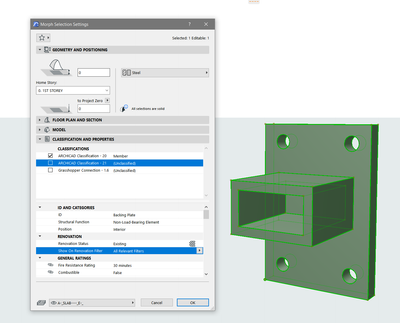
yes that's another way of doing that. other options i can think of is using morph tool you just need to classify it but it will be as one element rather than two.
In the end what is your Objective? ArchiCAD 9 onwards
CPU: i9-14900K @ 3.2Ghz; GPU: GeForce RTX 5080 super (16GB); SSD: XPG GAMMIX S70 1TB; RAM: 64GB @ 4200MT/s.
WINDOWS 11 PRO
CPU: i9-14900K @ 3.2Ghz; GPU: GeForce RTX 5080 super (16GB); SSD: XPG GAMMIX S70 1TB; RAM: 64GB @ 4200MT/s.
WINDOWS 11 PRO

Still looking?

