
Turn on suggestions
Auto-suggest helps you quickly narrow down your search results by suggesting possible matches as you type.
Showing results for
EN
Turn on suggestions
Auto-suggest helps you quickly narrow down your search results by suggesting possible matches as you type.
Showing results for
Options
- Subscribe to RSS Feed
- Mark Topic as New
- Mark Topic as Read
- Pin this post for me
- Bookmark
- Subscribe to Topic
- Mute
- Printer Friendly Page

Kumar Jo
Contributor
Options
- Mark as New
- Bookmark
- Subscribe
- Mute
- Subscribe to RSS Feed
- Permalink
- Report Inappropriate Content
2026-07-15 09:24 PM
Brick Soldiers Arched Entry
2026-07-15
09:24 PM
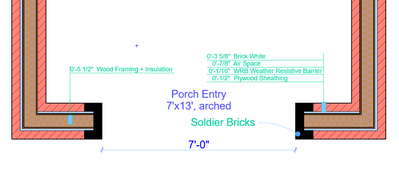
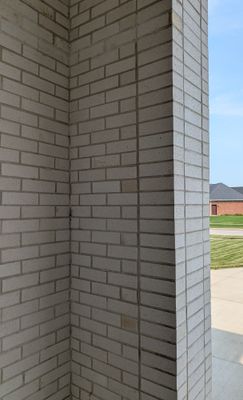
I need some help here how to model this soldier brick for a porch entry. The project was designed in 2017 with an another modeling software and used only the 2D representation for soldier course. Now I have transitioned to AC in 2024, I am recreating the old projects in AC. All the bricks are modular 7 5/8 length x 3 5/8 width x 2 1/4 height. Mortar 3/8 thick.
My workflow: Core walls as basic or composite (if either sides with gyp. board), sheathing skin to finish skin as CP Wall w Offset modifiers. This gets easier to offset the sheathing and other skins to mud sill and the bricks' skin to foundation ledge.

Operating system used: Windows 11-25H2
|| AC 29 USA ||
|| AMD Ryzen 9 6900HX 32GB || Win 11 Pro || PNY nVIDIA RTX 4060Ti 16GB XLR8 ||
|| AMD Ryzen 9 6900HX 32GB || Win 11 Pro || PNY nVIDIA RTX 4060Ti 16GB XLR8 ||
3 Replies 3

AllanP
Expert
Options
- Mark as New
- Bookmark
- Subscribe
- Mute
- Subscribe to RSS Feed
- Permalink
- Report Inappropriate Content
2026-07-16 07:17 AM
2026-07-16
07:17 AM
i would look to see if there is a setting like this in your loaded libraries...

I have been using ArchiCAD continually since ArchiCAD 4.5
Member of Architalk since 2003, but missed the migration from Architalk to Graphisoft Communities. Melbourne, Australia
Member of Architalk since 2003, but missed the migration from Architalk to Graphisoft Communities. Melbourne, Australia

Lingwisyer
Guru
Options
- Mark as New
- Bookmark
- Subscribe
- Mute
- Subscribe to RSS Feed
- Permalink
- Report Inappropriate Content
2026-07-16 08:08 AM
2026-07-16
08:08 AM
Note: The Masonry Arch option will not do the vertical sides, just the arch itself. I believe it also just radiates the joints from the arc centre rather than rotating actual rectangles and filling with wedges of mortar.
| AC22-29 AUS 3200 | Help Those Help You - Add a Signature |
| Self-taught, bend it till it breaks | Creating a Thread |
| Win11 | i9 10850K | 64GB | RX6600 | Win11 | 7800X3D | 32GB | RTX5070TI |
Kumar Jo
Contributor
Options
- Mark as New
- Bookmark
- Subscribe
- Mute
- Subscribe to RSS Feed
- Permalink
- Report Inappropriate Content
2026-07-16 04:53 PM
2026-07-16
04:53 PM
@AllanP , yes I have it, I use US library and INT library as well when some of the door setting options not there in US library. As @Lingwisyer said, the inbuilt settings are for only the arch and not the entire entry. And there is no way how you want to align/array the bricks. After I switched to AC, I started loving it but I couldn't sometimes.
Thank you @AllanP and @Lingwisyer
|| AC 29 USA ||
|| AMD Ryzen 9 6900HX 32GB || Win 11 Pro || PNY nVIDIA RTX 4060Ti 16GB XLR8 ||
|| AMD Ryzen 9 6900HX 32GB || Win 11 Pro || PNY nVIDIA RTX 4060Ti 16GB XLR8 ||

Still looking?
Suggested topics
