
Turn on suggestions
Auto-suggest helps you quickly narrow down your search results by suggesting possible matches as you type.
Showing results for
EN
Turn on suggestions
Auto-suggest helps you quickly narrow down your search results by suggesting possible matches as you type.
Showing results for
Options
- Subscribe to RSS Feed
- Mark Topic as New
- Mark Topic as Read
- Pin this post for me
- Bookmark
- Subscribe to Topic
- Mute
- Printer Friendly Page

FiestyFejioa
Contributor
Options
- Mark as New
- Bookmark
- Subscribe
- Mute
- Subscribe to RSS Feed
- Permalink
- Report Inappropriate Content
2026-08-16 06:24 AM
Ci Tools Roof Covering
2026-08-16
06:24 AM
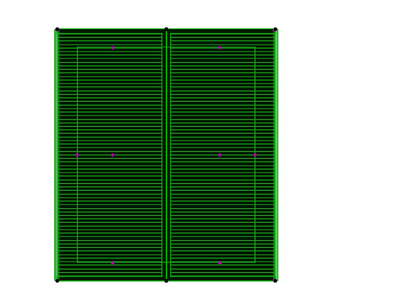
Hi there, I'm an Archicad student currently using Ci Tools Roof Coverings for an assignment. I'm having trouble removing the solid black fill that is displaying on my roof covering in plan view. I've tried changing the pens and fill settings, but the appearance doesn't seem to update. Could you please advise where this black fill is controlled and how I can make the roof covering display with a lighter or transparent fill instead?
Thank you for your help.
Kind regards,
Solved! Go to Solution.
Solved
Labels:
- Labels:
-
Design Options
-
Roofs
1 Solution
Accepted Solutions

CosminF
Advisor
Options
- Mark as New
- Bookmark
- Subscribe
- Mute
- Subscribe to RSS Feed
- Permalink
- Report Inappropriate Content
2026-08-17 01:54 PM
2026-08-17
01:54 PM
Hi,
I'd:
- Check the object fills and pens (make sure none is set to black)
- Check if you have any graphic overrides active (that might override the display settings for this)
- Check the MVO (Model view options) also for any display settings.
Cosmin Furdui - architect @ Wincon
AC 27, running on Windows 11 Intel(R) Core(TM) i7-14700K CPU64, 3.40GHz, 32GB RAM, Nvidia GeForce RTX5060 32GB
AC 27, running on Windows 11 Intel(R) Core(TM) i7-14700K CPU64, 3.40GHz, 32GB RAM, Nvidia GeForce RTX5060 32GB
2 Replies 2
CosminF
Advisor
Options
- Mark as New
- Bookmark
- Subscribe
- Mute
- Subscribe to RSS Feed
- Permalink
- Report Inappropriate Content
2026-08-17 01:54 PM
2026-08-17
01:54 PM
Hi,
I'd:
- Check the object fills and pens (make sure none is set to black)
- Check if you have any graphic overrides active (that might override the display settings for this)
- Check the MVO (Model view options) also for any display settings.
Cosmin Furdui - architect @ Wincon
AC 27, running on Windows 11 Intel(R) Core(TM) i7-14700K CPU64, 3.40GHz, 32GB RAM, Nvidia GeForce RTX5060 32GB
AC 27, running on Windows 11 Intel(R) Core(TM) i7-14700K CPU64, 3.40GHz, 32GB RAM, Nvidia GeForce RTX5060 32GB

Lingwisyer
Guru
Options
- Mark as New
- Bookmark
- Subscribe
- Mute
- Subscribe to RSS Feed
- Permalink
- Report Inappropriate Content
2026-08-18 05:00 AM
2026-08-18
05:00 AM
Given that the addon generates a 3D object, make sure that it is set to show Symbolic in the floor plan, else every ridge and valley edge will draw a contour if enabled.
Ling.
| AC22-29 AUS 3200 | Help Those Help You - Add a Signature |
| Self-taught, bend it till it breaks | Creating a Thread |
| Win11 | i9 10850K | 64GB | RX6600 | Win11 | 7800X3D | 32GB | RTX5070TI |

Still looking?

Suggested topics
- Ci Tools Roof Covering in Modeling
- Silpu Render for Archicad: photoreal AI renders from your live view, in about a minute (free to try) in General discussions
- Solid Element Operations - Floor Plans and the Roof Tool in Modeling
- Update — FloorPlan6 is now on GitHub (open-source, AGPL-3.0) in Parametric design
- FloorPlan6 — open-source apartment layout generator looking for contributors in Parametric design
