
Turn on suggestions
Auto-suggest helps you quickly narrow down your search results by suggesting possible matches as you type.
Showing results for
EN
Turn on suggestions
Auto-suggest helps you quickly narrow down your search results by suggesting possible matches as you type.
Showing results for
Options
- Subscribe to RSS Feed
- Mark Topic as New
- Mark Topic as Read
- Pin this post for me
- Bookmark
- Subscribe to Topic
- Mute
- Printer Friendly Page

Kamelite
Expert
Options
- Mark as New
- Bookmark
- Subscribe
- Mute
- Subscribe to RSS Feed
- Permalink
- Report Inappropriate Content
2021-03-04
10:52 PM
- last edited on
2023-05-09
03:44 PM
by
 Rubia Torres
Distance to far from 0,0,0?
2021-03-04
10:52 PM
This building is a part of a big project, and it is geographically correct in accordens to the rest f the buildngs...
To find out what was wrong, I drew a wall from 0,0 to my building. And when I moved along that wal in 3Dl, all of a sudden the geometry stopped, but the reference line went on....
.Kamelite
Windows 10, Archicad 27,28 and 29
3 Replies 3

Barry Kelly
Moderator
Options
- Mark as New
- Bookmark
- Subscribe
- Mute
- Subscribe to RSS Feed
- Permalink
- Report Inappropriate Content
2021-03-05 02:57 AM
2021-03-05
02:57 AM
Archicad doesn't like the model to be too far from the origin - but I wouldn't say 500m is very far at all.
Usually you start to see glitches in the 3D - not that it just disappears.
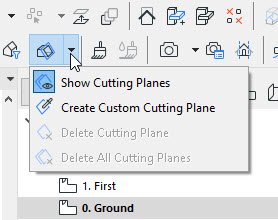
I am wondering if you maybe have a 3D cutting plane.
You can turn of the cutting planes or delete them completely.
Barry.
Usually you start to see glitches in the 3D - not that it just disappears.
I am wondering if you maybe have a 3D cutting plane.
You can turn of the cutting planes or delete them completely.
Barry.
One of the forum moderators.
Versions 6.5 to 27
i7-10700 @ 2.9Ghz, 32GB ram, GeForce RTX 2060 (6GB), Windows 10
Lenovo Thinkpad - i7-1270P 2.20 GHz, 32GB RAM, Nvidia T550, Windows 11
Versions 6.5 to 27
i7-10700 @ 2.9Ghz, 32GB ram, GeForce RTX 2060 (6GB), Windows 10
Lenovo Thinkpad - i7-1270P 2.20 GHz, 32GB RAM, Nvidia T550, Windows 11

Options
- Mark as New
- Bookmark
- Subscribe
- Mute
- Subscribe to RSS Feed
- Permalink
- Report Inappropriate Content
2021-03-05 08:23 AM
2021-03-05
08:23 AM
Hello Kamelite,
The last time I have check how far from origin we can model with archicad, I have found about 80km.
With Archicad we should put our origin on a building or a parcel corner to be able to inquire GPS coordinations.
If you want to be able to export a referenced DWG you are able to do this through a worksheet and keep your model near from origin.
The last time I have check how far from origin we can model with archicad, I have found about 80km.
With Archicad we should put our origin on a building or a parcel corner to be able to inquire GPS coordinations.
If you want to be able to export a referenced DWG you are able to do this through a worksheet and keep your model near from origin.
Kamelite
Expert
Options
- Mark as New
- Bookmark
- Subscribe
- Mute
- Subscribe to RSS Feed
- Permalink
- Report Inappropriate Content
2021-03-05 08:43 AM
2021-03-05
08:43 AM
Thanks to both of you. Turning off the 3D Cutaway the trick!
.Kamelite
.Kamelite
Windows 10, Archicad 27,28 and 29

Still looking?

Suggested topics
- Some free useful objects: Road signs, parametric pathway, roof crickets, crowds in Libraries & objects
- Zone boundary excludes curtainwall footprint area. in Project data & BIM
- Elevations View in Documentation
- Georeferencing an IFC4 in Collaboration with other software
- Profile Stack 2D Detail object in Libraries & objects
