
Turn on suggestions
Auto-suggest helps you quickly narrow down your search results by suggesting possible matches as you type.
Showing results for
EN
Turn on suggestions
Auto-suggest helps you quickly narrow down your search results by suggesting possible matches as you type.
Showing results for
Options
- Subscribe to RSS Feed
- Mark Topic as New
- Mark Topic as Read
- Pin this post for me
- Bookmark
- Subscribe to Topic
- Mute
- Printer Friendly Page

Too Long
Advocate
Options
- Mark as New
- Bookmark
- Subscribe
- Mute
- Subscribe to RSS Feed
- Permalink
- Report Inappropriate Content
2022-03-06 04:48 AM - edited 2022-03-06 04:50 AM
Skylights cutting through roof with surface
2022-03-06
04:48 AM
Hi all.
Im confused by a setting that is using a surface on the face of the roof composite when cutting through a skylight.
I cant find a setting in the skylight or roof composite to change this.
Do you know where I can find this setting so I can change the brick surface?
Thanks
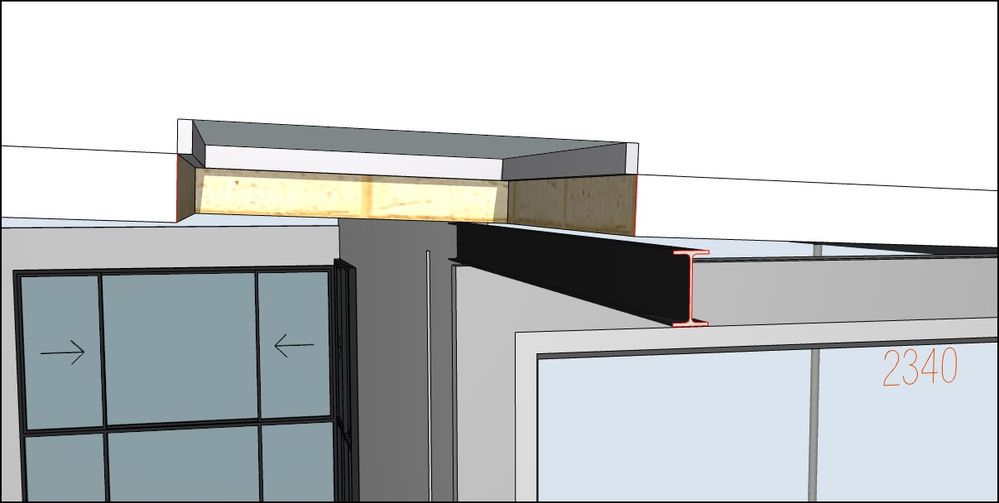
AC26 AUS Full
Read-Only
3 Replies 3

 Laszlo Nagy
Community Admin
Options
- Mark as New
- Bookmark
- Subscribe
- Mute
- Subscribe to RSS Feed
- Permalink
- Report Inappropriate Content
2022-03-07 05:00 AM
2022-03-07
05:00 AM
Try the "Edge Surface" override in the "Model" panel of the Roof Settings Dialog.
Loving Archicad since 1995 - Find Archicad Tips at x.com/laszlonagy
AMD Ryzen9 5900X CPU, 64 GB RAM 3600 MHz, Nvidia GTX 1060 6GB, 500 GB NVMe SSD
2x28" (2560x1440), Windows 10 PRO ENG, Ac20-Ac29
AMD Ryzen9 5900X CPU, 64 GB RAM 3600 MHz, Nvidia GTX 1060 6GB, 500 GB NVMe SSD
2x28" (2560x1440), Windows 10 PRO ENG, Ac20-Ac29
Too Long
Advocate
Options
- Mark as New
- Bookmark
- Subscribe
- Mute
- Subscribe to RSS Feed
- Permalink
- Report Inappropriate Content
2022-03-08 01:29 AM
2022-03-08
01:29 AM
Hi Laszlo.
Unfortunately that hasnt helped. All the overides are off and over riding dosnt help.
AC26 AUS Full

Barry Kelly
Moderator
Options
- Mark as New
- Bookmark
- Subscribe
- Mute
- Subscribe to RSS Feed
- Permalink
- Report Inappropriate Content
2022-03-08 02:02 AM - edited 2022-03-08 02:03 AM
2022-03-08
02:02 AM
What skylight object are you using?
All the ones I have in 25 seem to have trims to the edge of the roof and are more detailed.
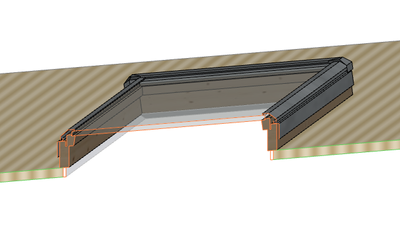
OK, you must have the 'Simplified' view set in your Model View Options for 3D of skylights.
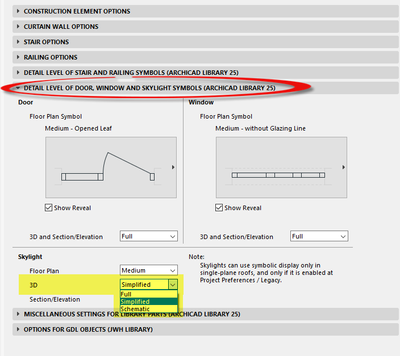
In that case it seems it actually uses the bottom surface of the roof, even when the overrides for the roof are turned off.
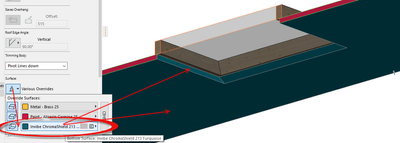
Turn the roof bottom surface override on, change it to what you want and then turn the override off again so the roof still appears as you want it.
Or set the 3D view of the skylight to 'Full' for a more realistic view.
Barry.
One of the forum moderators.
Versions 6.5 to 27
i7-10700 @ 2.9Ghz, 32GB ram, GeForce RTX 2060 (6GB), Windows 10
Lenovo Thinkpad - i7-1270P 2.20 GHz, 32GB RAM, Nvidia T550, Windows 11
Versions 6.5 to 27
i7-10700 @ 2.9Ghz, 32GB ram, GeForce RTX 2060 (6GB), Windows 10
Lenovo Thinkpad - i7-1270P 2.20 GHz, 32GB RAM, Nvidia T550, Windows 11

Still looking?

Suggested topics
- Wall surface offset in Modeling
- Surface texture in elevation won't publish to pdf in Documentation
- Some free useful objects: Road signs, parametric pathway, roof crickets, crowds in Libraries & objects
- Surface / Component Schedule Bug: Automatic Column Wrapping Ignores Folded Geometry and Returns Flat in Project data & BIM
- Changing wall preview type in favorite window library in Libraries & objects
