
Turn on suggestions
Auto-suggest helps you quickly narrow down your search results by suggesting possible matches as you type.
Showing results for
EN
Turn on suggestions
Auto-suggest helps you quickly narrow down your search results by suggesting possible matches as you type.
Showing results for
Options
- Subscribe to RSS Feed
- Mark Topic as New
- Mark Topic as Read
- Pin this post for me
- Bookmark
- Subscribe to Topic
- Mute
- Printer Friendly Page

KeesW
Advocate
Options
- Mark as New
- Bookmark
- Subscribe
- Mute
- Subscribe to RSS Feed
- Permalink
- Report Inappropriate Content
2015-05-28
04:53 AM
- last edited on
2023-05-26
02:09 PM
by
 Rubia Torres
Text tab settings
2015-05-28
04:53 AM
Cornelis (Kees) Wegman
cornelis wegman architects
AC 5 - 26 Dell XPS 8940 Win 10 16GB 1TB SSD 2TB HD RTX 3070 GPU
Laptop: AC 24 - 26 Win 10 16GB 1TB SSD RTX 3070 GPU
cornelis wegman architects
AC 5 - 26 Dell XPS 8940 Win 10 16GB 1TB SSD 2TB HD RTX 3070 GPU
Laptop: AC 24 - 26 Win 10 16GB 1TB SSD RTX 3070 GPU
8 Replies 8

Matt Balaam
Advocate
Options
- Mark as New
- Bookmark
- Subscribe
- Mute
- Subscribe to RSS Feed
- Permalink
- Report Inappropriate Content
2015-05-28 05:36 AM
2015-05-28
05:36 AM
Just click on the ruler at the top to create a tab stop. These can be set individually for each line of text or the same for the whole text box by selecting all the text prior to creating the tab stop.
They can also be adjusted by dragging them along the ruler or removed by dragging them off the ruler.
They can also be adjusted by dragging them along the ruler or removed by dragging them off the ruler.
AC29 AUS | Windows 11 | Intel Core i7-12700 @ 2.1GHz | 32GB RAM | NVidia T1000

Barry Kelly
Moderator
Options
- Mark as New
- Bookmark
- Subscribe
- Mute
- Subscribe to RSS Feed
- Permalink
- Report Inappropriate Content
2015-05-28 05:46 AM
2015-05-28
05:46 AM
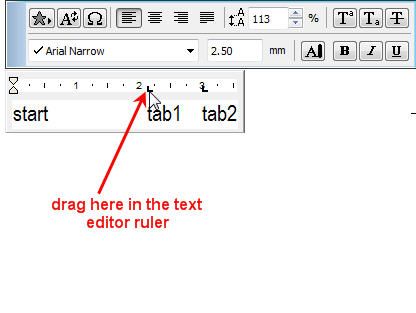
Just click and drag in the ruler of the text editor.
It seems a little buggy to me as sometimes you can create a new tab between existing tabs and sometimes it just moves the next tab along.
The tabs also seem to be set line by line - not for the entire paragraph when you are adjusting them.
Although once you have the first line set up and then 'Enter' for a new line it will use the tabs of the line above (but still they adjust separately).
Barry.
Beaten to the punch by Matt.
I hadn't tried selecting all to adjust all lines at once.
Mind you I had never tried to adjust the tabs before either.
It seems a little buggy to me as sometimes you can create a new tab between existing tabs and sometimes it just moves the next tab along.
The tabs also seem to be set line by line - not for the entire paragraph when you are adjusting them.
Although once you have the first line set up and then 'Enter' for a new line it will use the tabs of the line above (but still they adjust separately).
Barry.
Beaten to the punch by Matt.
I hadn't tried selecting all to adjust all lines at once.
Mind you I had never tried to adjust the tabs before either.
One of the forum moderators.
Versions 6.5 to 27
i7-10700 @ 2.9Ghz, 32GB ram, GeForce RTX 2060 (6GB), Windows 10
Lenovo Thinkpad - i7-1270P 2.20 GHz, 32GB RAM, Nvidia T550, Windows 11
Versions 6.5 to 27
i7-10700 @ 2.9Ghz, 32GB ram, GeForce RTX 2060 (6GB), Windows 10
Lenovo Thinkpad - i7-1270P 2.20 GHz, 32GB RAM, Nvidia T550, Windows 11
KeesW
Advocate
Options
- Mark as New
- Bookmark
- Subscribe
- Mute
- Subscribe to RSS Feed
- Permalink
- Report Inappropriate Content
2015-05-28 06:28 AM
2015-05-28
06:28 AM
Thank you. How obvious.
I must have tried it once with a corrupted file and it didn't work. So, I didn't try it again.
I must have tried it once with a corrupted file and it didn't work. So, I didn't try it again.
Cornelis (Kees) Wegman
cornelis wegman architects
AC 5 - 26 Dell XPS 8940 Win 10 16GB 1TB SSD 2TB HD RTX 3070 GPU
Laptop: AC 24 - 26 Win 10 16GB 1TB SSD RTX 3070 GPU
cornelis wegman architects
AC 5 - 26 Dell XPS 8940 Win 10 16GB 1TB SSD 2TB HD RTX 3070 GPU
Laptop: AC 24 - 26 Win 10 16GB 1TB SSD RTX 3070 GPU
 Laszlo Nagy
Community Admin
Options
- Mark as New
- Bookmark
- Subscribe
- Mute
- Subscribe to RSS Feed
- Permalink
- Report Inappropriate Content
2015-05-28 05:24 PM
2015-05-28
05:24 PM
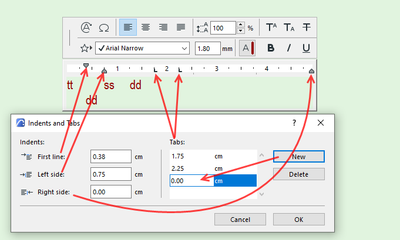
While editing a Text Block, you can also right-click the Ruler or anywhere in the text block and select the Indents and Tabs command of the context menu. In the upcoming Dialog you can numerically set indent positions and define and set tab positions.
Loving Archicad since 1995 - Find Archicad Tips at x.com/laszlonagy
AMD Ryzen9 5900X CPU, 64 GB RAM 3600 MHz, Nvidia GTX 1060 6GB, 500 GB NVMe SSD
2x28" (2560x1440), Windows 10 PRO ENG, Ac20-Ac29
AMD Ryzen9 5900X CPU, 64 GB RAM 3600 MHz, Nvidia GTX 1060 6GB, 500 GB NVMe SSD
2x28" (2560x1440), Windows 10 PRO ENG, Ac20-Ac29

Lingwisyer
Guru
Options
- Mark as New
- Bookmark
- Subscribe
- Mute
- Subscribe to RSS Feed
- Permalink
- Report Inappropriate Content
2022-06-15 11:12 AM
2022-06-15
11:12 AM
Reviving this thread... Is there a way to change the tab type? I am wanting centre tabs after the initial indent.
Ling.
| AC22-29 AUS 3200 | Help Those Help You - Add a Signature |
| Self-taught, bend it till it breaks | Creating a Thread |
| Win11 | i9 10850K | 64GB | RX6600 | Win11 | 7800X3D | 32GB | RTX5070TI |
Barry Kelly
Moderator
Options
- Mark as New
- Bookmark
- Subscribe
- Mute
- Subscribe to RSS Feed
- Permalink
- Report Inappropriate Content
2022-06-15 11:39 AM
2022-06-15
11:39 AM
After the initial 'custom' tab on any line, it will revert back to 'standard' tabs (what ever spacing that is - 1.25 and a little bit units - text size seems to have no impact on this spacing).
If you look just under the ruler, you will see very small faint marks where the standard tabs are.
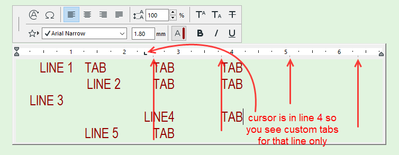
Every time you create a custom tab position, the standard tabs before it are wiped out but you will see them after it.
I hope that helps.
Barry.
One of the forum moderators.
Versions 6.5 to 27
i7-10700 @ 2.9Ghz, 32GB ram, GeForce RTX 2060 (6GB), Windows 10
Lenovo Thinkpad - i7-1270P 2.20 GHz, 32GB RAM, Nvidia T550, Windows 11
Versions 6.5 to 27
i7-10700 @ 2.9Ghz, 32GB ram, GeForce RTX 2060 (6GB), Windows 10
Lenovo Thinkpad - i7-1270P 2.20 GHz, 32GB RAM, Nvidia T550, Windows 11
Lingwisyer
Guru
Options
- Mark as New
- Bookmark
- Subscribe
- Mute
- Subscribe to RSS Feed
- Permalink
- Report Inappropriate Content
2022-06-16 04:03 AM
2022-06-16
04:03 AM
In the Microsoft and Adobe Suites, as well as AutoCAD:
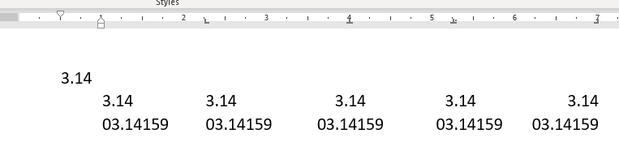
Header - Hanging - Left - Middle - Decimal - Right
Is this possible in AC? Given how AC is with all other text formatting...
Ling.
| AC22-29 AUS 3200 | Help Those Help You - Add a Signature |
| Self-taught, bend it till it breaks | Creating a Thread |
| Win11 | i9 10850K | 64GB | RX6600 | Win11 | 7800X3D | 32GB | RTX5070TI |
Barry Kelly
Moderator
Options
- Mark as New
- Bookmark
- Subscribe
- Mute
- Subscribe to RSS Feed
- Permalink
- Report Inappropriate Content
2022-06-16 04:15 AM
2022-06-16
04:15 AM
It seems not.
Just regular left justified tabs only.
No option to change them to other types of tabs.
Barry.
One of the forum moderators.
Versions 6.5 to 27
i7-10700 @ 2.9Ghz, 32GB ram, GeForce RTX 2060 (6GB), Windows 10
Lenovo Thinkpad - i7-1270P 2.20 GHz, 32GB RAM, Nvidia T550, Windows 11
Versions 6.5 to 27
i7-10700 @ 2.9Ghz, 32GB ram, GeForce RTX 2060 (6GB), Windows 10
Lenovo Thinkpad - i7-1270P 2.20 GHz, 32GB RAM, Nvidia T550, Windows 11

Still looking?

Suggested topics
- ToDo list - Archicad free addon in General discussions
- Window frame representation (AC 29 - new libpack) in Libraries & objects
- From one hand-drawn sketch to an Archicad construction model, rebar model and 61 structural drawings in AI solutions
- screwy widows and dimension in model views in Libraries & objects
- Archicad 30: what the official MCP and Tapir 1.7.1 can each do (side-by-side table) in AI solutions
