
Turn on suggestions
Auto-suggest helps you quickly narrow down your search results by suggesting possible matches as you type.
Showing results for
EN
Turn on suggestions
Auto-suggest helps you quickly narrow down your search results by suggesting possible matches as you type.
Showing results for
Options
- Subscribe to RSS Feed
- Mark Topic as New
- Mark Topic as Read
- Pin this post for me
- Bookmark
- Subscribe to Topic
- Mute
- Printer Friendly Page

SectionSeven
Participant
Options
- Mark as New
- Bookmark
- Subscribe
- Mute
- Subscribe to RSS Feed
- Permalink
- Report Inappropriate Content
2022-09-25 05:26 PM
Trim function issue
2022-09-25
05:26 PM
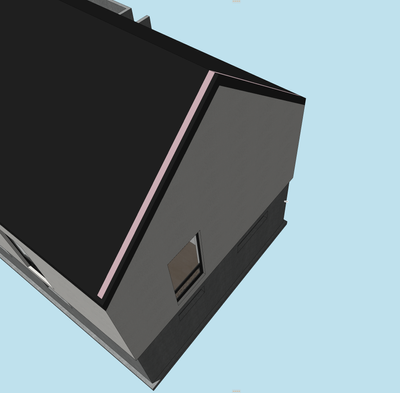
Wondering if anyone can advise. When using the trim tool between the roof plane and wall, I end up with the wall showing on the surface plane of the outer roof. Attached image shows the issue. Why would this occur?
Solved! Go to Solution.
Solved
Read-Only
1 Solution
Accepted Solutions

Lee Hankins
Virtuoso
Options
- Mark as New
- Bookmark
- Subscribe
- Mute
- Subscribe to RSS Feed
- Permalink
- Report Inappropriate Content
2022-09-25 08:00 PM
2022-09-25
08:00 PM
This happens because the building material of the wall is a higher priority than that of the roof. You need to either change the material of the roof to one that has a higher priority than the wall or open the Building Material settings from the Attribute Manager and increase the priority so that it is higher than the material used for the wall.
Lee Hankins
ArchiCAD 4.5 - Archicad 29
macOS Tahoe (26.0)
ArchiCAD 4.5 - Archicad 29
macOS Tahoe (26.0)
Solution
2 Replies 2
Lee Hankins
Virtuoso
Options
- Mark as New
- Bookmark
- Subscribe
- Mute
- Subscribe to RSS Feed
- Permalink
- Report Inappropriate Content
2022-09-25 08:00 PM
2022-09-25
08:00 PM
This happens because the building material of the wall is a higher priority than that of the roof. You need to either change the material of the roof to one that has a higher priority than the wall or open the Building Material settings from the Attribute Manager and increase the priority so that it is higher than the material used for the wall.
Lee Hankins
ArchiCAD 4.5 - Archicad 29
macOS Tahoe (26.0)
ArchiCAD 4.5 - Archicad 29
macOS Tahoe (26.0)
Solution
SectionSeven
Participant
Options
- Mark as New
- Bookmark
- Subscribe
- Mute
- Subscribe to RSS Feed
- Permalink
- Report Inappropriate Content
2022-09-25 08:03 PM
2022-09-25
08:03 PM
Thanks for that. Appreciated.

Still looking?

Suggested topics
- Library Part Maker: Bug Reporter appears when clicking “Check” in Libraries & objects
- Keynote conflict - import IFC in Documentation
- After more than three decades with Archicad: has Graphisoft lost touch with professional offices? in General discussions
- BIMcloud Cross-License Collaboration - Misleading UI and a Real Problem for BIM Consultants in Teamwork & BIMcloud
- Help! "Hole" in wall in Modeling
