
Turn on suggestions
Auto-suggest helps you quickly narrow down your search results by suggesting possible matches as you type.
Showing results for
EN
Turn on suggestions
Auto-suggest helps you quickly narrow down your search results by suggesting possible matches as you type.
Showing results for
Options
- Subscribe to RSS Feed
- Mark Topic as New
- Mark Topic as Read
- Pin this post for me
- Bookmark
- Subscribe to Topic
- Mute
- Printer Friendly Page

EAttila
Participant
Options
- Mark as New
- Bookmark
- Subscribe
- Mute
- Subscribe to RSS Feed
- Permalink
- Report Inappropriate Content
2023-01-26
09:34 AM
- last edited on
2023-05-09
02:27 PM
by
 Rubia Torres
Trimmed wall and roof - floor plan
2023-01-26
09:34 AM
Hi everybody, we are designing a building with pitched roof and wall connections, where the bottom parts of the walls are trimmed. Is there any way to hide the trimmed part of the wall on the floor plan?
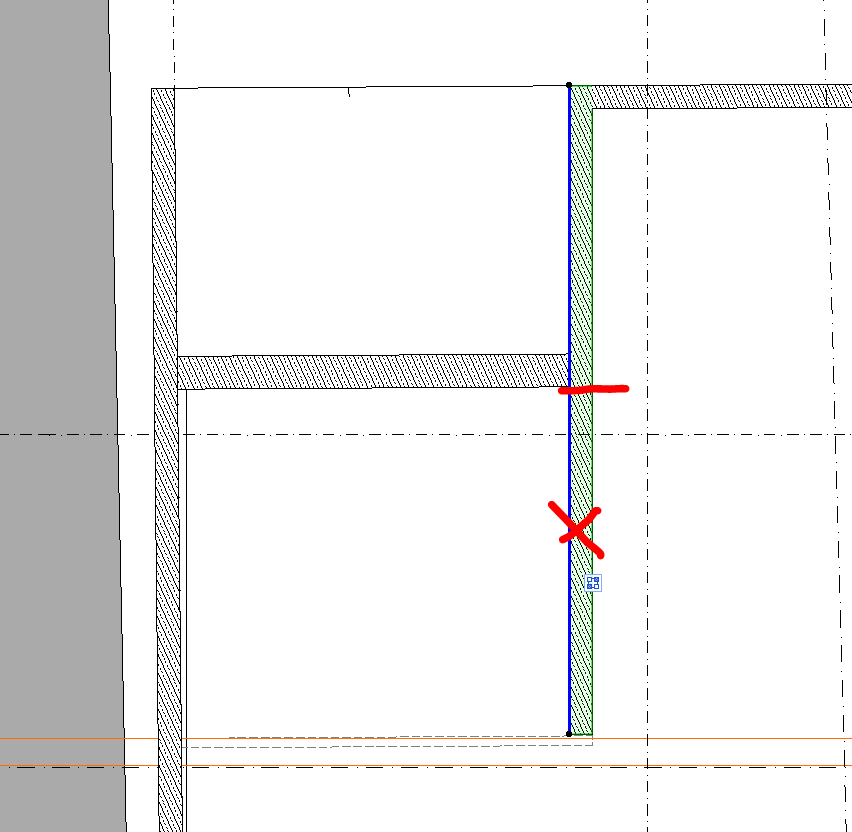
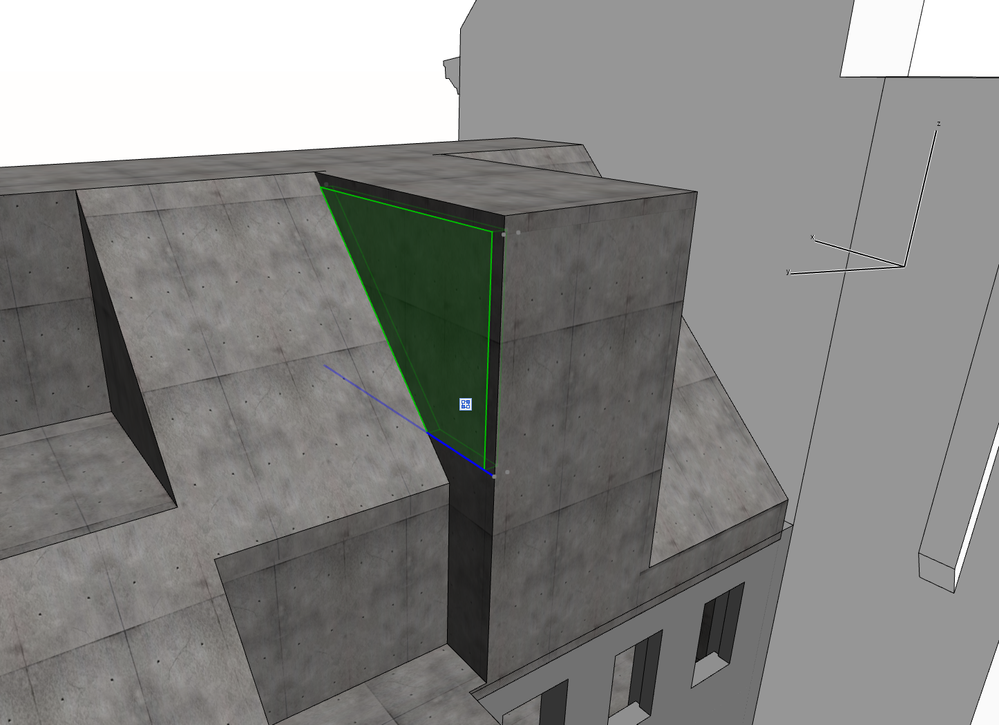
Solved! Go to Solution.
1 Solution
Accepted Solutions

Mahmoud Qenawi
Ace
Options
- Mark as New
- Bookmark
- Subscribe
- Mute
- Subscribe to RSS Feed
- Permalink
- Report Inappropriate Content
2023-01-26 10:23 AM
2023-01-26
10:23 AM
Unfortunately SEO is not reflected in Floorplan so I recommend as a workaround which will give you the same result you can use polygonal opening tool rather than trim to roof then you can adjust the opening to have no symbol, no reference axis and no cover fill.
AC 29 INT 4006/WIN 11
AMD Ryzen 7 5800H with Radeon Graphics 3.20 GHz 16.0 GB
AMD Ryzen 7 5800H with Radeon Graphics 3.20 GHz 16.0 GB
3 Replies 3
Mahmoud Qenawi
Ace
Options
- Mark as New
- Bookmark
- Subscribe
- Mute
- Subscribe to RSS Feed
- Permalink
- Report Inappropriate Content
2023-01-26 10:23 AM
2023-01-26
10:23 AM
Unfortunately SEO is not reflected in Floorplan so I recommend as a workaround which will give you the same result you can use polygonal opening tool rather than trim to roof then you can adjust the opening to have no symbol, no reference axis and no cover fill.
AC 29 INT 4006/WIN 11
AMD Ryzen 7 5800H with Radeon Graphics 3.20 GHz 16.0 GB
AMD Ryzen 7 5800H with Radeon Graphics 3.20 GHz 16.0 GB
EAttila
Participant
Options
- Mark as New
- Bookmark
- Subscribe
- Mute
- Subscribe to RSS Feed
- Permalink
- Report Inappropriate Content
2023-01-26 10:56 AM
2023-01-26
10:56 AM
Thank you! Great idea! We are stuck in AC24 because the project, but I was able to replicate your solution with a custom window.
 Laszlo Nagy
Community Admin
Options
- Mark as New
- Bookmark
- Subscribe
- Mute
- Subscribe to RSS Feed
- Permalink
- Report Inappropriate Content
2023-02-02 01:21 PM
2023-02-02
01:21 PM
Another option is to split the Wall into two, trim both with the Roof, and change the Floor Plan representation of the overhead Wall segment to "overhead". If you do not want to see it on the Floor Plan, you can even place it on a separate Layer and hide that Layer.
Loving Archicad since 1995 - Find Archicad Tips at x.com/laszlonagy
AMD Ryzen9 5900X CPU, 64 GB RAM 3600 MHz, Nvidia GTX 1060 6GB, 500 GB NVMe SSD
2x28" (2560x1440), Windows 10 PRO ENG, Ac20-Ac29
AMD Ryzen9 5900X CPU, 64 GB RAM 3600 MHz, Nvidia GTX 1060 6GB, 500 GB NVMe SSD
2x28" (2560x1440), Windows 10 PRO ENG, Ac20-Ac29

Still looking?

Suggested topics
- Rounded Wall Corner displays correctly in Floor Plan but glitches in 3D Document in Modeling
- Issues with 3Dconnexxion CadMouse Pro Wireless in Installation & update
- Expanded Show on Stories for Wall in Documentation
- Detail marker as plan in Documentation
- Automatic mesh hatching on floorplan in Documentation
