
Turn on suggestions
Auto-suggest helps you quickly narrow down your search results by suggesting possible matches as you type.
Showing results for
EN
Turn on suggestions
Auto-suggest helps you quickly narrow down your search results by suggesting possible matches as you type.
Showing results for
- English
- :
- Forum
- :
- Project data & BIM
- :
- Re: Opening lines in schedule
Options
- Subscribe to RSS Feed
- Mark Topic as New
- Mark Topic as Read
- Pin this post for me
- Bookmark
- Subscribe to Topic
- Mute
- Printer Friendly Page

Anonymous
Not applicable
Options
- Mark as New
- Bookmark
- Subscribe
- Mute
- Subscribe to RSS Feed
- Permalink
- Report Inappropriate Content
2019-08-27
09:17 AM
- last edited on
2023-05-20
01:07 AM
by
 Gordana Radonic
Opening lines in schedule
2019-08-27
09:17 AM
I am trying to edit a window schedule in Archicad 22 with a preview image (3D Front View field in my case) and I can't seem to be able to control its transparency.
Normally, I wouldn't have a problem with windows being transparent, but the issue is that I want to show opening lines - a solid line on the opening side and a dashed line on the opposite side. But with the transparency, these two lines blend into one "solid" line and therefore showing a wrong opening symbol according to our local codes...
Is there any hidden setting I'm missing?
I've tried to control the opening line only in the object, then only in the MVO, I've tried creating a new GO with no transparency, but so far without any luck.
6 Replies 6

Barry Kelly
Moderator
Options
- Mark as New
- Bookmark
- Subscribe
- Mute
- Subscribe to RSS Feed
- Permalink
- Report Inappropriate Content
2019-08-27 10:19 AM
2019-08-27
10:19 AM
This has cropped up before but I don't think the solution here will do what you want.
https://archicad-talk.graphisoft.com/viewtopic.php?f=34&t=61635
It will give you dashed )or solid) lines to both the inside and outside views in the schedule.
I think the problem is that transparency is not actually controlled in the Graphic overrides.
That is in the 3D-style - which you can't set for a door/window schedule.
Overriding the surface in the GO does not affect doors and windows or objects.
Overriding the fill does - but it affects the entire window frame and not just the glass.
Because the window is an object you can not override just the glass material as GOs can not access object parameters.
I was thinking that if you override the fill with a solid fill with white foreground and background pens that might work.
But it doesn't the glass is still transparent.
The only thing that might work is to create a non-transparent glass material (or just use a different material for the glass in the windows that is not transparent).
But this will mess up any 3D views (sections and elevations also) if you want transparent glass).
Barry.
One of the forum moderators.
Versions 6.5 to 27
i7-10700 @ 2.9Ghz, 32GB ram, GeForce RTX 2060 (6GB), Windows 10
Lenovo Thinkpad - i7-1270P 2.20 GHz, 32GB RAM, Nvidia T550, Windows 11
Versions 6.5 to 27
i7-10700 @ 2.9Ghz, 32GB ram, GeForce RTX 2060 (6GB), Windows 10
Lenovo Thinkpad - i7-1270P 2.20 GHz, 32GB RAM, Nvidia T550, Windows 11
Anonymous
Not applicable
Options
- Mark as New
- Bookmark
- Subscribe
- Mute
- Subscribe to RSS Feed
- Permalink
- Report Inappropriate Content
2019-08-27 11:54 AM
2019-08-27
11:54 AM
Thanks Barry,
Yes, I thought about having both lines the same - either solid or dashed, but the problem is that not all our doors and windows have opening on the same side.
I thought I could get around the transparency by assigning a solid white surface to the whole window object, not just glass surface. I wouldn't mind having a separate GO with such override only for the schedules.
That should work in theory and it does work in the 3D view, but unfortunately, it does not seem to affect the schedule's "3D Front/Back View".
And yes, using a non transparent material for glass, or creating a "non transparent" glass works, but I would like to avoid that if possible. I think it would mess too much and limit the use of the model later on . But so far it seems to be the closest I can get.

rvto
Contributor
Options
- Mark as New
- Bookmark
- Subscribe
- Mute
- Subscribe to RSS Feed
- Permalink
- Report Inappropriate Content
2022-11-14 09:58 PM - last edited Saturday
2022-11-14
09:58 PM
deleted
Barry Kelly
Moderator
Options
- Mark as New
- Bookmark
- Subscribe
- Mute
- Subscribe to RSS Feed
- Permalink
- Report Inappropriate Content
2022-11-15 02:45 AM
2022-11-15
02:45 AM
Nothing has changed that I am aware of.
The problem is the transparency of the glass.
So setting a non-transparent material for the glass in the window works.
But of course this affects elevations and 3D if you want to see transparent glass.
Overriding the surface material in a Graphic Override used for a window schedule, does not seem to change the surface of the windows, even in a 3D axonometric view.
I always thought it did, but maybe I was mistaken.
Just tried in 25 and the window surface is not changing.
So it seems a non-transparent material is the only thing that will work if you want dashed opening lines on one side and solid on the other.
Barry.
One of the forum moderators.
Versions 6.5 to 27
i7-10700 @ 2.9Ghz, 32GB ram, GeForce RTX 2060 (6GB), Windows 10
Lenovo Thinkpad - i7-1270P 2.20 GHz, 32GB RAM, Nvidia T550, Windows 11
Versions 6.5 to 27
i7-10700 @ 2.9Ghz, 32GB ram, GeForce RTX 2060 (6GB), Windows 10
Lenovo Thinkpad - i7-1270P 2.20 GHz, 32GB RAM, Nvidia T550, Windows 11
rvto
Contributor
Options
- Mark as New
- Bookmark
- Subscribe
- Mute
- Subscribe to RSS Feed
- Permalink
- Report Inappropriate Content
2022-11-15 03:29 AM - last edited Saturday
2022-11-15
03:29 AM
deleted

Luseka
Contributor
Options
- Mark as New
- Bookmark
- Subscribe
- Mute
- Subscribe to RSS Feed
- Permalink
- Report Inappropriate Content
2024-04-20
07:39 PM
- last edited on
2024-05-07
06:28 PM
by
Laszlo Nagy
2024-04-20
07:39 PM
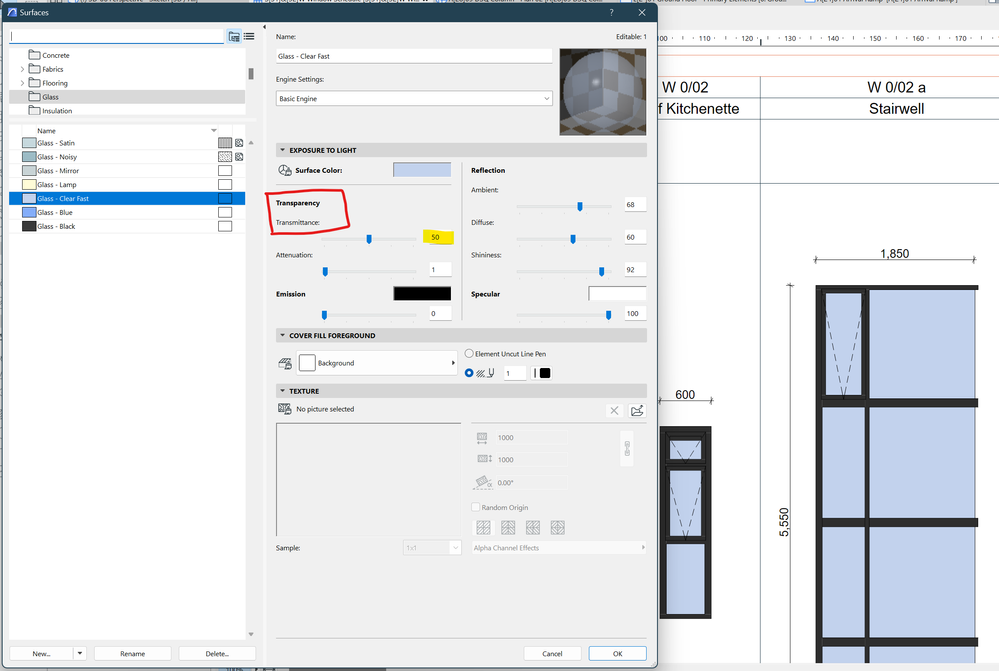
The only feasible solution to this is reducing the Surface Transmittance to a Value of 50 or less. Go to Options > Element Attributes > Surfaces. Look for Exposure to Light > Transparency > Transmittance. Reduce the Value to not more than 50. This ensures that the surface is translucent enough not to enable the projections in the Elevations and Schedules to see through the surfaces thus seeing only the relevant lines depending on the side the projection is facing.
Didn't find the answer?
Check other topics in this Forum
Back to ForumRead the latest accepted solutions!
Accepted SolutionsStart a new conversation!

Suggested topics
- Opening tool lines in section/3D in Modeling
- From one hand-drawn sketch to an Archicad construction model, rebar model and 61 structural drawings in AI solutions
- screwy widows and dimension in model views in Libraries & objects
- Model View Options Not Reversing Opening Lines for Reversible Windows (Error) in Documentation
- automatic sill line in window schedule in Project data & BIM
