cancel
Showing results for 
Search instead for 
Did you mean: 
EN
cancel
Showing results for 
Search instead for 
Did you mean: 

Layer Palette

Eduardo Rolon
Moderator

At a minimum Folders NEED to be hierarchical and should display as every folder structure in AC or CAD program.

For Example:
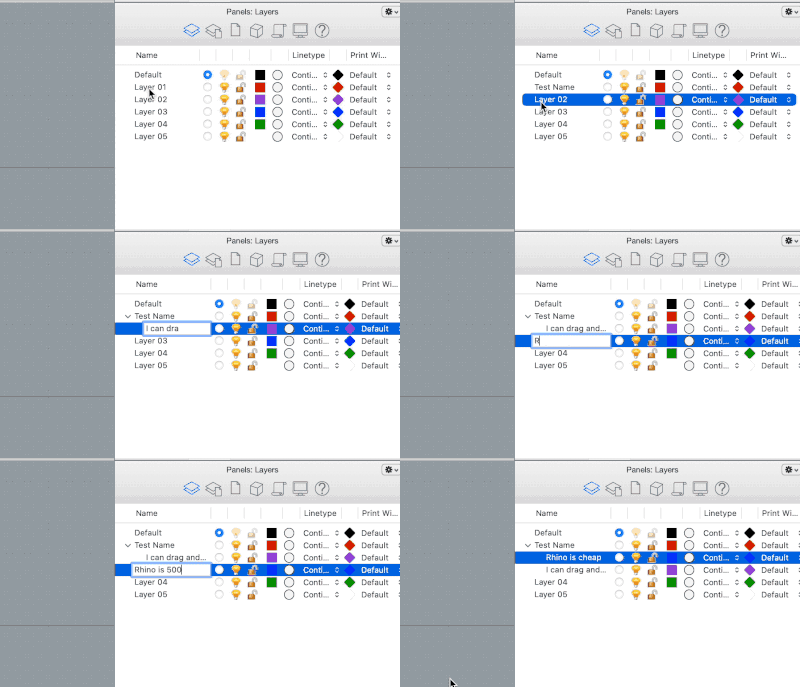
 

Rhino Drag and Drop.gif


A Rhino upgrade only costs $500US around every 14-16 months so it should not be a money issue.

This is what we got


EduardoRolon_0-1657983726231.png


Missing options:

1. Using Folders to control visibility, priority, lock, properties? . Main problem with this is that a layer can only reside within one folder so this has to be implemented in the Layer Combination side.

2. Click to rename Layers needs to return
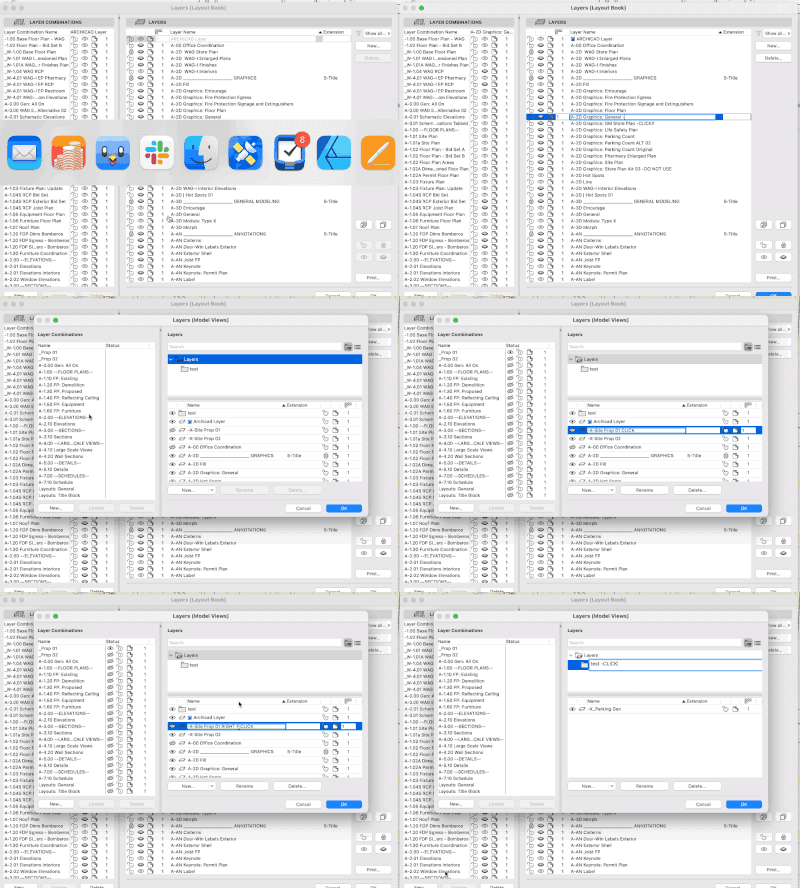
 

2022-07-15 LAyers.gif

3. Select All - Unselect All, Lock - Unlock, Hide - Show buttons need to come back.


Layers Missing Buttons.png


24 Comments
DBruns
Participant

Hi - has anyone by any chance figured out how to get these buttons back on Archicad 26? Really struggling without them!!! Please assist!


maxresdefault.jpg
Barry Kelly
Moderator

You can't get them back.

They have gone.


CTRL+A will select all layers (CMD+A on a Mac?).

Once selected you can turn the selection on/off, lock/unlock.


You have always been able to do this and with the new dialogue window, these buttons were seen as superfluous.


Barry.

DBruns
Participant

Thanks so much, Barry. I appreciate the prompt reply. This already helps.


How would I then go about the following:


While working, I want to unlock and view a couple (2 or three) random layers (not part of a specific layer combo) at once. I used to just open the Layer Palette, pick the two or three layers i quickly wanted to unlock and view and that was it. 


For example - I'm working on ground floor on a marketing layer combination (which does not have the MEP Electrical and MEP plumbing layers visible), then I just want to have the MEP Electrical and MEP plumbing on to see if fittings are in the way of what I want to do. I have to now open the Layer Palette, select the MEP Electrical and unlock it and open it's eye, then select the MEP plumbing and unlock it and open it's eye. This gets very irritating when it's a bunch of layers I need to quickly view? 


Do you know of a quicker way I can get this done?

Barry Kelly
Moderator

You can still select 2 or 3 layers and unlock them all at the same time.

That is no different to what it was before.


But if you happen to have your layers in folders, you will only see the layers in that particular folder you have open.

Unless you switch to the 'list' view where you will see all of the layers in one long list as before.


But to speed things up a bit now, you have the search option.

Just type MEP in the search bar, and all layers that have 'MEP' in their name will show in the list - regardless of what folder they are in and 'MEP' can be anywhere in the layer name.

Then just select the ones you want and turn them on.


Barry.


dcerezo
Advocate

[Moderator: Merged to existing wish on the same topic]


I hate that I have to open the layer box, close the layer box, open the layer box, close the layer box. Can it just stay open like some of the other palettes? 


Laurentiu
Advocate

You're looking for a Layer Palette.

It does exist as a paid addon (link here by bimdots), but I do agree Graphisoft should integrate it natively since new users find it weird that layers are controlled through a dialog box and not a palette.


Most design software nowadays has a always open layers panel (everything from adobe/ figma/ rhino,etc), so coming to Archicad and finding it's different is indeed confusing and different from the norm.


It could be argued that you don't really need it if you use a good template and have everything set up, but honestly it really should be a user choice so I definitely support it.


You have my vote 🙂

dcerezo
Advocate

Thank you @Laurentiu !

Space_Agency
Enthusiast

Agreed. Or at least let the Info Box (which can always be "on") or Element Settings Dialogue box modify the layers.

James B
Graphisoft
Graphisoft
Status changed to: Under consideration

Thanks for your feedback.

We plan to continue development in managing Attributes, so I've moved this to 'under consideration'.

We've been working on a new tree view control, that we'd like to roll out in Attributes in the future.

Space_Agency
Enthusiast

@James B 


Under consideration? Look at the date of the post, over 3 years ago. This wish should be on the roadmap now. Layers are fundamental to organizing architectural projects in archicad and we interact with them every time we use the software. Please focus on the fundamentals and items we interact with for the majority of our work. 

Status
Under consideration

with 48 Votes

Wish details
