
Turn on suggestions
Auto-suggest helps you quickly narrow down your search results by suggesting possible matches as you type.
Showing results for
EN
Turn on suggestions
Auto-suggest helps you quickly narrow down your search results by suggesting possible matches as you type.
Showing results for
- English
- :
- Forum
- :
- Documentation
- :
- Re: Detail Marker to show layout ID it is placed o...
Options
- Subscribe to RSS Feed
- Mark Topic as New
- Mark Topic as Read
- Pin this post for me
- Bookmark
- Subscribe to Topic
- Mute
- Printer Friendly Page

Chris Pooley
Enthusiast
Options
- Mark as New
- Bookmark
- Subscribe
- Mute
- Subscribe to RSS Feed
- Permalink
- Report Inappropriate Content
2023-11-15
03:30 AM
- last edited on
2023-11-16
12:30 AM
by
 Laszlo Nagy
Detail Marker to show layout ID it is placed on
2023-11-15
03:30 AM
Hi All,
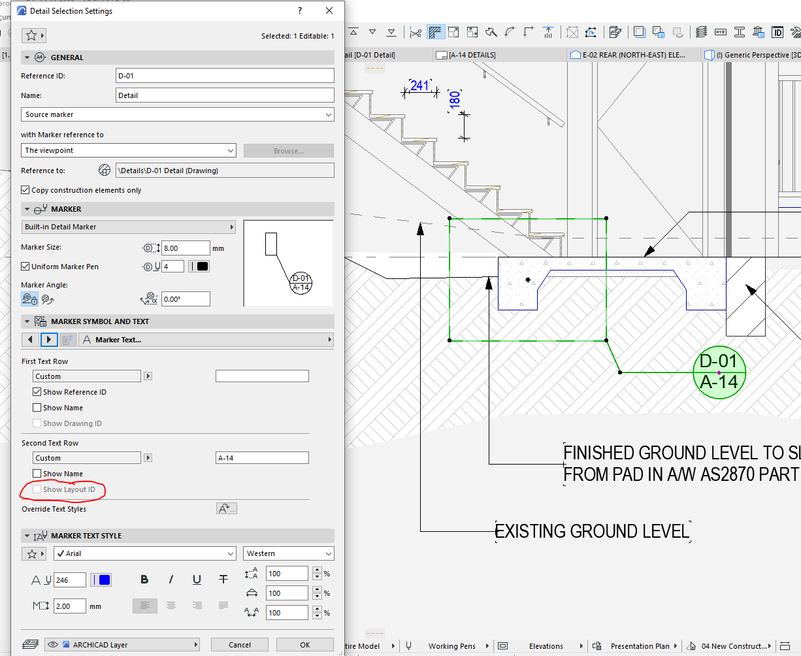
I am trying to make the detail marker show the layout the view is placed on. I can manually draw write the layout ID in there, but if I add more sheets or change the order of the sheets, I would like this to automatically update.
I know this must be possible as there is a checkbox there, but I cant make it turn on.
ArchiCAD 19 to 27
Windows 11
Windows 11
Solved! Go to Solution.
Solved
Labels:
- Labels:
-
3D Document
-
Detail
-
Section
-
Worksheet
1 Solution
Accepted Solutions

kmitotk
Expert
Options
- Mark as New
- Bookmark
- Subscribe
- Mute
- Subscribe to RSS Feed
- Permalink
- Report Inappropriate Content
2023-11-15 05:17 AM
2023-11-15
05:17 AM
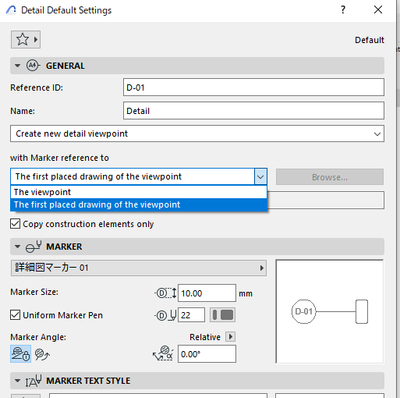
Set "with Marker reference to" to "The first placed drawing of the viewpoint".
Kei Mito
MITO architecture + design
Architect | Graphisoft Certified BIM Manager
ArchiCAD 29 JPN/USA/INT | Windows 11
2 Replies 2
kmitotk
Expert
Options
- Mark as New
- Bookmark
- Subscribe
- Mute
- Subscribe to RSS Feed
- Permalink
- Report Inappropriate Content
2023-11-15 05:17 AM
2023-11-15
05:17 AM
Set "with Marker reference to" to "The first placed drawing of the viewpoint".
Kei Mito
MITO architecture + design
Architect | Graphisoft Certified BIM Manager
ArchiCAD 29 JPN/USA/INT | Windows 11
Chris Pooley
Enthusiast
Options
- Mark as New
- Bookmark
- Subscribe
- Mute
- Subscribe to RSS Feed
- Permalink
- Report Inappropriate Content
2023-11-15 09:34 AM
2023-11-15
09:34 AM
Thank you very much.
ArchiCAD 19 to 27
Windows 11
Windows 11

Still looking?

Suggested topics
- Parking layouts and solar parks in a site polygon in Libraries & objects
- Two free GDL objects: parking layouts and solar parks in a site polygon in Libraries & objects
- Number of Section Elevation and Detail Markers (Total Number of Viewpoints) in Documentation
- Detail marker as plan in Documentation
- Surface texture in elevation won't publish to pdf in Documentation
