
Turn on suggestions
Auto-suggest helps you quickly narrow down your search results by suggesting possible matches as you type.
Showing results for
EN
Turn on suggestions
Auto-suggest helps you quickly narrow down your search results by suggesting possible matches as you type.
Showing results for
- English
- :
- Forum
- :
- Documentation
- :
- Elements not showing in section view
Options
- Subscribe to RSS Feed
- Mark Topic as New
- Mark Topic as Read
- Pin this post for me
- Bookmark
- Subscribe to Topic
- Mute
- Printer Friendly Page

CYNZ
Participant
Options
- Mark as New
- Bookmark
- Subscribe
- Mute
- Subscribe to RSS Feed
- Permalink
- Report Inappropriate Content
2023-01-24
11:21 AM
- last edited on
2025-01-31
12:48 PM
by
 Molinda Prey
Elements not showing in section view
2023-01-24
11:21 AM
I am having an issue with elements not showing in section view. All the solutions provided in posts I have see don't seem to fix the issue.
I have checked:
Renovation filters
Layer combinations
Any ideas?
Thanks
6 Replies 6

Lee Hankins
Virtuoso
Options
- Mark as New
- Bookmark
- Subscribe
- Mute
- Subscribe to RSS Feed
- Permalink
- Report Inappropriate Content
2023-01-24 11:30 AM
2023-01-24
11:30 AM
Which elements aren't showing? Have you checked Model View Options? Which version of Archicad are you using and on which OS?
Lee Hankins
ArchiCAD 4.5 - Archicad 29
macOS Tahoe (26.0)
ArchiCAD 4.5 - Archicad 29
macOS Tahoe (26.0)
CYNZ
Participant
Options
- Mark as New
- Bookmark
- Subscribe
- Mute
- Subscribe to RSS Feed
- Permalink
- Report Inappropriate Content
2023-01-24 11:45 AM
2023-01-24
11:45 AM
I'm using Archicad 24 student edition - Windows 11 Pro (21H2)
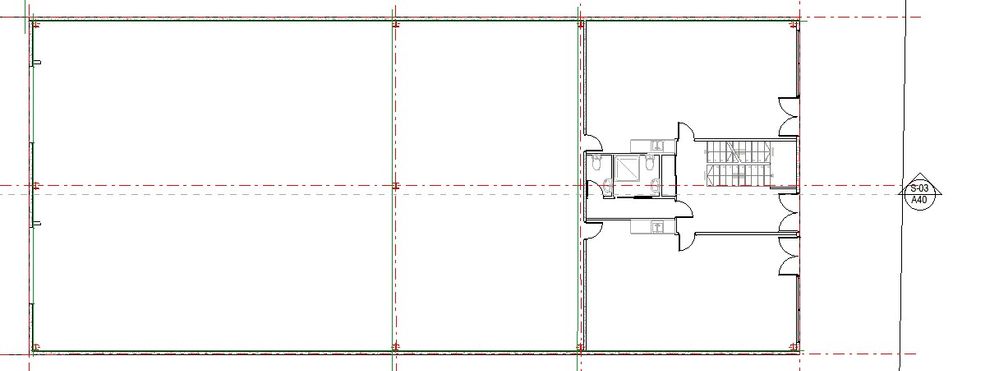
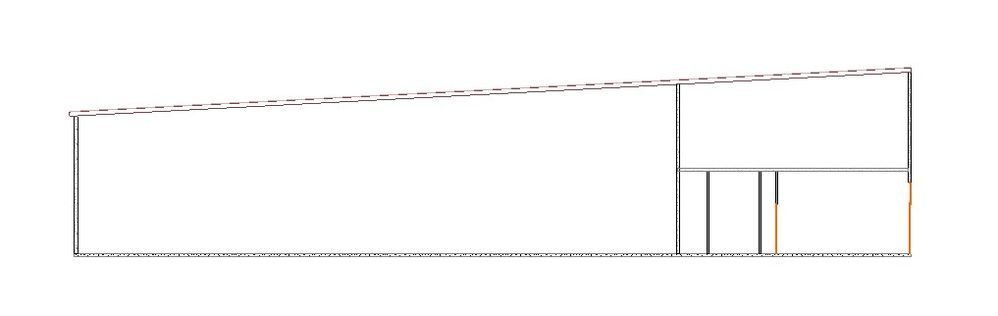
Its a number of elements - Columns, stairs, plumbing fittings, some exterior walls
CYNZ
Participant
Options
- Mark as New
- Bookmark
- Subscribe
- Mute
- Subscribe to RSS Feed
- Permalink
- Report Inappropriate Content
2023-01-24 12:00 PM
2023-01-24
12:00 PM
I have checked the model views and they seem ok.
Please see attached the floor plan and the section incase they help in any way.
Lee Hankins
Virtuoso
Options
- Mark as New
- Bookmark
- Subscribe
- Mute
- Subscribe to RSS Feed
- Permalink
- Report Inappropriate Content
2023-01-24 12:01 PM
2023-01-24
12:01 PM
Have you tried turning all layers on to visible. I know you mentioned you had checked layer combinations but it would be worth a try. It would be useful to post some screenshots of the section, the section settings and a 3D view to see if the elements appear there.
Lee Hankins
ArchiCAD 4.5 - Archicad 29
macOS Tahoe (26.0)
ArchiCAD 4.5 - Archicad 29
macOS Tahoe (26.0)
Lee Hankins
Virtuoso
Options
- Mark as New
- Bookmark
- Subscribe
- Mute
- Subscribe to RSS Feed
- Permalink
- Report Inappropriate Content
2023-01-24 12:02 PM - edited 2023-01-24 12:03 PM
2023-01-24
12:02 PM
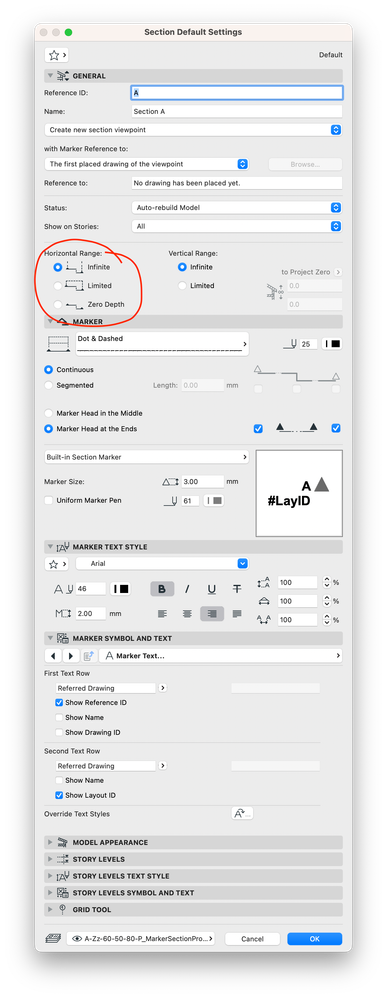
Is the section set to zero depth in the section settings? If it is try setting it to infinite or set depth.
Lee Hankins
ArchiCAD 4.5 - Archicad 29
macOS Tahoe (26.0)
ArchiCAD 4.5 - Archicad 29
macOS Tahoe (26.0)

ksjhawk
Enthusiast
Options
- Mark as New
- Bookmark
- Subscribe
- Mute
- Subscribe to RSS Feed
- Permalink
- Report Inappropriate Content
2023-01-25 02:30 PM - edited 2023-01-25 02:32 PM
2023-01-25
02:30 PM
Any chance you'd be willing to share the model? It does look like a zero depth section. You may be right Lee.
MacBook Pro Apple M4 Max 128GB ram
OS X 15.7.2
AC29 - AC6.5
OS X 15.7.2
AC29 - AC6.5

Still looking?

Suggested topics
- Introducing the EasyBIM Add-On Suite for ArchiCAD in General discussions
- How to structure prompts for AI Visualizer in Archicad 30 in AI solutions
- Archicad Interactive Schedule shows a single multi-plane hip roof as four separate elements in Documentation
- How can I show hidden stair treads as dashed lines in a section? in Modeling
- Window with adjustable frame extensions (jamb) and automatic insulation return – AC29 / GDL in Modeling
