
Turn on suggestions
Auto-suggest helps you quickly narrow down your search results by suggesting possible matches as you type.
Showing results for
EN
Turn on suggestions
Auto-suggest helps you quickly narrow down your search results by suggesting possible matches as you type.
Showing results for
- English
- :
- Forum
- :
- Documentation
- :
- Re: Publish PDF without overriding existing file
Options
- Subscribe to RSS Feed
- Mark Topic as New
- Mark Topic as Read
- Pin this post for me
- Bookmark
- Subscribe to Topic
- Mute
- Printer Friendly Page

Narska
Advocate
Options
- Mark as New
- Bookmark
- Subscribe
- Mute
- Subscribe to RSS Feed
- Permalink
- Report Inappropriate Content
2021-05-16
06:45 PM
- last edited on
2023-05-19
10:05 PM
by
 Gordana Radonic
Publish PDF without overriding existing file
2021-05-16
06:45 PM
Tomasz Mlynarski
New York based Architect
New York based Architect
Read-Only
Labels:
- Labels:
-
PDF
-
Publishing
9 Replies 9

Eduardo Rolon
Moderator
Options
- Mark as New
- Bookmark
- Subscribe
- Mute
- Subscribe to RSS Feed
- Permalink
- Report Inappropriate Content
2021-05-16 08:00 PM
2021-05-16
08:00 PM
AFAIK No.
If the Auto rename option worked with all Publishing options and it had the DATE autotext then you could use it as a prefix and it might work within the limitations but this is another of the 80% tools.
If the Auto rename option worked with all Publishing options and it had the DATE autotext then you could use it as a prefix and it might work within the limitations but this is another of the 80% tools.
Eduardo Rolón AIA NCARB
AC29 US/INT -> AC08
AC29 US/INT -> AC08
Mac Studio M4 Max 64GB ram, OS X 10.XX latest
Narska
Advocate
Options
- Mark as New
- Bookmark
- Subscribe
- Mute
- Subscribe to RSS Feed
- Permalink
- Report Inappropriate Content
2021-05-16 09:13 PM
2021-05-16
09:13 PM
This date auto-text thing you mention would likely save me hours over the course of a year... I'm not a programmer but this seems like low-hanging fruit.
ejrolon wrote:
AFAIK No.
If the Auto rename option worked with all Publishing options and it had the DATE autotext then you could use it as a prefix and it might work within the limitations but this is another of the 80% tools.
Tomasz Mlynarski
New York based Architect
New York based Architect

DGSketcher
Legend
Options
- Mark as New
- Bookmark
- Subscribe
- Mute
- Subscribe to RSS Feed
- Permalink
- Report Inappropriate Content
2021-05-16 11:34 PM
2021-05-16
11:34 PM
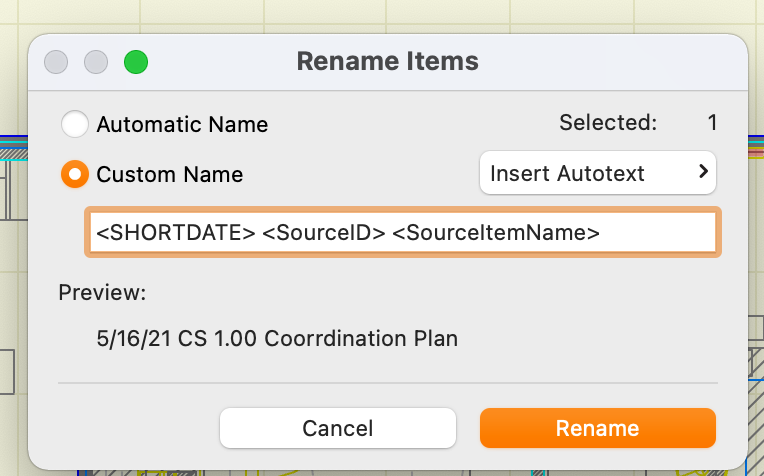
I am using AC24 on Mac and can add <SHORTDATE> to the end of both custom file & folder names in Publisher which seem to be updating correctly these days. Earlier versions were prone to ignoring the conversion or placing the date as static. Worth a try?
Apple iMac Intel i9 / macOS Sonoma / AC27UKI (most recent builds.. if they work)
Eduardo Rolon
Moderator
Options
- Mark as New
- Bookmark
- Subscribe
- Mute
- Subscribe to RSS Feed
- Permalink
- Report Inappropriate Content
2021-05-16 11:58 PM

Eduardo Rolon
Moderator
Options
- Mark as New
- Bookmark
- Subscribe
- Mute
- Subscribe to RSS Feed
- Permalink
- Report Inappropriate Content
2021-05-17 12:01 AM
DGSketcher
Legend
Options
- Mark as New
- Bookmark
- Subscribe
- Mute
- Subscribe to RSS Feed
- Permalink
- Report Inappropriate Content
2021-05-17 12:08 AM
2021-05-17
12:08 AM
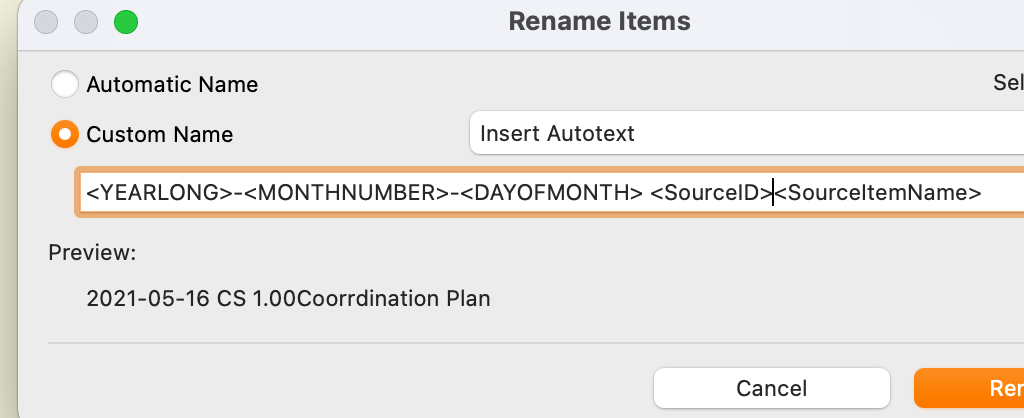
There's a list of system auto texts here... https://helpcenter.graphisoft.com/user-guide/135256/, and yes I think you have to type them in manually.
Apple iMac Intel i9 / macOS Sonoma / AC27UKI (most recent builds.. if they work)
Eduardo Rolon
Moderator
Options
- Mark as New
- Bookmark
- Subscribe
- Mute
- Subscribe to RSS Feed
- Permalink
- Report Inappropriate Content
2021-05-17 12:09 AM

Podolsky
Ace
Options
- Mark as New
- Bookmark
- Subscribe
- Mute
- Subscribe to RSS Feed
- Permalink
- Report Inappropriate Content
2021-05-17 08:05 AM
2021-05-17
08:05 AM
Yes, not all auto-texts are shown in drop-down menu - you need to type them manually and it works.

Brian Spears
Booster
Options
- Mark as New
- Bookmark
- Subscribe
- Mute
- Subscribe to RSS Feed
- Permalink
- Report Inappropriate Content
2021-05-17 06:05 PM


Still looking?

Suggested topics
- Graphic Override Bug - Minor in Documentation
- Renovation filter changing surface colors of walls in Modeling
- Publisher: Use Layout ID as exported filename in Documentation
- Detailing | Better methods of 2d drafting, creation of Blocks , Detail Elements , 2d Objects in Documentation
- Renovation Graphic Overrides in Documentation
