
Turn on suggestions
Auto-suggest helps you quickly narrow down your search results by suggesting possible matches as you type.
Showing results for
EN
Turn on suggestions
Auto-suggest helps you quickly narrow down your search results by suggesting possible matches as you type.
Showing results for
- English
- :
- Forum
- :
- Documentation
- :
- Re: Published PDF Large Size
Options
- Subscribe to RSS Feed
- Mark Topic as New
- Mark Topic as Read
- Pin this post for me
- Bookmark
- Subscribe to Topic
- Mute
- Printer Friendly Page

henrysaxby
Booster
Options
- Mark as New
- Bookmark
- Subscribe
- Mute
- Subscribe to RSS Feed
- Permalink
- Report Inappropriate Content
2023-02-14
10:58 AM
- last edited on
2023-05-17
12:34 AM
by
 Gordana Radonic
Published PDF Large Size
2023-02-14
10:58 AM
Hello Archicad Community,
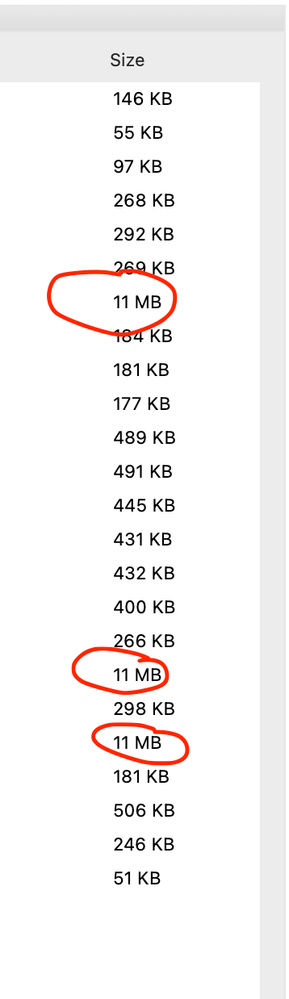
I'm working on a project that has about 20 drawings. These are large/complex plan drawings of a full floor of a tower block, full of partition walls, offices, chairs etc. When I export the drawings, the majority export as PDF between 200-500KB, with three drawings in the package exporting at 11MB.
I can't figure out why these three drawings are coming out so large, and the architect I'm working for is persisting with me that I need to reduce the file size.
So far I have:
- Consolidated Lines (rid of thousands of lines)
- Consolidated Fills & Deleted unnecessary
- Deleted everything that isn't required
- Purged layers that are unnecessary
- Attempted to reduce file size in Acrobat (made file bigger!)
- Attempted to reduce file size in Apple Preview (Made file bigger!)
The three drawings are all based off the same level, but not all drawings created from this level are causing the overt size issue. Also, when I work on this level or with the drawing that is placed on the layout, the computer moves incredibly slowly.
Is there anything that anyone can recommend I try that might help to get the file size down on these three drawings?
Any assistance would be greatly appreciated.
Regards,
Henry.
Labels:
- Labels:
-
Drawings
-
Layouts
-
Publishing
-
Views
11 Replies 11

Barry Kelly
Moderator
Options
- Mark as New
- Bookmark
- Subscribe
- Mute
- Subscribe to RSS Feed
- Permalink
- Report Inappropriate Content
2025-11-11 01:39 AM
2025-11-11
01:39 AM
You can still publish and 'Print' to the PDF printer of your choice - all PDFs in one publish operation.
You just can't merge them into one document automatically, you have to do that manually after creating the PDF if you can.
Also you may have issues with the quality of some fills - I recall reading posts about this.
If I remember correctly, some external PDF printers have trouble displaying some fills (i.e. % fills) as they are supposed to be.
Barry.
One of the forum moderators.
Versions 6.5 to 27
i7-10700 @ 2.9Ghz, 32GB ram, GeForce RTX 2060 (6GB), Windows 10
Lenovo Thinkpad - i7-1270P 2.20 GHz, 32GB RAM, Nvidia T550, Windows 11
Versions 6.5 to 27
i7-10700 @ 2.9Ghz, 32GB ram, GeForce RTX 2060 (6GB), Windows 10
Lenovo Thinkpad - i7-1270P 2.20 GHz, 32GB RAM, Nvidia T550, Windows 11

Lingwisyer
Guru
Options
- Mark as New
- Bookmark
- Subscribe
- Mute
- Subscribe to RSS Feed
- Permalink
- Report Inappropriate Content
2025-11-11 04:25 AM
2025-11-11
04:25 AM
Yeah, some PDF printers will render % fills as distinct dot fills... They generally result in a lower file size though, which I suspect is due to actually flattening the file.
| AC22-29 AUS 3200 | Help Those Help You - Add a Signature |
| Self-taught, bend it till it breaks | Creating a Thread |
| Win11 | i9 10850K | 64GB | RX6600 | Win11 | 7800X3D | 32GB | RTX5070TI |

- « Previous
-
- 1
- 2
- Next »
- « Previous
-
- 1
- 2
- Next »
Still looking?

Suggested topics
- PDF publishing in Documentation
- [Python tool] Exporting symbol fills in autocad in Collaboration with other software
- Best workflow for multiple wall finish combinations without Composite Bloat in Documentation
- Cut and drafting fills not willing to display correctly. in Documentation
- PDF Purgatory in Documentation
